How to create a fishbone diagram: Ishikawa example

Despite its quirky name, the Fishbone Diagram is actually an effective problem solving tool for project managers — or rather, a good problem identifier. The ability to effectively diagnose and address issues is crucial for project quality management, and using this type of diagram is one way to make a PM’s life easier.
In this article, we are exploring the Fishbone Diagram’s visual format that is invaluable as a group creativity technique for brainstorming and problem identification.
What is a fishbone diagram?
A fishbone diagram is a visual tool used in root cause analysis to identify, organize, and investigate the possible causes of a problem. It is also known as an Ishikawa diagram or cause-and-effect diagram. When a certain part of a work process goes wrong, the technique helps teams look beyond obvious symptoms and understand what might be driving an unwanted outcome.
The diagram resembles a fish skeleton, hence the name. The problem sits at the fish's head, a horizontal line forms its central spine, and branches represent major categories of potential causes. Smaller branches break those causes down into more specific contributing factors.
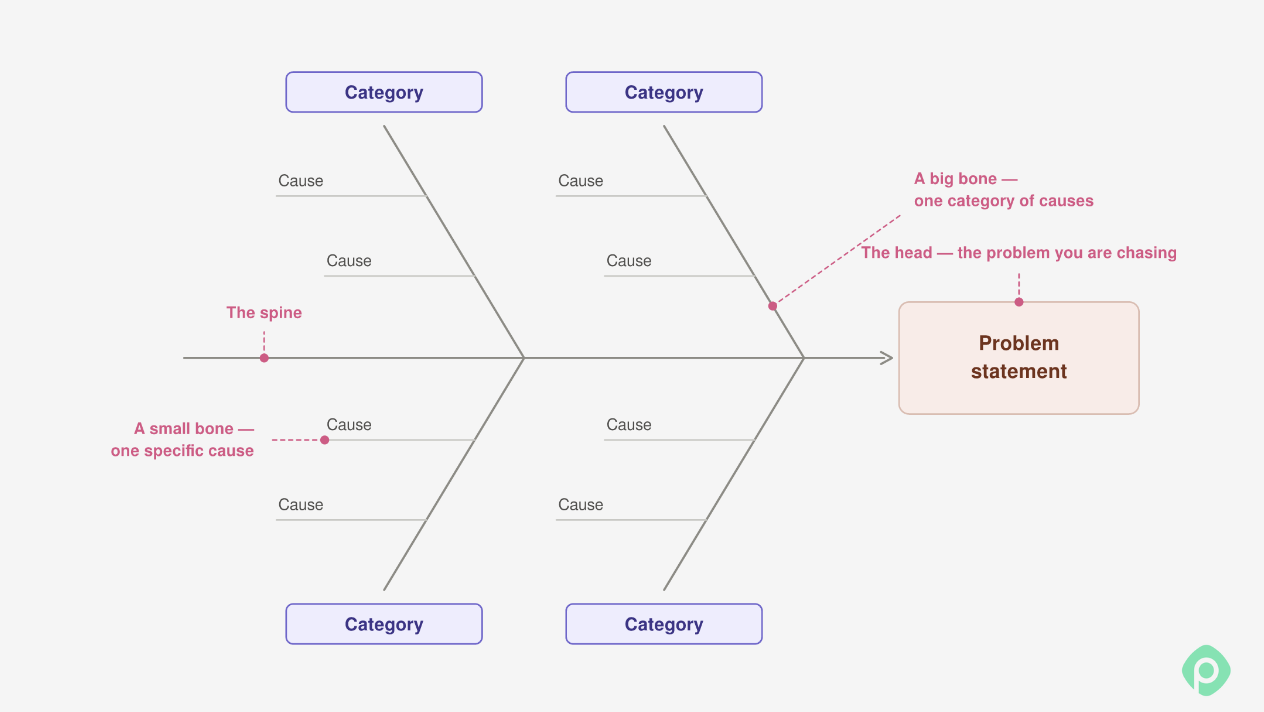
The method was developed by Japanese quality management expert Kaoru Ishikawa in the 1960s and became a widely used tool for quality control and process improvement. Today, project managers use it to investigate everything from recurring product defects to missed deadlines and inefficient workflows.
Additionally, it is often referred to as a group creativity technique, fostering collaborative problem identification and brainstorming. By involving multiple stakeholders in the process, diverse perspectives are considered, leading to a more comprehensive understanding of the issue.
How to create a Fishbone diagram: a step-by-step guide
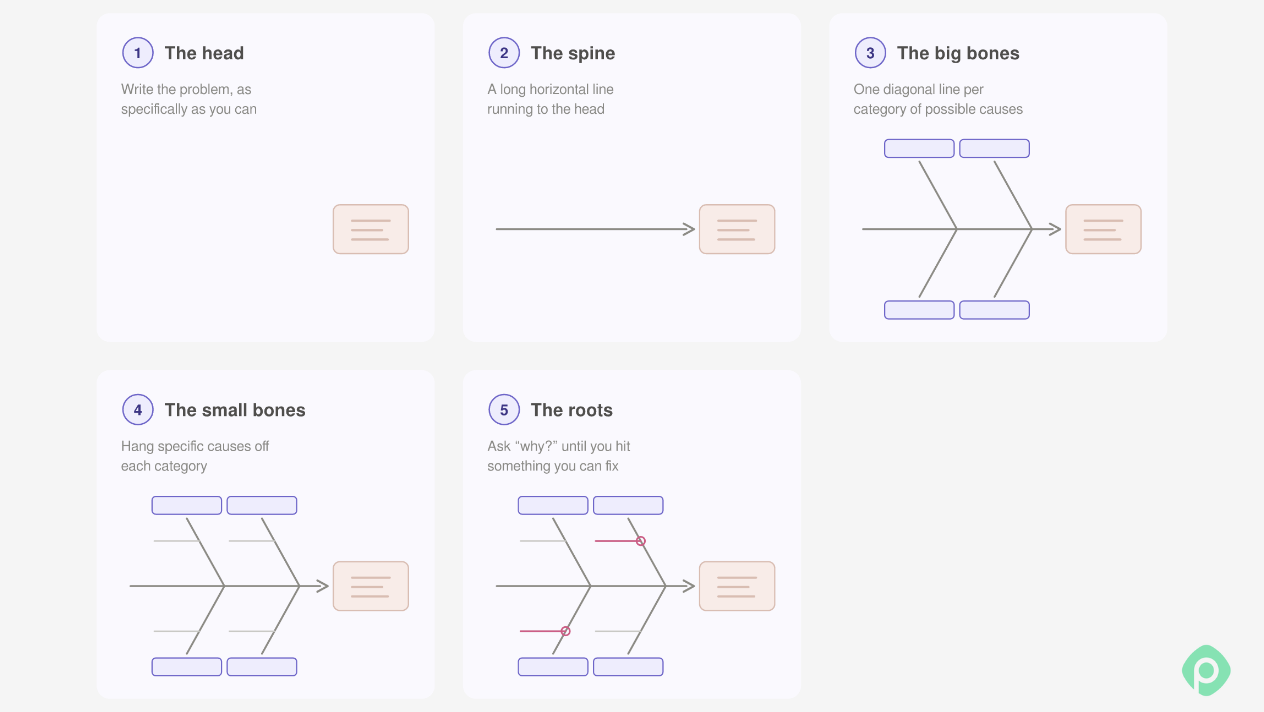
Since the diagram looks like a fish skeleton, you have to build it from the head backward:
- The head. Write the problem here, as specifically as you can.
- The spine. Draw a long horizontal line running to the head.
- The big bones. Draw diagonal lines off the spine, one per category of possible causes.
- The small bones. Hang specific causes off each category.
- The roots. For each cause, ask "why?" a few times until you hit something you can fix.
The purpose is to systematically trace the origins of a problem to find the most significant underlying factors. But to find the solutions, you’ll have to look elsewhere: the Fishbone diagram merely helps in identifying key issues that need to be addressed. For problem-solving, other tools and methodologies are required.
Common high-level bones of the fish
While the fish bones entirely depend on your specific problem, there are some common high-level categories that are recommended to start with:
- People. This category examines the human elements involved in the process. It includes staff, management, stakeholders, and customers.
- Processes. This looks at the procedures and workflows. Inefficiencies, bottlenecks, and errors in the process itself can be root causes of problems.
- Equipment. Here, look at the equipment and tools used in the process. Malfunctioning equipment, lack of proper maintenance, or outdated technology can be significant contributors to issues.
- Materials. The quality and availability of materials and inputs used in the process are crucial. Defective materials, shortages, or incorrect specifications can cause significant disruptions.
- Environment. This category includes the physical and organizational environment where the process occurs. Factors such as work conditions, ergonomics, and organizational culture can impact performance and outcomes.
- Management. The role of leadership and administrative actions is analyzed here. Poor management decisions, lack of strategic direction, or inadequate support can be root causes of problems.
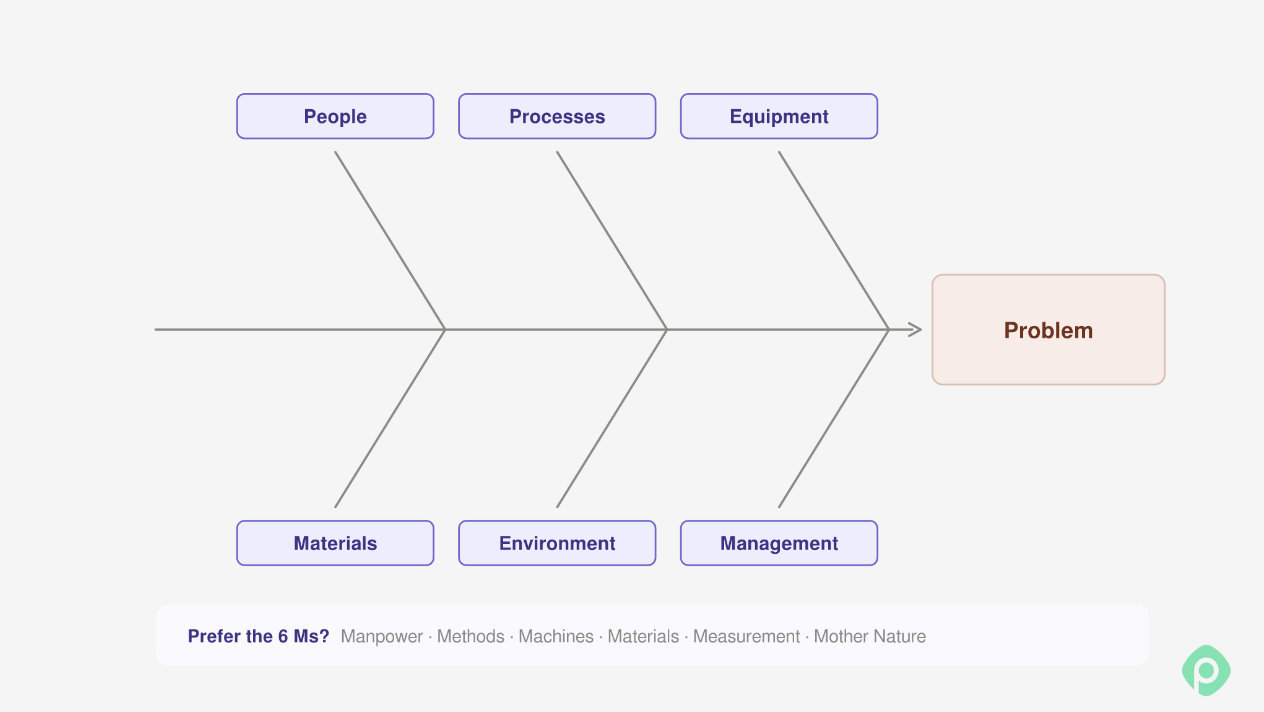
Other project managers prefer to categorize a bit differently, using a ‘6 Ms breakdown’: Manpower, Methods, Machines, Materials, Measurement, and Mother Nature. But not every problem necessarily falls into one of the categories. Do not force them: instead, use the categories as a springboard to identify the issue.
Fishbone diagram example: why do sprints keep slipping?
Most of us meet a fishbone diagram at work with a problem like this one: the team plans a sprint, finishes about two-thirds of it, and carries the rest over. Then it does the same thing next sprint.
Let’s see how a six-person team could start working through it, starting with the fishbone diagram creation process and proceeding to finding a solution (the details below are made up for illustration).
Step 1: Write the problem on the fish's head
Make it specific enough to check. You can’t really check "Planning is bad". But if it’s "We've finished about 65% of committed work in each of the last four sprints", it makes it so much clearer. The team simply shortens it to "Sprint work keeps spilling over."
Step 2: Pick the bones
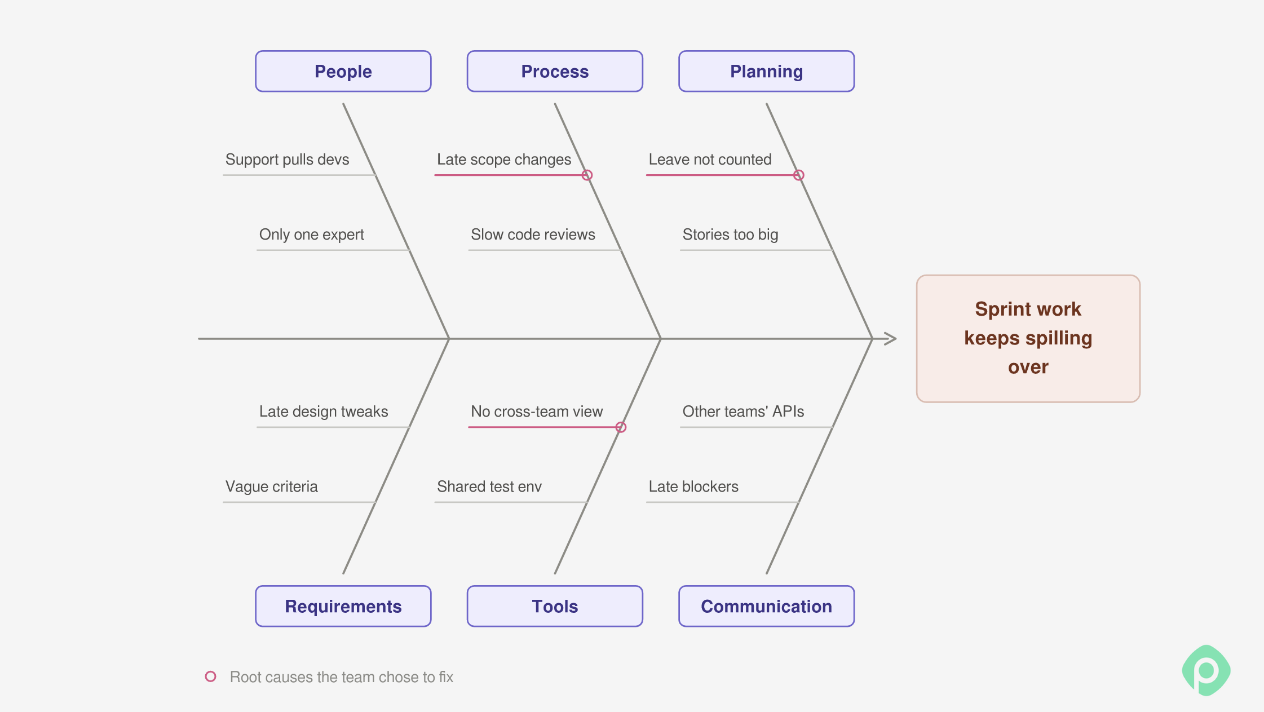
The team goes with People, Process, Planning, Requirements, Tools, and Communication. You don't need all six, and you can rename them to match your problem.
Step 3: Brainstorm causes, one bone at a time
Everyone adds causes to the bone they know best, with no arguing yet. After one round, the diagram looks like this:
Step 4: Reading the diagram
Twelve causes is a lot, and they're not all equal. But a few things do stand out. "Support pulls devs" and "No cross-team view" seem to be two sides of the same problem when people are booked on other work, and nobody can see it. When the same cause shows up under two bones, that's usually a good sign you've found something real.
Step 5: Ask "why?" until the answers stop being useful
Most of what's on the fish is a symptom. The team has to then pick the causes that come up most often and dig into them.
Late scope changes
- Why do we add work mid-sprint? → Because the product owner gets urgent requests from sales.
- Why do those land in the current sprint? → There's no agreed way to say "next sprint" to an urgent request.
- Why not? → Nobody ever defined what "urgent" means.
Root cause: no scope-change rule.
Leave not counted
- Why does the plan ignore time off? → Capacity is guessed, and not planned, so when we say “six people, ten days,” it doesn’t reflect reality.
- Why a guess? → Vacations and days off live in a different place than the sprint plan.
Root cause: capacity is estimated, not calculated.
- Why do two developers get pulled into support mid-sprint? → They're also booked on another project.
- Why didn't planning catch it? → Nobody can see everyone's bookings across projects in one place.
Root cause: no shared view of who is booked on what.
Two of these three root causes come down to the same gap: the plan doesn’t know who’s actually available. That’s the part a tool can fix.
In Planyway for Jira, time off and personal work schedules come off capacity automatically, and the workload view shows each person’s bookings across every Jira space, so both problems show up while you’re still planning. 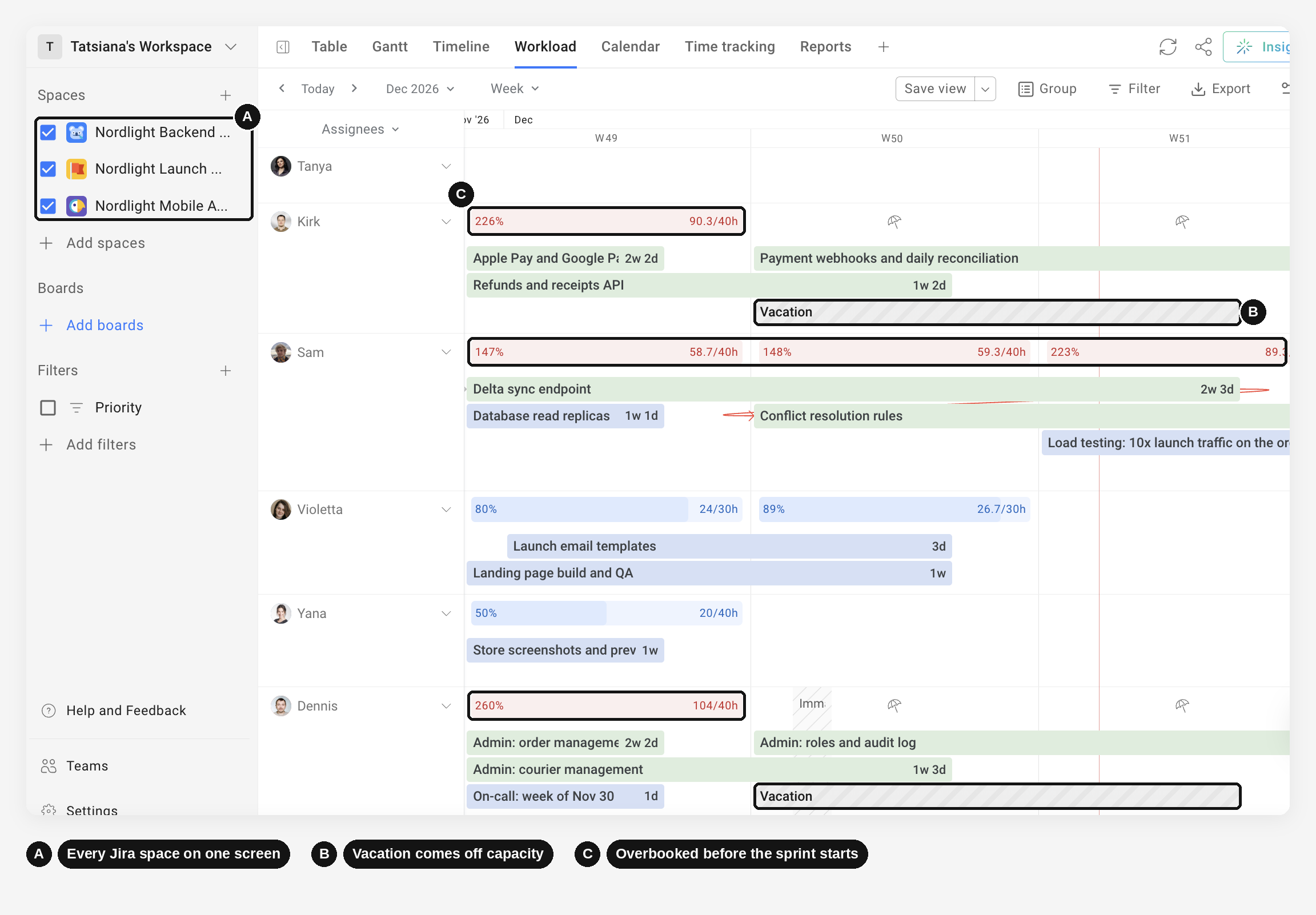
The scope-change rule is on you, though. No app is going to define “urgent” for your team.
Step 5: Pick what to fix
Now we have three root causes, not twelve. A quick dot vote helps if the team disagrees. The first three items below fix those root causes, and the last two are a quick win and a parking lot. Here's what this team commits to:
- Add a scope-change rule. An urgent request has to push something else out of the sprint.
- Plan capacity from real calendars. Time off gets subtracted before anyone commits to anything.
- Look at everyone's bookings across projects during planning. If two developers are needed elsewhere, you find out before the sprint starts.
- Split big stories. If a story won't fit in a few days, it gets broken down before it enters the sprint.
- Park the rest. Slow code reviews, vague acceptance criteria, and the shared test environment go to the backlog.
Fishbone diagram templates (Excel, PowerPoint, PDF)
You've seen how the sprint example works. The easiest way to learn this method is to run a session with your own problem, so we made the template in the formats people actually use. Pick the one that fits how your team works.
- PNG (blank and filled-in example). Drop it into a doc, a slide, or a whiteboard tool and draw over it.
- SVG (blank and example). An editable vector file you can open in Figma, Illustrator, or Inkscape and recolor to match your brand.
- PDF (download). Two A4 landscape pages: a blank one to print and write on, and the sprint example. Handy for an in-person workshop.
- PowerPoint (download). Three slides with every box and line editable: a blank fishbone, the sprint example, and a 5 whys worksheet for digging into one cause at a time.
- Excel (download). A grid version of the fishbone, a table where you list causes and ask "why?" up to three times, and an action plan with owners, dates, and statuses. Type a star in front of a cause, and it turns pink and gets counted as a root cause.
Identifying causes is step 1 towards problem-solving
Effective Fishbone diagrams are a powerful tool for root cause analysis. It helps teams identify and decompose factors contributing to their problems in a systematic way. The visual approach also helps understand the relationships between various elements and how they impact project’s success, thus simplifying further investigation.
By involving multiple stakeholders and fostering a collaborative environment, the Ishikawa diagram is a helpful step 1 towards resolving complex problems. But naturally, it cannot replace all the other steps to address the issues. So it’s still essential to combine this tool with other methodologies for developing and implementing problem solutions.
For teams working in Jira, Planyway for Jira can help come up with proper solutions: creating workload reports, visualizing the projects on a timeline, tracking dependencies, and utilizing opportunities Jira’s default plans don’t usually offer. When your Fishbone diagram has pinpointed root causes, use Planyway to help find a solution and corroborate your action plan.


FAQ
The purpose of a fishbone diagram is to identify and organize the potential causes of a problem so a team can determine its root cause. Also known as an Ishikawa diagram or cause-and-effect fishbone diagram, it helps you visually map all the factors behind the main problem instead of stopping at the first explanation. It came out of quality control in manufacturing, where causes are concrete things like equipment malfunctions, but it works for any kind of work, pushing teams past obvious symptoms toward the underlying issues in people, processes, and tools.
You can create a fishbone diagram in five steps. First, define the problem with a specific statement, such as “The team misses sprint commitments in three out of four sprints.” Second, draw the structure: the main problem at the fish’s head and a horizontal spine leading to it, the shape that gives the diagram its name. Third, choose cause categories such as People, Processes, Tools and Planning, and add or remove categories until you have useful categories for your own work. Fourth, brainstorm potential causes with the team, breaking them into sub causes leading off the bigger branches. Finally, review the data, identify the most plausible root causes and agree on corrective actions.
The 5 Whys technique traces a single chain of cause and effect by repeatedly asking “Why?”. A fishbone diagram is broader: it sorts many possible causes into categories so the team can weigh several at once, which makes it closer to a structured mind map than to a straight line. Both rest on the same principle, that the thing you noticed is rarely the thing causing it, and they work well together — map the field with the fishbone, then run 5 Whys down the most promising branch.
The 5 P’s are a set of cause categories sometimes used in fishbone diagrams, particularly in service-oriented settings: People, Processes, Policies, Procedures and Place, meaning the physical or working environment. They’re one option among several, since manufacturing teams often use the 6 Ms and software teams usually build their own. Swap them for whatever surfaces the hidden issues in your context.
A fishbone diagram typically includes four main elements: the problem statement, which is the specific effect being investigated and sits at the fish’s head; the main spine, the horizontal line connecting the problem to its causes; the cause categories, major branches for areas such as People, Processes, Tools, Materials and Environment; and the potential causes and sub causes, the smaller branches that break those categories into specific, testable explanations.
Almost any software tools that draw boxes and lines will do. Whiteboard apps suit live sessions where the whole team adds causes at once, Microsoft Word handles a simple diagram through SmartArt when it needs to sit inside an existing document, presentations in PowerPoint or Google Slides work when you’re showing the diagram rather than working on it, and diagramming or mind maps software copes best with many sub causes. Our fishbone templates are available below in PNG, SVG, PDF, PowerPoint and Excel.