Capacity planning: how to plan resources before projects begin

For many managers, capacity planning for future projects can feel like assembling a jigsaw puzzle. You need to understand your team capacity, resource availability, and future market demands to make informed decisions about your workforce. That's a lot to take in at once, and that's why the exercise of capacity planning helps.
In this article, we are going to take a look at capacity planning through the lens of different use cases for short-term, mid-term, and long-term planning while covering some of the problems managers run into the most.
🥸 Please be aware that there are different types of capacity planning, since it can also be applied to non-human resources, like testing devices, raw materials, or production capacity. For simplicity throughout the article, whenever “resources” are mentioned, human resources (i.e., workforce capacity planning) are meant.
TL;DR:
- Capacity planning helps you understand how much work is coming, how much capacity you’ll need, and when you’ll need it. It works at a higher level than resource planning, which focuses on assigning specific people and resources to specific work.
- There are three main approaches for capacity planning: Lead keeps extra capacity ready for demand, Lag adds capacity only when demand increases, and Match adjusts capacity as demand changes. The right approach depends on your growth plans, hiring constraints, budget, and tolerance for unused capacity.
- You can free up bandwidth by reducing scope, limiting multitasking, automating routine work, improving communication, developing skills, or cutting low-value work. The goal is to create enough capacity to meet demand without overloading the team.
What is capacity planning?
Capacity planning is the strategic process of determining how much of each resource you need to have available at a specific point in the future to meet upcoming demand.
We should obviously draw a line between operations management capacity planning vs resource capacity planning, as defined in project management. They do go hand in hand and essentially answer the same question: What is the amount of each possible resource I need to have available at a specific time in the future?.
However, capacity planning has to do mainly with higher-level operational “bandwidth”, i.e., understanding whether an organization has the resources required to meet future demand. Resource planning, on the other hand, goes into much more detail, factoring in every single time slot and work item.
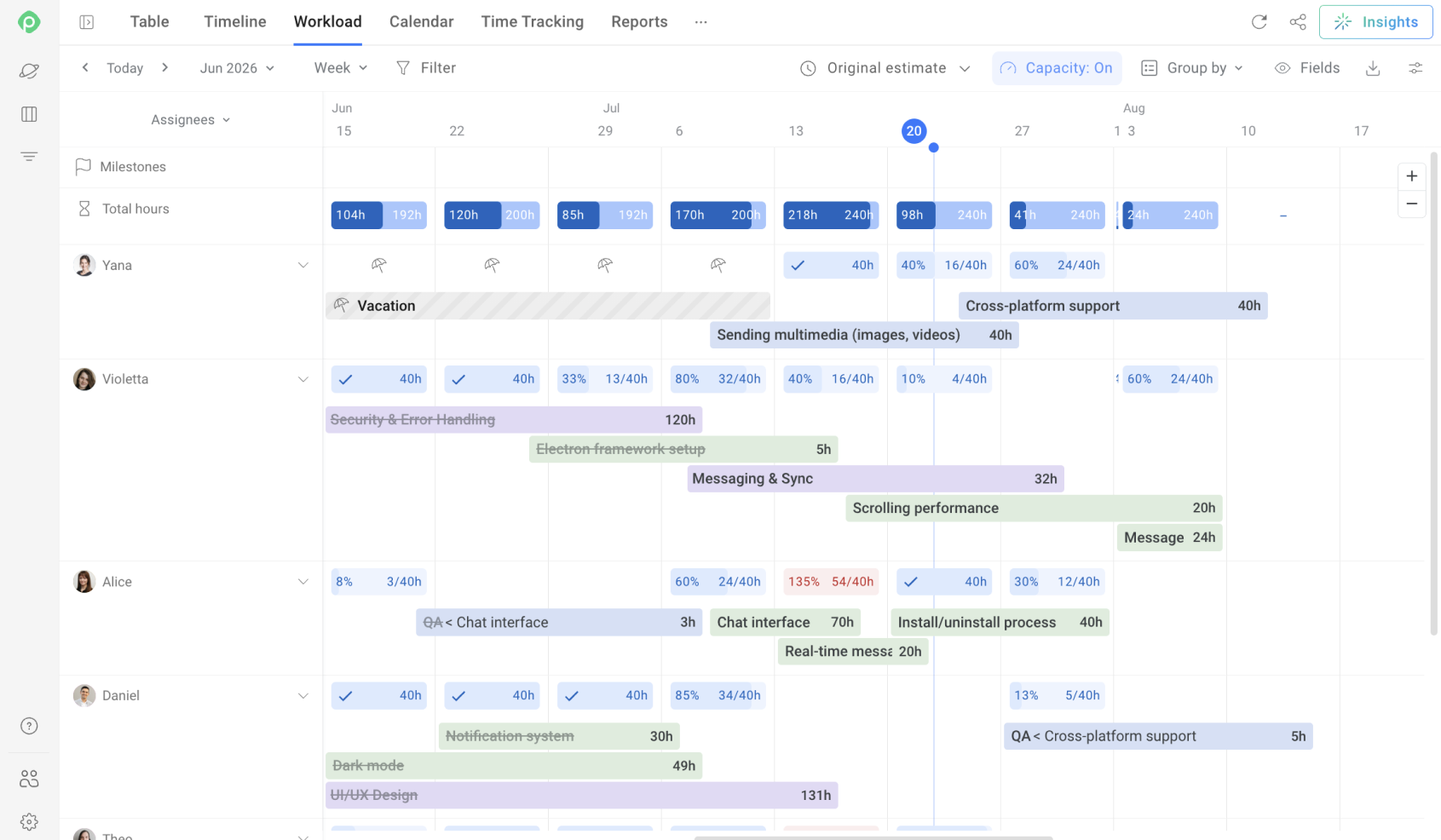
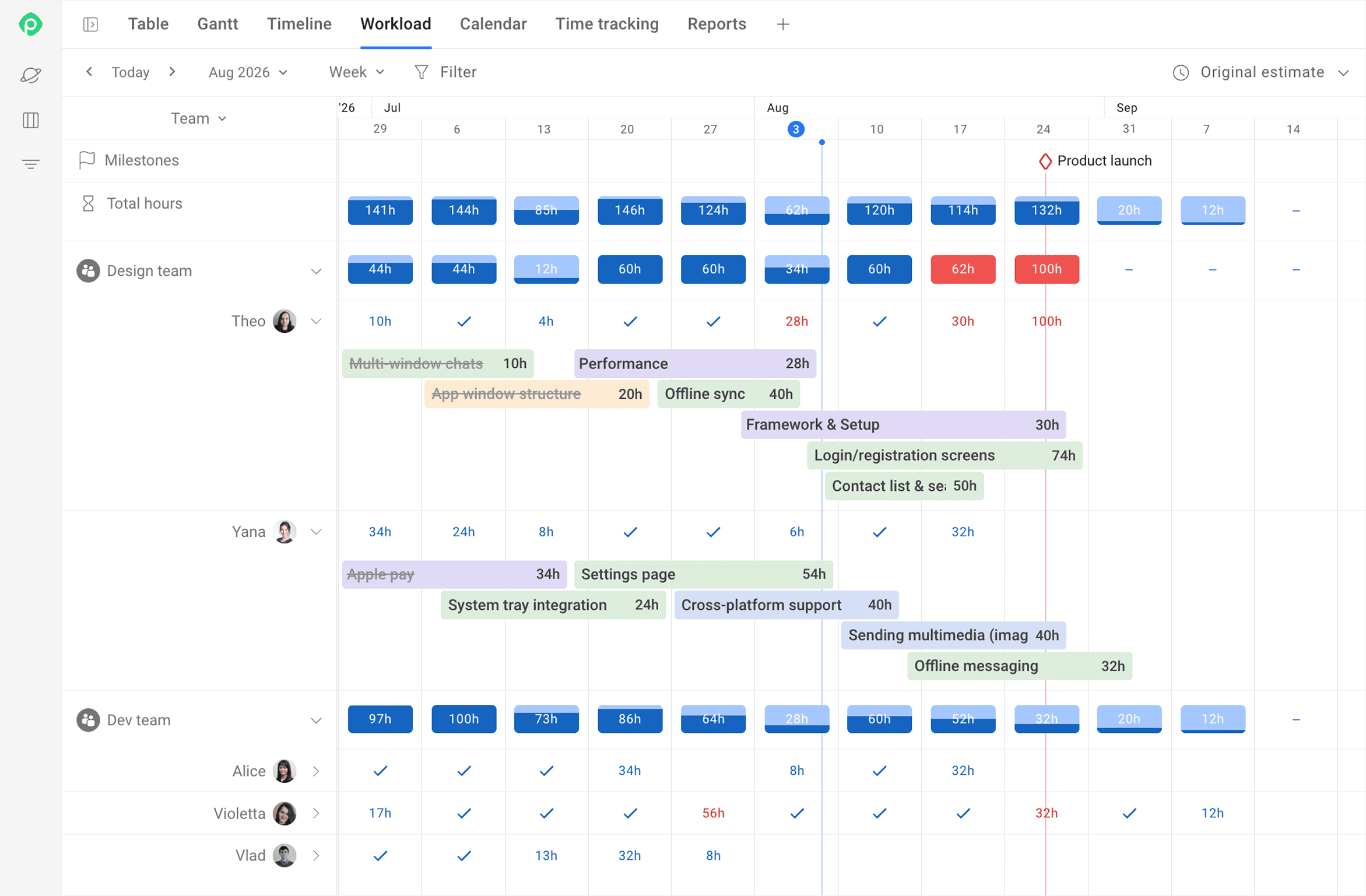
For example, in the image above (which is Planyway’s workload view), we can think of the number of people on the left as capacity and the literal distribution of their hours as a sort of resource plan.
In PMI terms, project management capacity planning focuses on the planning of organisation, acquisition, allocation, monitoring, and controlling both human and non-human resources. Conversely, capacity planning takes a step back and focuses on forecasting whether the organization has enough workforce and available capacity to handle future work.
What are the essentials of any capacity plan?
The building blocks of any capacity plan are based on the three foundational questions one would mull over in this case: What kind of work is coming our way? How much capacity will it take? And when do we need the right people available to deliver it?
What work are we preparing for?
When doing resource planning, you almost always want to start with understanding what needs to be done and which resources it will require. If you are creating a Java application, you wouldn’t want to hire a bunch of JavaScript engineers to handle the task, right?
During the capacity planning process, you typically do the following things to make sure your department is ready to respond quickly to any challenge and always have relevant skills to meet customer demand:
- Look at the company’s strategic roadmap. As soon as you understand where the company is headed, your own plans become much easier to build.
- Go to the product or sales department and talk to them to understand which projects are in the pipeline for the near- and mid-term.
- Study the trends in the market, as they help you understand how the company’s strategy might pivot in the future.
- Be aware of the current capacity. You can regularly conduct reviews of your employees' skill set or educate them to improve their skill set in the direction your company needs.
How much capacity do we need?
The trick here is making sure you have enough people available when new work comes in, without carrying more capacity than you actually need. There are three main capacity planning strategies for striking that balance.
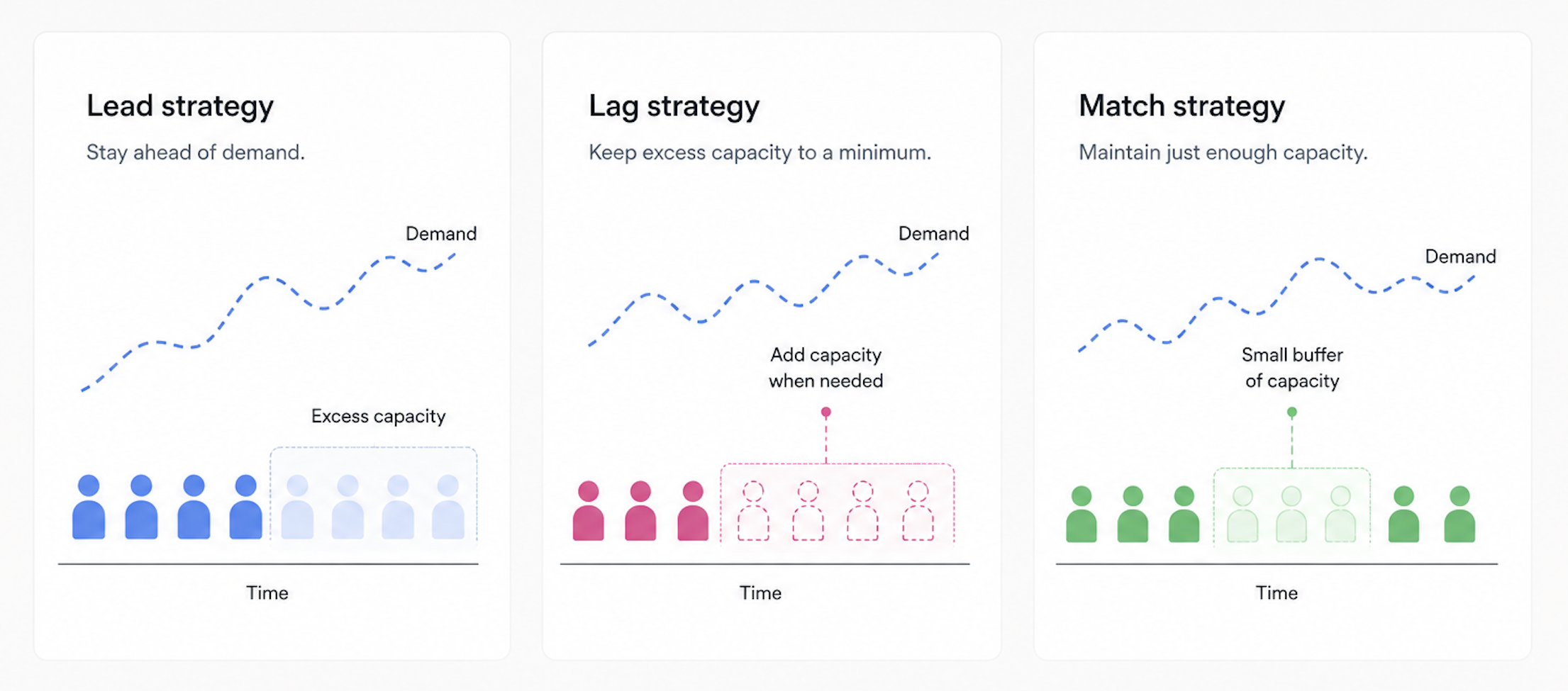
Lead capacity planning strategy: staying ahead of demand
When you want to be able to satisfy the requests for workforce as fast as possible, the most obvious thing you can do is maintain a bench of available resources (aka. excess capacity) and be able to quickly bring people in whenever an opportunity arrives. This pretty much sums up the Lead capacity planning approach.
The biggest advantage of this approach is speed. If your customers expect projects to start right away, having people ready to go becomes a strong competitive advantage. You can take on new work faster than organizations that need weeks or months to build a team.
On the other hand, having a large workforce on tap means paying employees who may not always be billable. This makes the Lead strategy justifiable only in scenarios when the anticipated demand for your company/department services is consistently high or when rapid growth is a strategic priority.
Lag capacity planning strategy: keeping excess capacity to a minimum
The Lag strategy takes the opposite angle. Instead of maintaining extra capacity, you keep your bench as small as possible to reduce costs and only add resources when demand increases. The biggest advantage is lower overhead, because you avoid paying for idle capacity.
The downside of the Lag strategy is the effort, time, and uncertainty it often takes you to land a professional in this market to fulfill your project’s demands in time. If hiring takes longer than expected, project timelines can slip, and customer expectations become harder to meet.
However, the trade-offs can vary by business model and selling points. If your company is seeking a long-term partnership from your customer and has an efficient hiring process, adding capacity on demand can be both practical and cost-effective.
Match capacity planning strategy: maintaining just enough capacity
The Match strategy is a balance between the Lead and Lag strategies. It requires you to have a clear understanding of what resources are available right now, what their resource utilization rate is, and when you are going to start increasing your capacity to match future demand. In this case, you might want to maintain a small pool of available workforce at all times just in case.
Although the Match strategy planning looks the most balanced, at the same time, it can still leave you either short-staffed when you need more hands on deck, or losing money by paying people who don’t have a project to work on yet.
When will we need that capacity?
In addition to the information above and your available budget, you need to consider how soon you need to start and how far ahead you need to plan your capacity. Hiring contractors is very handy, but usually quite expensive, and they come and go, making them good for short- to mid-term planning.
Hiring for the long term requires a well-coordinated company strategy to justify a long-term contract for the next couple of years, and you need to be confident that your company will keep growing.
| Planning Horizon | Typical Timeframe | Best Approach | Key Considerations |
| Short-term | 0-3 months | Contractors, freelancers, overtime, or reallocating existing staff | Fast to implement, but costly per hour and less predictable availability |
| Mid-term | 3-12 months | Combination of contractors and targeted permanent hires | Gives you flexibility while building a core team; requires solid hiring pipeline |
| Long-term | 1-3+ years | Permanent hires, training programs, and strategic workforce planning | Requires confidence in business growth; lower per-head cost over time but higher commitment |
Capacity planning in practice: three use cases
Let's bring all of this together with real-world examples across different planning horizons and show how project managers and delivery leaders can apply these principles in practice.
Use case 1: Short-term planning for a marketing agency
A digital marketing agency is bidding on four new campaigns that have to be launched within six weeks. Each of them requires the same resources for the same amount of time. The team estimates that their chance of winning those is 75%, so the head of delivery needs to figure out whether the bandwidth of the current team will be enough for potential work. So, assuming the estimation is correct:
- Approach: Match strategy with a lean toward Lag (they don't keep excess staff).
- Actions taken: Review current resource utilization, identify that two designers are at 90% capacity, and contract two freelance designers for the next two months.
- Result: Campaigns launch on time; permanent hiring is deferred until demand proves consistent.
Use case 2: Mid-term planning for a SaaS product team
A growing SaaS company has three major releases scheduled on its product roadmap over the next eight months. According to estimations, the current team will complete those successfully and on time.
However, according to recent customer surveys, the product is considered overengineered, with too many unnecessary features. The CPO has decided to change the product management approach to better validate new features, so the engineering manager needs to ensure they have enough backend, frontend, and QA resources to come through on that new approach.
- Approach: Lag strategy - staying conservative about hiring, do it only if it’s absolutely necessary.
- Actions taken: Reassess the current team structure and identify any potentially idle resources.
- Result: The team meets all roadmap milestones without overspending or feature bloating.
Steps for effective capacity planning
So, let’s say you need to plan the capacity for your team; what would you actually do? On the surface, it’s simple:
- estimate the potential workload changes;
- figure out the current capacity of the team;
- pick a method you are going to match capacity with workload…
- … and voilà!
But let’s add some nuance to that.
As mentioned above, capacity and resource planning differ in scale and method of application. For example, resource planning involves several activities, from managing current resources to planning capacity for future needs:
- Plan resource management: Define how you will estimate, acquire, manage, and use team and physical resources.
- Estimate activity resources: Estimate the type and quantity of team members (or other resources, e.g., equipment or supplies).
- Acquire resources: Obviously, obtain the necessary amount of human or other resources for your work.
- Develop the team: Strengthen the skills and competencies the team needs to perform effectively.
- Manage the team: Resolve issues, address conflicts, and coordinate work between the team members.
- Control resources: Monitor resource utilization and ensure the project has the capacity and resources needed for successful completion.
We could adjust this list to optimize capacity planning or allocation.
- Plan how you plan: Determine the way you are going to approach each of the points below.
- Gather data:
- Demand: company strategy, marketing trends, situation on the market, product/sales/marketing roadmap, info from other departments that might have the resource you need, historical time you spend on KTLO ("Keep the Lights On") tasks.
- Supply: available capacity (occupied and idle), historical throughput, skills that are available at hand and with a learning curve.
- Talent market: time-to-hire (for permanent employees and contractors), time-to-productivity (how soon an employee will become fully productive), turnover and churn.
- Budget: salary budget, contractor budget, ability for a rapid increase.
- Guesstimate the upcoming work: Provide a high-level but sufficiently accurate estimate of the amount of work that needs to be done. Consider the following data points:
- Many of the classic estimation methods that we all know and love don’t work when the uncertainty is very high. So the more relevant data you have, the better, because the fog of war is thick, and every decision you make carries some degree of risk.
- Risk management grows in importance. Anticipate upcoming risks and keep the risk register up to date.
- Acquire resources: Either by hiring permanently, getting contractors, or… read further to see more ways to increase your workforce’s bandwidth. 🙂
- Developing the team, managing it, and controlling resources would be very similar to resource management.
However, as mentioned above, there are several ways to increase your squad’s capacity without increasing headcount, although some are more effective than others.
How to increase capacity without increasing the headcount
Here are a few ways that can help you widen the bandwidth of you or your team (aka. capacity planning best practices).
Permit overtime work
Tried and true, some team members may be willing to take on extra hours for additional pay. However, it’s worth keeping in mind that this approach can sometimes have unintended effects, especially when overtime rates are higher and may influence how people distribute their effort across regular and overtime hours.
People working longer hours may also be more susceptible to burnout, which can affect their ability to contribute in the long term. So, while overtime can be useful when needed, it’s important to keep an eye on workloads and potential burnout risks.
Decrease the scope of work
Cutting back on the scope is another go-to approach, although it’s not always easy to negotiate with clients. In some cases, reducing the scope may even mean turning down a project if you know your team won’t be able to meet the demand and hiring additional capacity isn’t worth the investment.
Another version of this is to try and spread out the scope of work. If the timeline isn’t critical for the client (for the sake of this point, let's assume such a rare breed exists), you can spread the work over a longer period and bring it back in line with your capacity, giving you time to hire and ramp up additional people.
Manage burnout
In general, a good manager always cares about employees and takes real action to keep the stress of the workforce at a manageable level. An excessive amount of stress is one of the biggest factors that limit a person’s ability to perform at the highest level, especially when the situation requires an employee to focus hard on an important problem.
Invest in education
It’s not just about deepening existing expertise, but also about broadening your team’s skill set. Both improving existing expertise and making the employees more T-shaped gives you more leeway in how you allocate resources. And if you have people with idle capacity, encouraging them to acquire new skills will definitely help you improve the utilization rate and reduce bench time.
Do not shun today's tech comforts
For programmers, repetitive tasks get a lot easier with AI tools like GitHub Copilot. Another popular option for automating routine workflows is n8n. These tools can free up significant capacity and help developers move faster.
But it doesn't boil down to AI only. Overall, taking advantage of any tools that can automate or streamline routine work can free up valuable capacity, reduce manual effort, and let your team focus on higher-value tasks. Even simple solutions like Google Apps Script or Microsoft Power Automate can take repetitive work off people’s plates and make better use of the capacity you already have.
Cut down on multitasking, context switching and distractions
According to research, it takes an average of 23 minutes and 15 seconds to return to a task after a context switch. The exact number may vary by person, but the underlying problem is the same: ongoing distractions disrupt our state of flow, thus increasing the Lead Time.
With so many notifications, meetings, messages, and other demands competing for our attention, staying focused has become unprecedentedly challenging. Reducing unnecessary multitasking and interruptions can therefore be a surprisingly effective way to improve resource availability without adding more people to the team.
Optimize communication protocols
This isn’t just about getting rid of unnecessary meetings and syncs. It also means ending meetings early when the goal has been achieved, or when it’s clear it won’t be achieved within the allotted time. You can also encourage a cultural shift by letting people leave meetings when they realize they have nothing meaningful to contribute.
At the same time, setting acceptable ETAs for answering messages (e.g., 2 working hours for instant messages and 8 working hours for emails) will minimize the amount of distractions and therefore increase productivity.
Don’t be afraid to cancel stuff
Kanban teaches us that the mere existence of a queue can slow down the delivery, so the shorter your queue, the better results you are going to have. Take a hard look at your backlog and cancel anything that realistically is not going to get done. It takes a fair amount of honesty with yourself, but chances are high you’ll feel much better with a short and neat backlog rather than with a huge and messy one full of things that will probably never see the light of day.
Visualize and manage capacity with Planyway
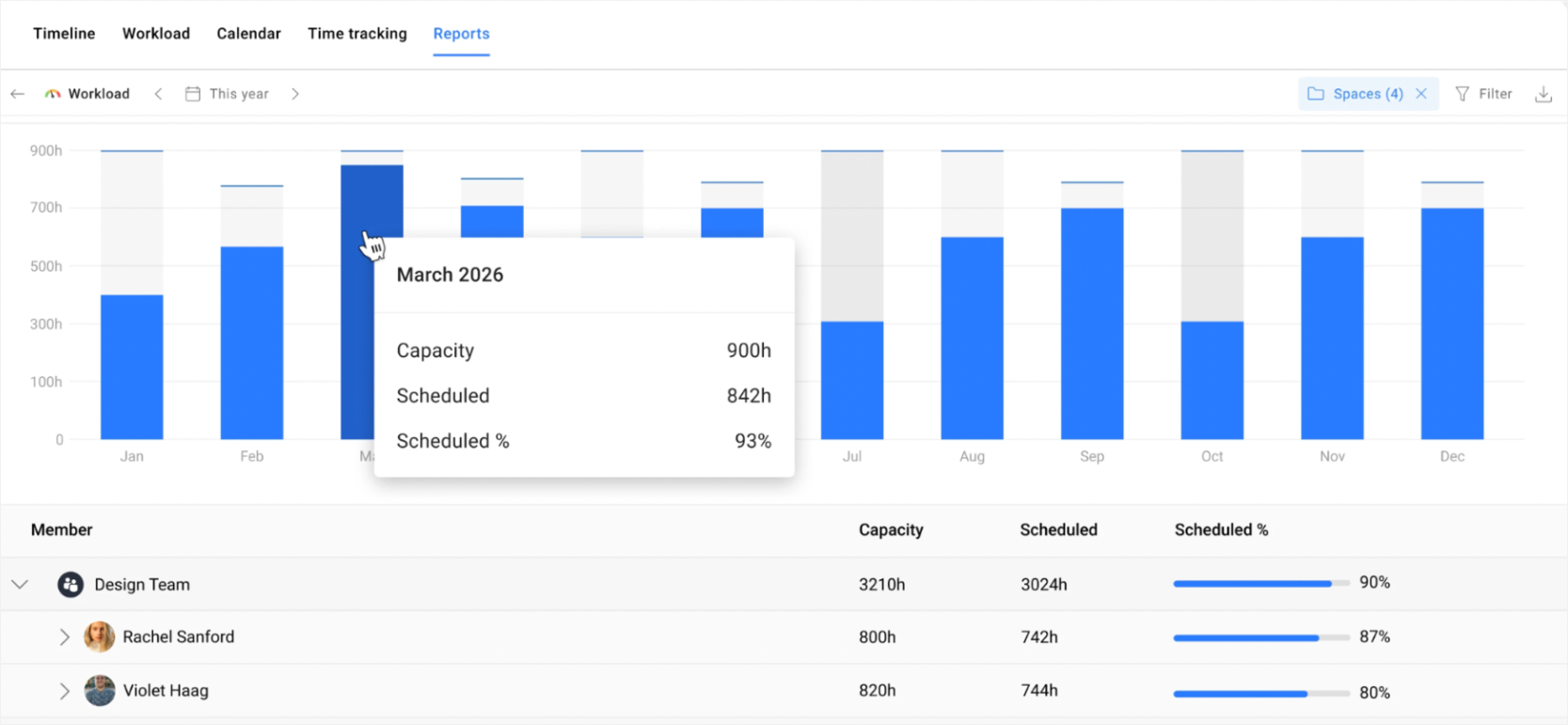
To understand what your capacity is and how it compares with upcoming work, you should visualize it, and that's when you need dedicated capacity planning tools. Planyway for Jira is an advanced project planning tool lets you compare scheduled work with available capacity and identify people who are over- or under-allocated.
Its Workload view calculates workload based on task estimates and team capacity…
… while the Workload Report explicitly compares scheduled work with capacity.
Planyway also includes time tracking, so you can compare planned work with actual time spent. Over time, this gives you historical data that can help make estimates and future capacity plans more realistic.
What not to do when planning capacity
In operational management, like in any sphere, there are dos and don'ts. It is useful to be aware of common mistakes that people make when trying to plan and allocate capacity, so below are five things to avoid — yet they still happen surprisingly often.
Assuming 100% efficiency
People are not robots, and even robots are not 100% efficient. People need breaks, deal with interruptions, and switch between tasks. So, whenever a guesstimate assumes that an 8-hour task is done within an 8-hour working day, you should take it with a pinch of salt, because, in reality, a workday rarely translates into eight hours of productive work.
Instead, teach your team to estimate better and instruct them on what to include and what not to include in the estimations.
Ignoring the possibility of unplanned work
There has never been a project without rework, bug fixing, change requests, incidents, security fixes, unexpected audits, or some other wrench thrown into the works. There are simply too many possibilities in the real world for things not to go as planned, so creating a buffer, which is going to be used for different kinds of unplanned work, is essential.
Seeing buffer as “free real estate”
Speaking of the buffer, whenever it’s created, it’s often wise to keep its size limited to those who need to be in the know, such as the C-level team. Otherwise, it can sometimes be seen by product teams as extra room to fit in additional features before the release, which can gradually eat into the buffer and leave little room for the unexpected.
Applying psychological pressure and expecting more work done
People respond differently to pressure, but does putting them under more stress make them more productive? According to research, the evidence is mixed: pressure and stress follow an inverted-U relationship with performance, where moderate stress can enhance focus and output but high levels impair functioning.
In other words, pushing people harder may help up to a point, but beyond that point, additional pressure is more likely to hurt productivity than improve it.
Assuming 9 women can deliver a baby in a month
It's one of the oldest fallacies in project management, yet it still comes up surprisingly often. Whenever there’s a deadline at risk, throwing more people at the problem should fix it. The trouble is that this approach often overlooks some important factors:
- distracting the main resource
- onboarding and offboarding costs
- impact on quality
- impact on communication
Bottom line is that increasing headcount can very often yield the opposite of the intended result. Instead, try to use some of the tips mentioned above and increase capacity without increasing headcount.
To sum up
Capacity management and capacity planning are closely related to resource planning, but there's an important distinction. Resource planning is about who is available and how they are allocated to specific work, while capacity planning looks at how much work the team can realistically take on overall. Depending on your situation, there are three broad strategies you can use to plan and manage capacity.
Keep in mind that capacity does not simply mean headcount. Your total delivery capacity depends on how effectively you use the people and time you already have. There are several methods you can use to increase capacity without ramping up the team, and in most cases, they fare better than a straightforward “quick hire - rapid fire” tactic.


FAQ
The overall approach can be split into 3 general strategies: Lead, Lag, and Match. Lead strategy means accumulating spare capacity in anticipation that it will soon be put to good use. Lag means you gain capacity only as soon as demand for it arrives. Match is something in between: you maintain a small pool of available workforce just in case.
To create a capacity plan, you start by gathering data about future demand and supply of workforce: how much work will come your way vs how much you are able to do. Historical data can help you make more accurate estimates of workload and throughput, while information about current resource availability shows you where capacity gaps may appear.
Dedicated capacity planning software like Planyway can help you bring this data together and visualize it. Then you decide on the best way to cover the demand, according to the amount of work that will have to be done and how soon.
Capacity planning is a collection of processes, methods, and strategies used to match the demand for workforce with its supply while focusing on the general bandwidth of the organization at a given time, rather than smaller-scale task allocation. Usually, it covers human resource management, but it is not limited to it. It is an ongoing process that helps organizations adjust their capacity as demand, priorities, and available resources change.