Project cost and budget management: essentials, template, and estimating methods

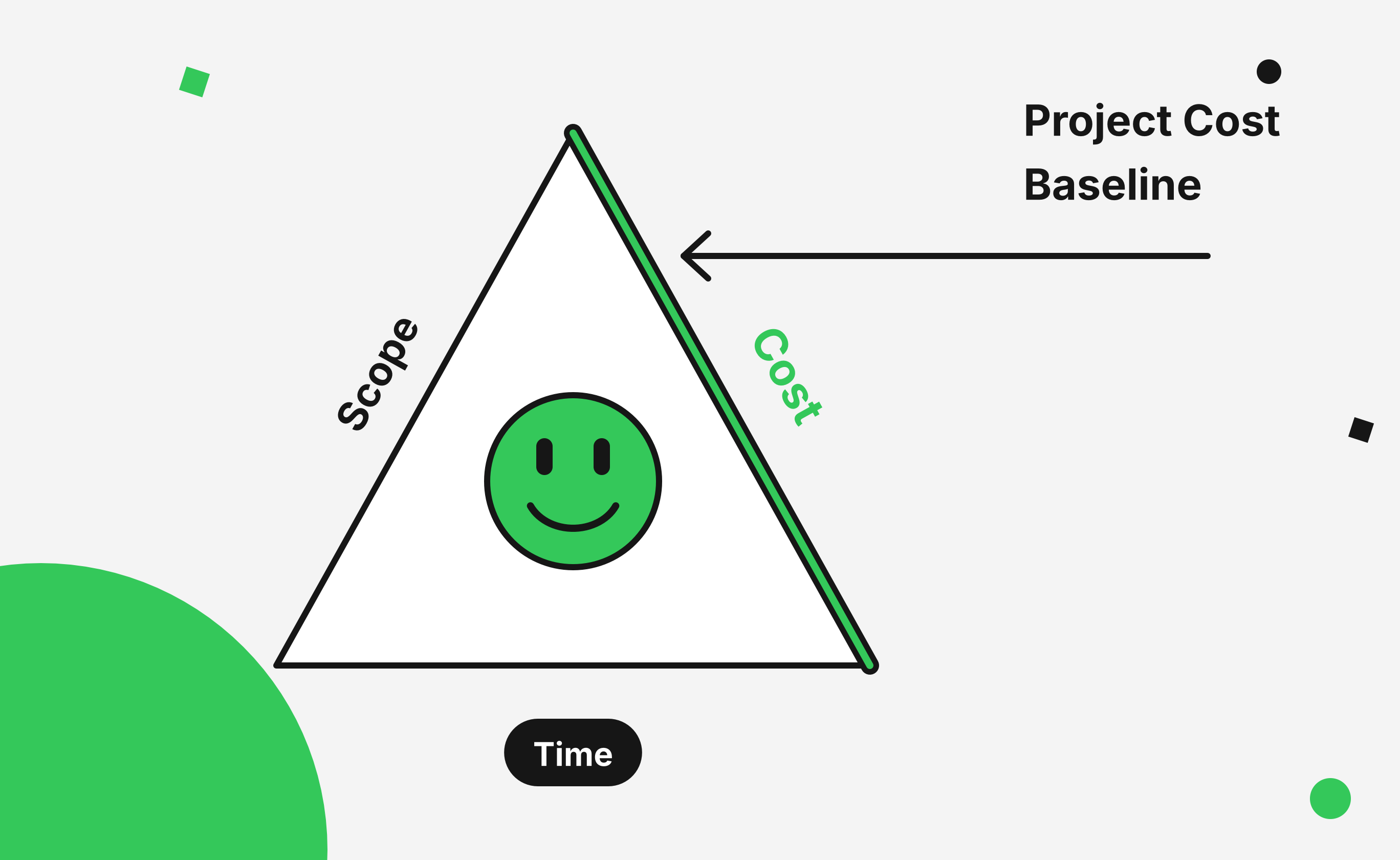
Cost is one of the three sides of the project management triangle, along with scope and time, and for a reason. You can have a great plan and a happy team, but if the money runs out halfway through, the project is in trouble.
Let's look at how cost management works, how to estimate costs as accurately as possible, and how to keep spending under control. We'll also share some tips on tools for cost management, because in 2026, certain complex projects may need something more advanced than a spreadsheet.
What is cost management?
Cost management is an ongoing business process. Its aim is to plan, estimate, control, track, and manage expenses, so the project finishes within its approved budget, or spending stays aligned with strategic goals.
In project management, though, costs aren't always the thing a PM manages. Often, especially in IT, you get a team instead of a budget. In that case, your job is to manage human resources instead of finances.
Sometimes you get both: a team and a budget for purchases. Then you handle cost management, but only for specific components, not the whole project cost.
The four cost management processes
In the PMBOK Guide, cost management comes down to four main processes:
- Plan cost management. Decide how you'll estimate, budget, and track costs, and who approves what.
- Estimate costs. Work out what each activity will cost.
- Determine the budget. Add up the estimates, add reserves, and get a cost baseline you can measure against.
- Control costs. Track actual expenditures and deal with variances.
In the rest of this guide, we'll cover all the cost types and look at some common mistakes that come up along the way.
Project cost baseline vs project budget
These two terms come up all the time in cost management, and they're easy to mix up. The difference is simple:
- The project cost baseline is a time-phased budget. It's the benchmark you measure cost performance against, and it includes the authorized, estimated costs of the scheduled activities.
- The project budget is the total funding for the project. It's the cost baseline plus risk reserves: contingency reserves for identified risks and management reserves for unforeseen ones.
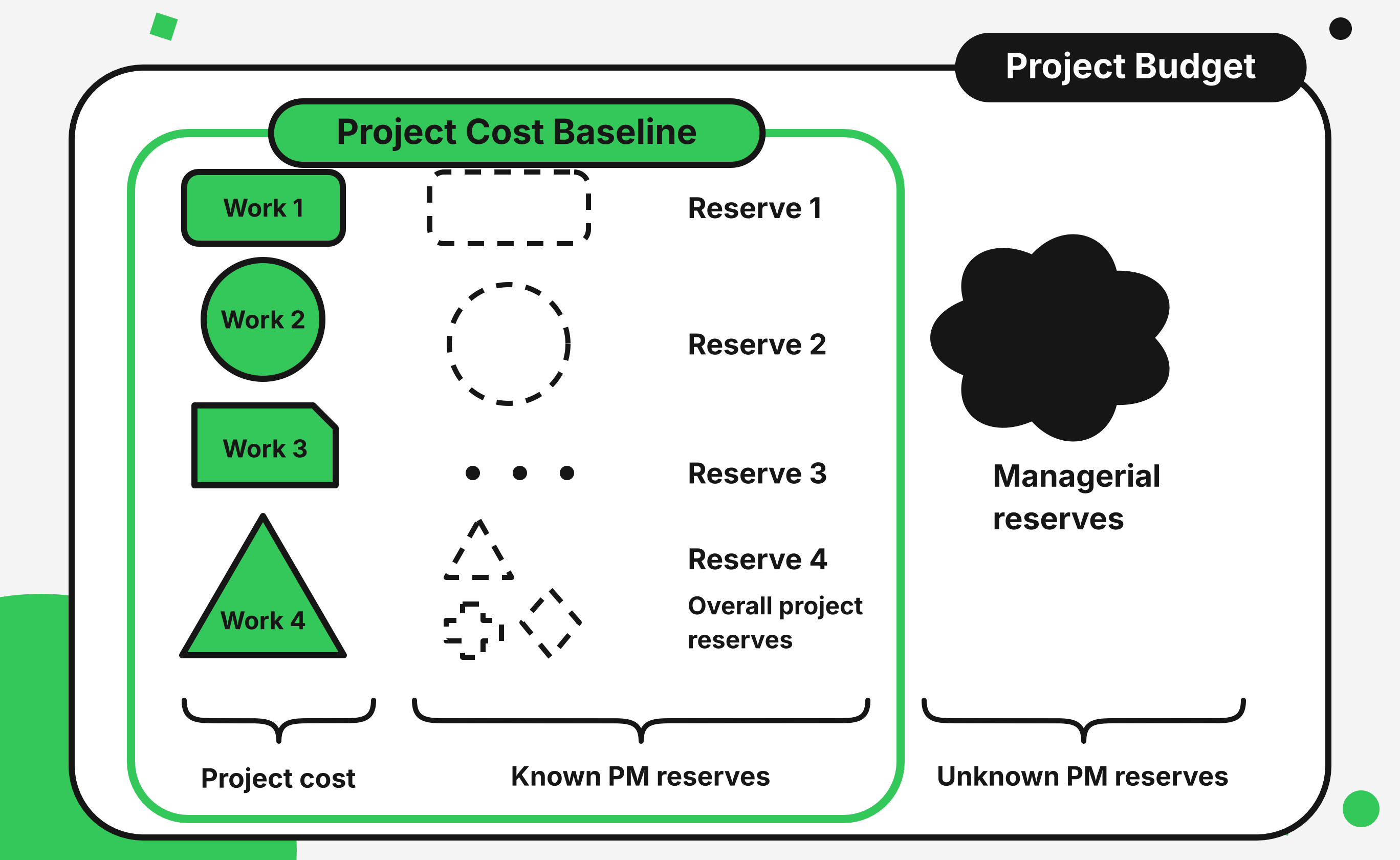
In everyday talk, managers mostly focus on the cost baseline but tend to call it "the budget." Don't let that confuse you. It's fine to use the terms interchangeably, as long as you know the difference.
Free project budget template (or how to build one yourself)
An accurate project budget template gives you a clear financial framework for the entire project. It helps you plan expenses, track spending, and keep project finances under control from start to finish.
You don't have to build a spreadsheet from scratch. An Excel budget template can work just fine for organizing your project plan and tracking costs across the entire project.
Here's a free template we built in Google Sheets.
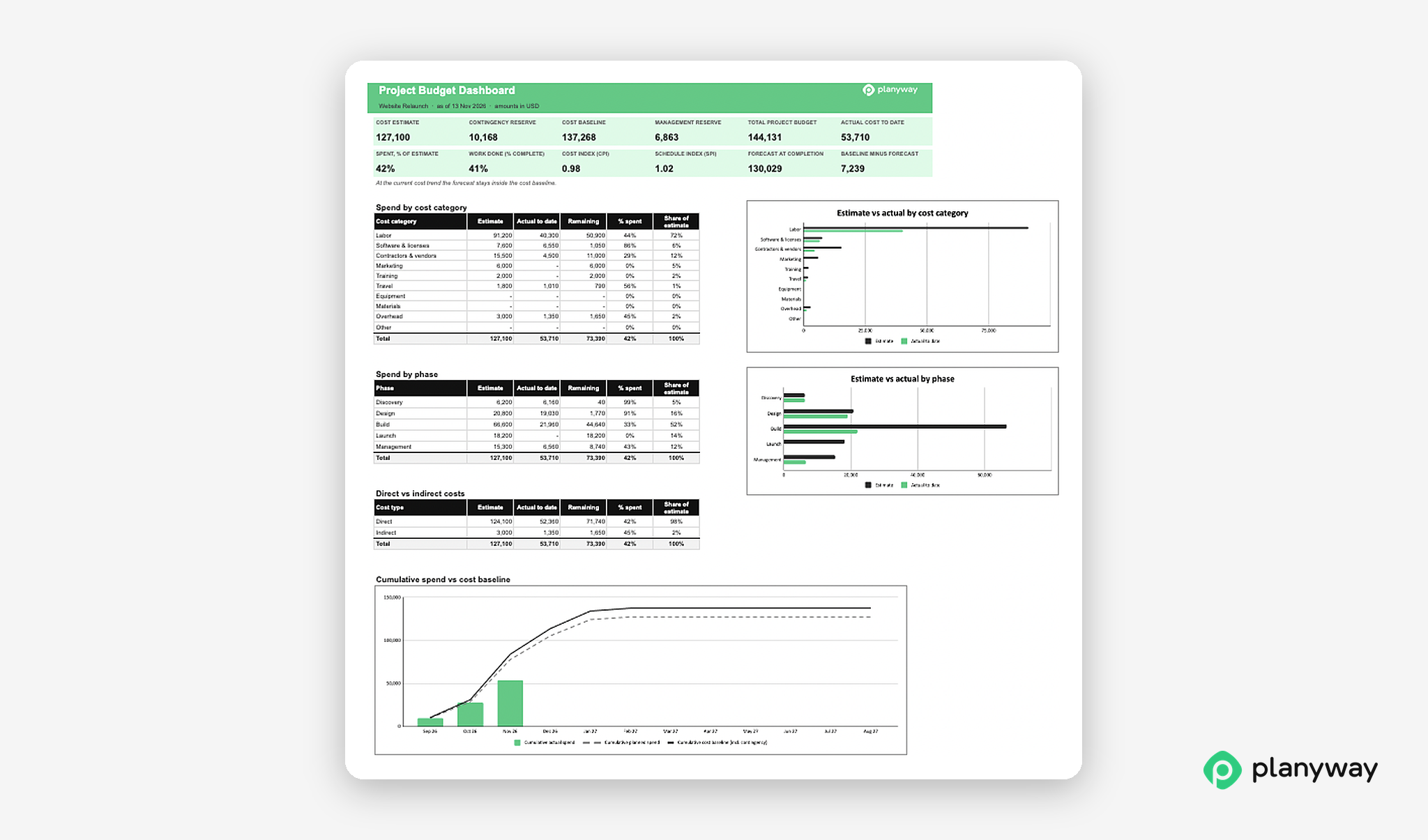
➡️ Download the project budget template
The right budget template should cover all the major expenses within your project scope. The right columns will help you see where the money goes and compare planned costs with actual spending.
Here are the essentials to include:
- WBS item or task: Break down the project plan into manageable activities.
- Resource or vendor: Identify who or what each expense is for.
- Cost category: Group expenses such as labor, materials, software, travel, and marketing.
- Unit cost and quantity: Record rates and amounts.
- Estimated cost: Calculate the expected cost of each item.
- Actual cost: Track what you've spent so far.
- Variance: Compare estimated and actual costs to spot differences.
You can also add a separate row for contingency reserves and keep it visible. Just label it clearly so nobody mistakes it for spare money.
Key components of a cost estimation
Before you estimate anything, it helps to know what you're dealing with. Project costs aren't limited to salaries or the tools your team uses. Some expenses belong directly to your project, while others are shared across the organization. Some stay the same no matter how much work gets done, and others increase with every extra hour or task.
A useful way to classify project expenses is to divide them into four categories:
- Direct costs go straight into the project: salaries of the people working on it, software licenses, equipment, contractors. To calculate direct labor costs, multiply each person's estimated project hours by their hourly rate.
- Indirect costs are shared with other projects: office rent, utilities, and management overhead.
- Fixed costs don't change with the amount of work, like a license or a one-time setup fee.
- Variable costs grow or shrink with the work, like hourly contractor fees.
This distinction also makes budget monitoring more useful. If a project starts running over budget, you can check whether the problem comes from underestimated labor, rising usage costs, or overhead allocation, instead of treating every expense as one big number.
How to do cost estimation accurately
Accurate cost estimation is the foundation of cost management. There are several techniques, and each one fits a different situation.
The first five methods are similar to the duration estimating techniques we covered earlier, so you can use duration methods for cost estimation too. You can learn more about them in our guide to project scheduling techniques.
- Expert judgment. Ask people with experience to estimate costs based on what they've seen before.
- Analogous estimating. Use the costs of similar past projects as the starting point for the current one.
- Parametric estimating. Use statistical relationships between historical data and other variables, like cost per square meter or per line of code.
- Three-point estimating. Take the best-case, most likely, and worst-case costs and combine them into a more realistic number. The simple version is an average. The weighted (PERT) version is (Optimistic + 4 × Most likely + Pessimistic) / 6, which gives more weight to the most likely scenario.
- Brainstorming and variations. Get stakeholders and team members in one room (or one call) and build the estimate together.
Now, the techniques that only apply to cost:
- Bottom-up estimating. Estimate the lowest-level WBS items and add them up to get the total project cost. It's reliable and accurate, but it takes time, and it's impractical early on, before you have a detailed breakdown.
- Top-down estimating. Start from the top levels of the WBS. For example, if a client has a $5,000 budget, check whether the project tasks fit into it. If the costs are higher, look for ways to optimize. It's a quick way to assess a project, and it matters most when the budget is tight.
- Quality costs. Decide how much to invest in quality. Some projects need a high upfront spend to satisfy the client and improve processes. Others can launch a rough product and improve it over time. Either way, this decision changes the project cost.
- Vendor bid analysis. If project funds pay for outside services, talk to vendors and compare their bids to find out what the outsourced parts will cost.
Estimation accuracy
Estimation accuracy is essential for effective cost management because it helps project managers and stakeholders make informed decisions. Early estimates are rough and cover a wide range of possible costs. Typically, their accuracy is around ±50%.
As the project goes on and you learn more, you refine the estimates. Accuracy can reach about +25% to −10%, and up to ±10% for definitive estimates.
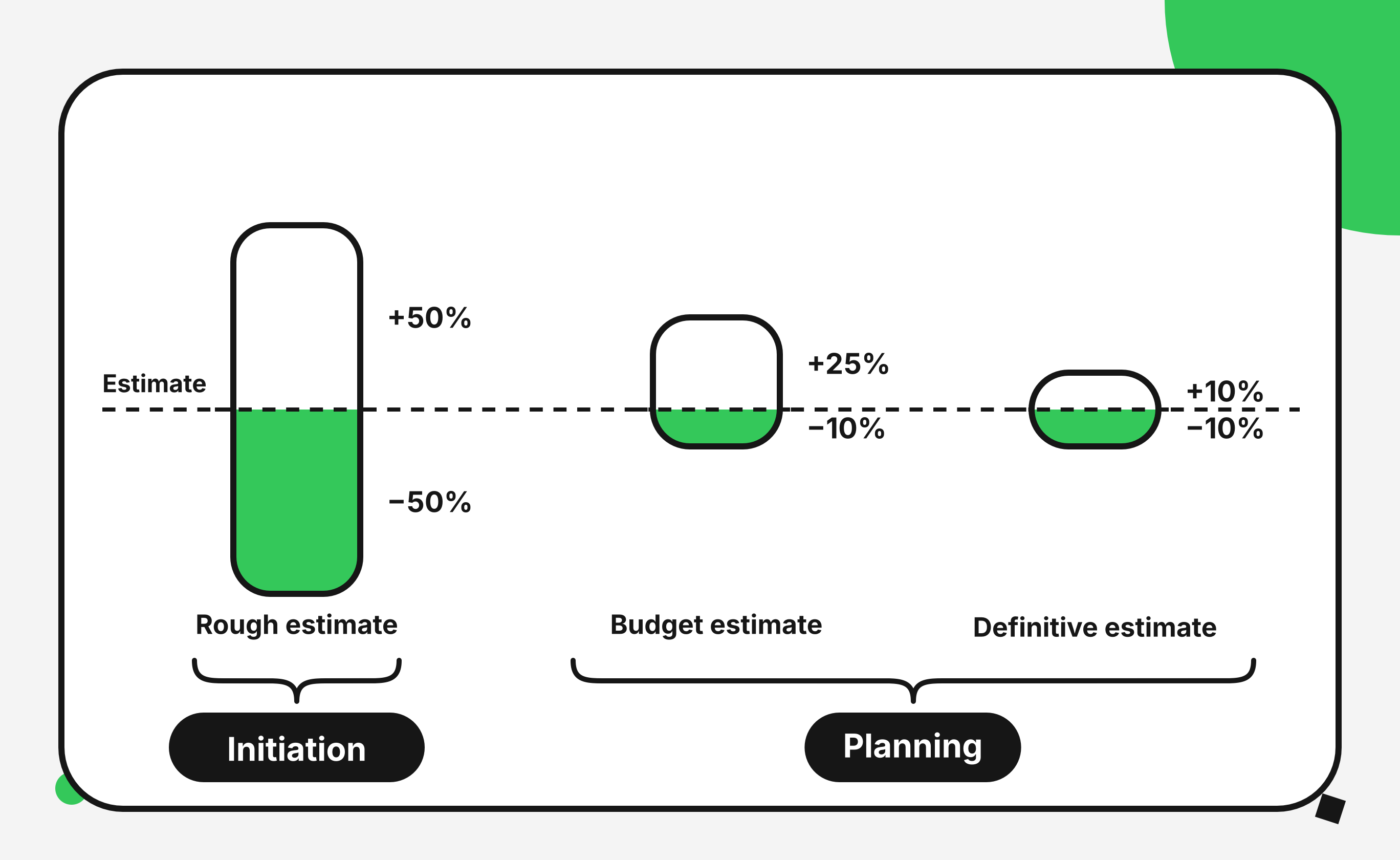
Getting to 100% accuracy is impossible, so build that uncertainty into your estimates.
How to control the project cost baseline
Controlling the project cost baseline is a crucial part of project cost management. It keeps the project inside its approved budget and helps with decision making.
This process involves three key activities:
- Monitor project expenditures. Keep a detailed record of all financial details and costs as they happen.
- Compare actual costs to the baseline. Check actual spending against the baseline regularly to spot deviations and variances.
- Identify variances and manage changes. Catch variances early, find out what caused them, and act: reallocate resources, adjust the scope, or cut costs.
Earned value management
Comparing actual costs to the baseline tells you how much you've spent, but not whether that spending matches the company's business goals. That's what earned value management (EVM) is for.
It uses three numbers:
- Planned Value (PV): the budgeted cost of the work you planned to finish by now.
- Earned Value (EV): the budgeted cost of the work you've actually finished.
- Actual Cost (AC): what you really spent.
From these, you get Cost Variance (CV = EV − AC) and Cost Performance Index (CPI = EV / AC).
If CPI is below 1, you're spending more than the work is worth. Say you've finished work budgeted at $40,000 but spent $50,000. Your CPI is 0.8, which means every dollar you spend returns 80 cents of value.
You can also forecast the final cost with EAC = BAC / CPI. If the original budget (BAC) is $100,000 and CPI stays at 0.8, expect to end up at $125,000.
Common cost management mistakes
Even a well-planned project can go over budget if spending isn't tracked closely. The problem often hides in a series of small mistakes that pile up over time, rather than in one big unexpected expense.
Here are five common ones to watch out for.
1. Estimating costs once and never updating them
Every project budget is based on assumptions, and those assumptions tend to change. If you keep using the original estimates without adjusting your forecasts, you'll lose sight of the project's real final cost.
How to avoid it: Accept that your budget is a living forecast. Review cost estimates regularly and compare planned and actual spending. Keep the approved cost baseline separate, so you can still measure performance against the original plan.
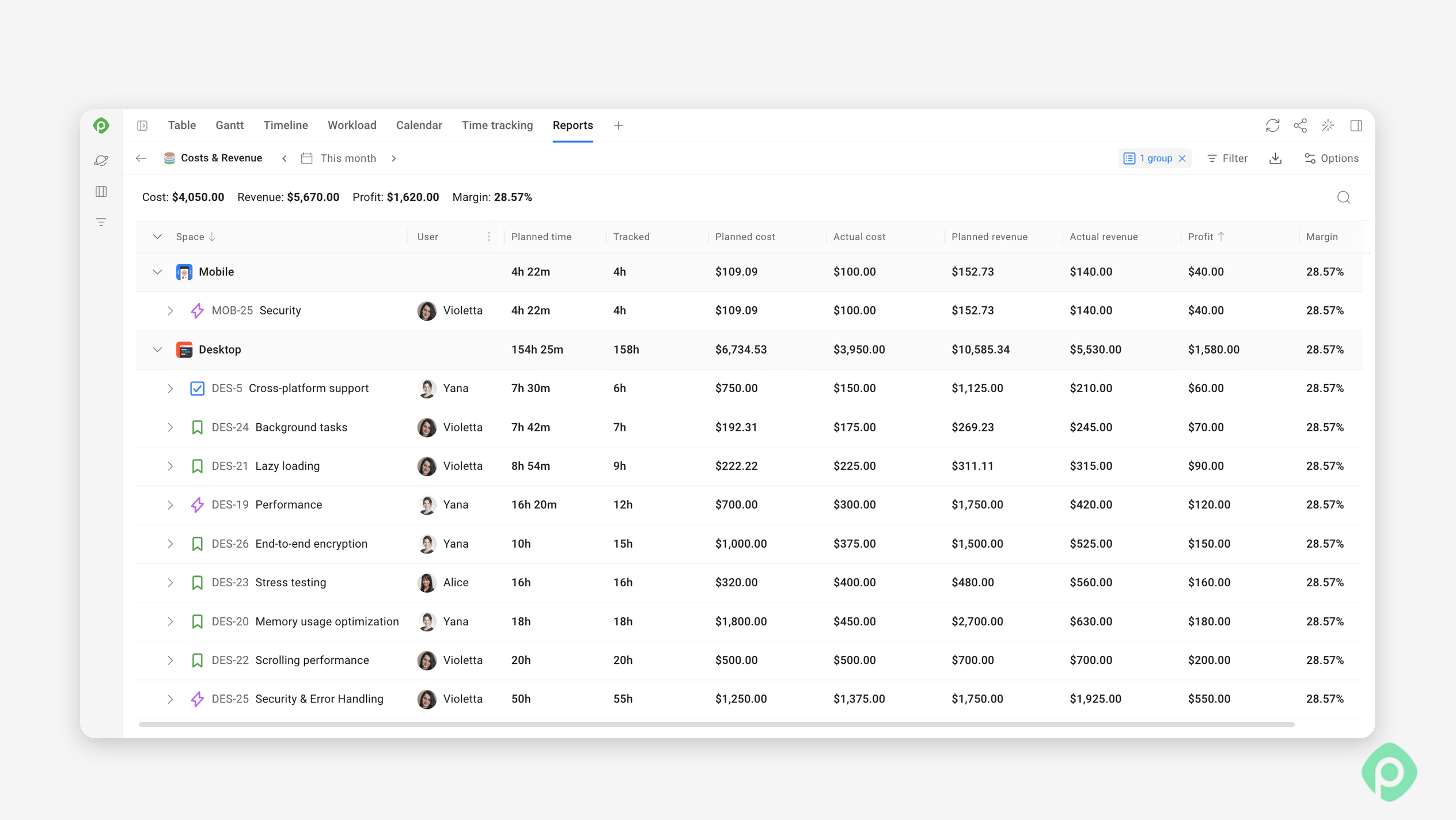
If you work in Jira, Planyway for Jira lets you track planned vs. actual costs as your project progresses. Set cost and billing rates for each team member, turn planned and tracked hours into costs and revenue, and see how much your projects earn. The Cost & Revenue report also shows profit and margin, so you can spot budget overruns and understand which projects are profitable — even across multiple Jira spaces.
2. Forgetting indirect costs and shared resources
It's easy to focus on the visible expenses, such as developer salaries, contractor fees, and software licenses, and overlook the cost of shared resources.
But things like the company's IT infrastructure, the time a finance specialist spends processing project invoices, or employees who split their time across several projects all have to be accounted for. If you assign a "splitter's" entire salary to one project, or forget their partial involvement, your estimates will be off.
How to avoid it: Identify all shared resources during estimation and agree on a consistent method for allocating overhead. For people working across multiple projects, estimate their actual involvement. Don't assume they're available full-time.
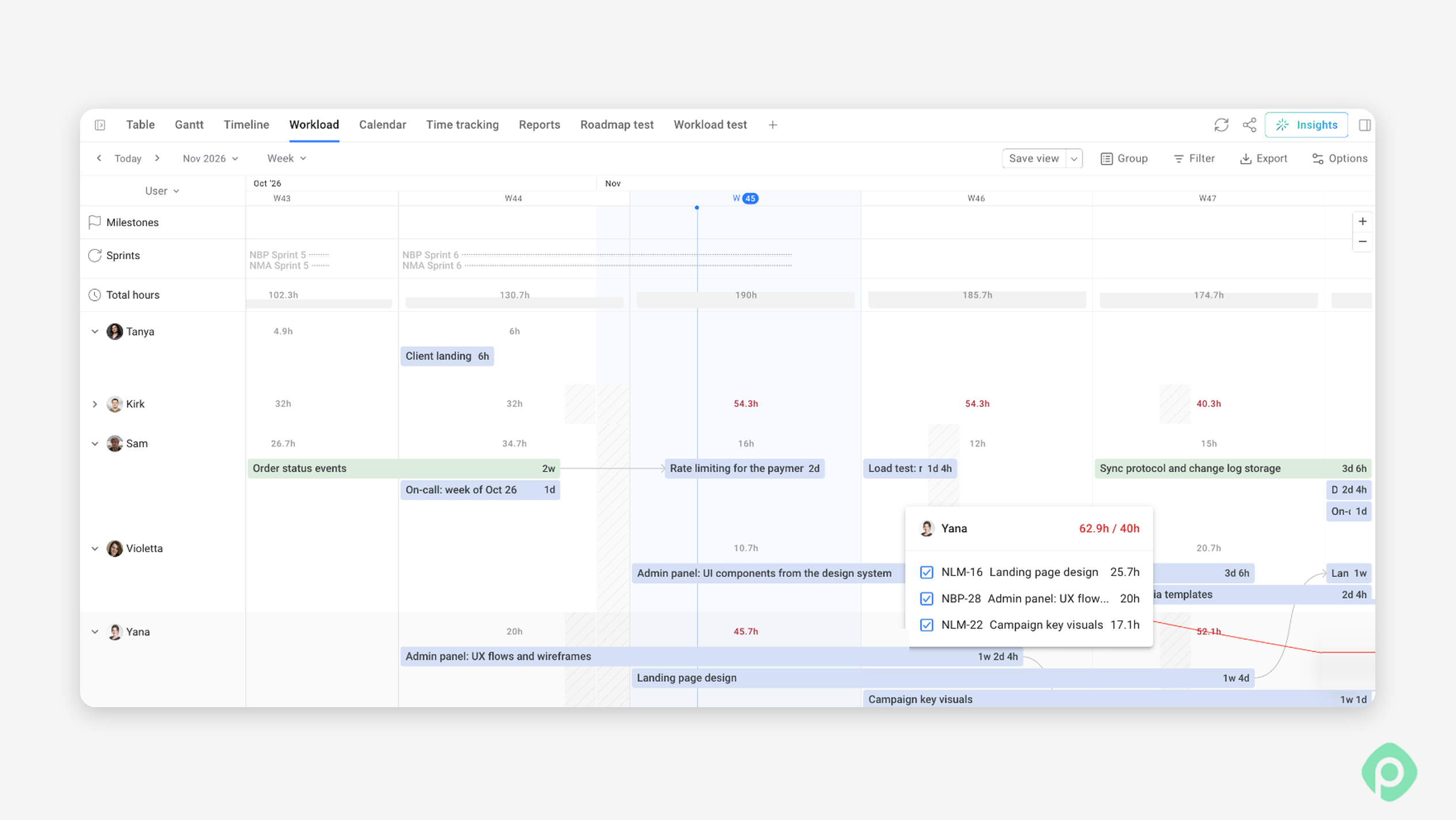
If you use Planyway for Jira, you can view each person's workload across projects and see how their capacity is allocated. This helps you estimate resource involvement more accurately and avoid basing your project budget on availability that doesn't actually exist.
3. Having no contingency reserve or hiding it in estimates
Without a contingency reserve, even small unexpected expenses can push a project over budget. Another mistake is failing to account for potential risks and unexpected costs when estimating the budget. If you don't set aside money for them upfront, you'll have to find room in the existing budget later.
How to avoid it: Calculate a separate contingency reserve based on project complexity and risk. Keep that amount visible, record when you use it, and don't treat it as extra budget for routine scope changes.
4. Tracking costs infrequently
Reviewing spending once a month might work for a long-term project with predictable expenses. For fast-moving teams, a monthly review can be too slow.
How to avoid it: Set a review frequency that matches your project's pace and financial risk. Weekly checks are a good place to start. As the project moves along, keep an eye on time logged against estimates, contractor hours, resource utilization, and actual expenses.
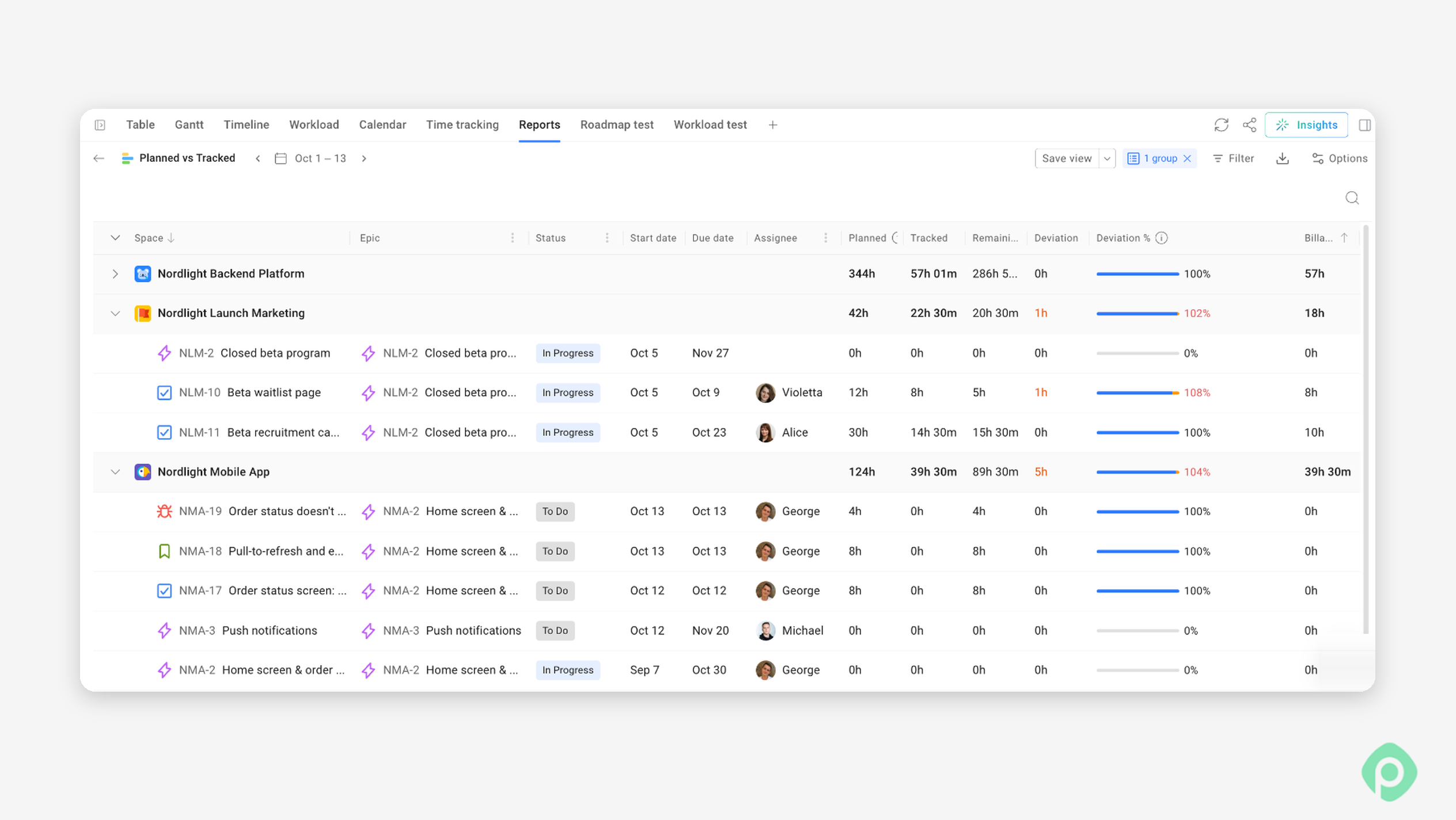
To this end, Planyway for Jira connects planned work, tracked time, and project costs. Compare planned vs. actual hours by person, task, epic, or project, and use the Cost & Revenue report to see how those hours translate into costs, revenue, and profit. This helps you spot budget deviations earlier and understand their impact on project profitability.
5. Accepting scope changes without updating the budget
This is one of the most common reasons software projects (and most other projects, really) go over their original budgets. Each extra request might look minor on its own. Together, though, those changes add work, extend the timeline, and use up resources. This is what project management calls scope creep.
How to avoid it: A change control process helps. Before you accept a significant scope change, estimate the extra effort, calculate its financial impact, and talk through the trade-offs with stakeholders. You might approve more funding, swap out lower-priority work, or move the request to a future release.
Keep your project budget under control
Cost management is what gives your work financial control, whether you're running SaaS or construction projects. If you understand the estimation techniques, keep your accuracy realistic, and watch the baseline, you can deliver projects within budget.
Costing is fairly straightforward for managers, because it builds on the earlier steps: time management and scope management. If you've planned well, know who does what, and have figured out what to buy and from whom, building a cost management plan and managing costs gets much simpler.
For Jira teams, one of the biggest challenges is connecting the financial side of a project with the day-to-day work. You need to know not only what your team is working on, but also how much time those tasks take, whether people are overloaded, and how actual effort compares with your original plan.
Planyway for Jira can help with that. You can plan work across projects, manage team capacity, track time, and compare planned effort with actual hours.


FAQ
Project cost management is the process of estimating, budgeting, tracking, and controlling expenses to keep a project within its budget constraints. It covers financial planning, expense tracking, and forecasting costs throughout the entire project.
The four main categories are direct costs (labor, equipment costs, materials, and marketing budgets), indirect costs (shared expenses), fixed costs, and variable costs. Don't forget miscellaneous costs and unexpected expenses.
Break down the project scope using a Work Breakdown Structure (WBS). Estimate labor hours and labor rates, material costs, raw materials, equipment, and other potential costs. Use data from similar projects and a risk assessment to improve accuracy. A budget spreadsheet template or Excel budget template can help organize estimates, even for smaller projects.
A project cost baseline is the approved budget used to compare planned and actual spending. It covers the entire project and serves as a reference for tracking financial performance. Changes require formal approval.
Use Jira worklogs for time tracking, issue estimates for planning, and custom fields or reporting apps to calculate costs. Planyway adds timesheets, planned-versus-actual reports, resource planning, and real-time dashboards to help project teams track spending and forecast costs.