Project cost estimation: example estimate and management guide

Estimating costs before the team knows exactly what to build is challenging. Usually, a project manager who’s asked to estimate something has little immediate data accessible. More likely, it’s the cost estimation that everyone will be relying on afterwards: stakeholders for approving a release, clients for proceeding with proposals, teams for improving processes.
Cost estimation in project management connects the intended work with people, resources, constraints, and uncertainty. This guide walks through the methods, the calculation, and a worked project cost estimation example for a software team.
What is project cost estimation?
Project cost estimation is the process of forecasting financial, human, and other resources needed to deliver a defined scope of work. The output of the process is predictably called a project cost estimate. It’s a documented calculation of expected cost, usually supported by assumptions and sources. If there’s any uncertainty, the cost estimate should address it.
For a software project, that might include development, design, QA, project coordination, cloud environments, licenses, external services, and contingency for risk management.
The basic calculation can be:
Estimated project cost = estimated labor costs + non-labor expenses + overhead + contingency
It’s also important to draw a distinction between a cost estimate (which is a forecast of how much the project is expected to cost) with project budget (the approved amount allocated for project delivery) or, say, a funding request.
This guide focuses on calculating the delivery estimate before you commit. For approvals, baselines, and ongoing cost control, use our guide to project cost and budget management.
What should a project cost estimate include?
Let’s take a quick look at each component of the formula we mentioned above.
Labor costs. They typically cover everyone involved in delivery: developers, designers, QA engineers, business analysts, project managers, and other specialists. To calculate it, identify the required roles, estimate their effort, and multiply the hours by the applicable hourly rates.
Labor cost = Hours per role × Hourly rate
Non-labor expenses. These are direct project expenses unrelated to team working hours. Cloud hosting, infrastructure, subscriptions, APIs, any third-party services are among the examples. To count those, identify the required resources, estimate their quantity or usage period, and multiply by their prices.
Overhead expenses. Covers indirect business expenses that support project delivery, such as office costs, HR, finance, internal IT, and administration. Overhead is often treated as a percentage of direct labor costs, as in:
Overhead = Direct labor cost × Overhead rate
Contingency aka risk management. An allowance for identified risks and estimation uncertainty. Contingency should not be confused with management reserve, which covers unforeseen events and is typically controlled by senior management.
This table should help with the dilemma of “where to include what.”
| Cost category | What to include | What to check |
|---|---|---|
| Labor | Design, development, QA, management, reviews, deployment | Hours by role or person, appropriate cost rate |
| External services | Security review, specialist consulting, contractors | Scope, exclusions, deliverables |
| Tools and infrastructure | Test environments, licenses, equipment costs, cloud usage | One-time charges, usage assumptions, duration |
| Materials and other purchases | Physical supplies, travel, or project-specific assets | Quantity, unit cost, delivery, applicable charges |
| Indirect costs | Allocated administration, facilities, or shared services | The organization’s allocation policy |
| Contingency | Allowance for uncertainty within the defined scope | Risks/assumptions behind the allowance |
Agree on the labor rate with whoever owns financial reporting, because a salary-only rate and a fully loaded rate will produce different totals. Chances are, benefits and overhead are already included in the hourly rate, so if you add them again, you’ll overstate.
Main project cost estimation methods
The method you choose depends on the information available. For the portal example below, we use a bottom-up estimate and check it against a comparable project.
- Analogous estimation uses the actual cost of a similar project as a starting point. If a comparable portal cost $24,000, adjust that figure for scope differences, a new integration, and current rates. Compare equivalent cost categories across the two projects.
- Parametric estimation multiplies a measurable quantity by a reliable unit cost. For example, five similar data sources × 12 hours per source × $55 per hour = $3,300. Check that the sources have comparable data quality and transformation requirements.
- Bottom-up estimation estimates each work package, then adds up labor, purchases, and applicable overhead. It works well once the scope is detailed enough to break down. Include reviews, QA, deployment, and work that spans multiple components. Count each cost once when rolling up the totals.
- Three-point estimation uses optimistic, most likely, and pessimistic scenarios to account for uncertainty. For scenarios of $4,000, $6,000, and $11,000, the simple average is $7,000. A PERT-style weighted average gives the most likely outcome four times the weight of either extreme, producing $6,500. Document the assumptions behind each scenario and why you chose that calculation.
Ask delivery specialists to challenge the effort assumptions, and use current supplier quotes for outsourced work. Of course, you can combine methods where you see fit as long as you focus on consistency of scope and source data.
➡️ For a fuller comparison of estimation techniques, see our guide on how to estimate a project.
Cost estimation process, step by step
There’s no need for complicated models to begin estimating a project. The entire thing can be broken down in 7 steps.
1. Define the project scope and the decision
To do that, write down the following:
- what the project will deliver
- what is excluded
- the decision the estimate supports
- expected delivery window
- currency
- owner
- date of preparation
If you have this info, it’s basically 60% of success. If you don’t have everything, at least you know what you need to fill the gaps.
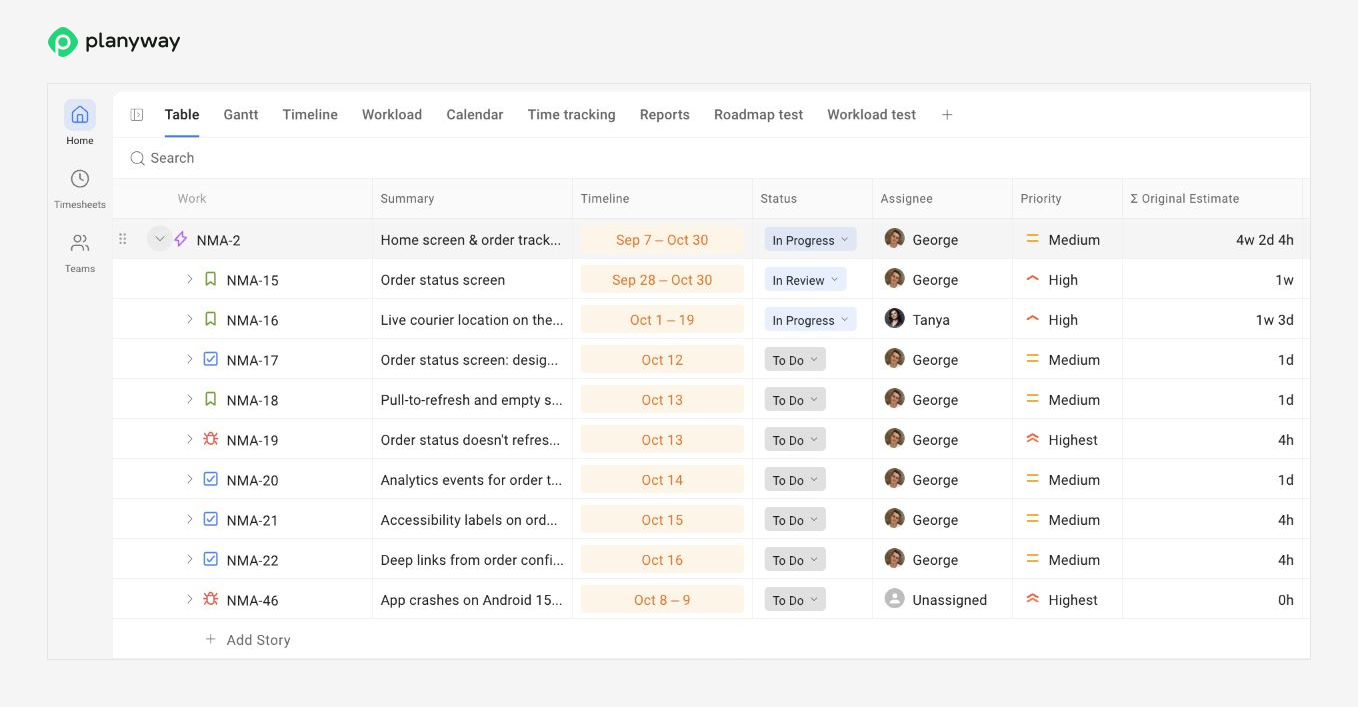
2. Create a work breakdown structure
Break the work into components that cover delivery from discovery through handover.
You can estimate by deliverable, phase, role, or a combination. What matters is that each cost appears once, and someone can explain what it covers.
3. Gather historical data
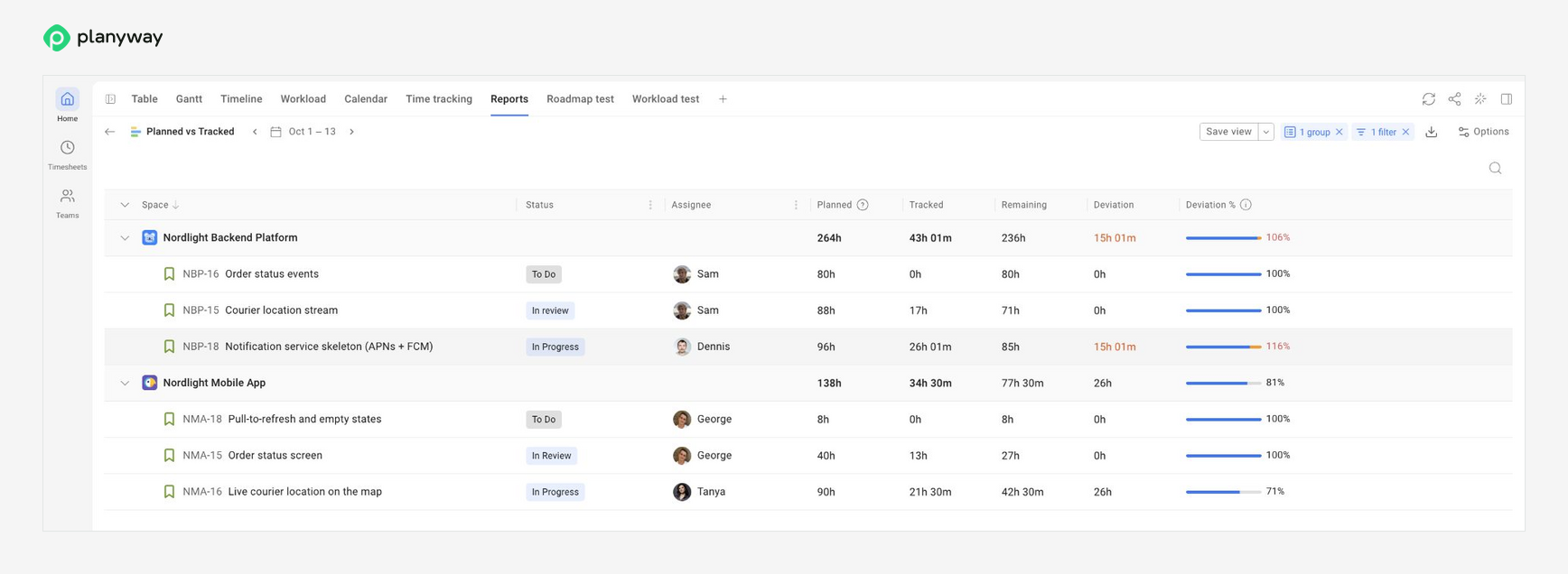
To estimate a project that’s not there yet, examine relevant historical data first. Look for comparable completed work and compare the original assumptions with what actually happened in similar past projects. Ideally, identify why things happened the way they did.
When using completed work as evidence, check that worklogs are complete and remaining effort is zero. For work in progress, consider both logged hours and the effort still needed to finish.
4. Estimate costs of labor using the right rates
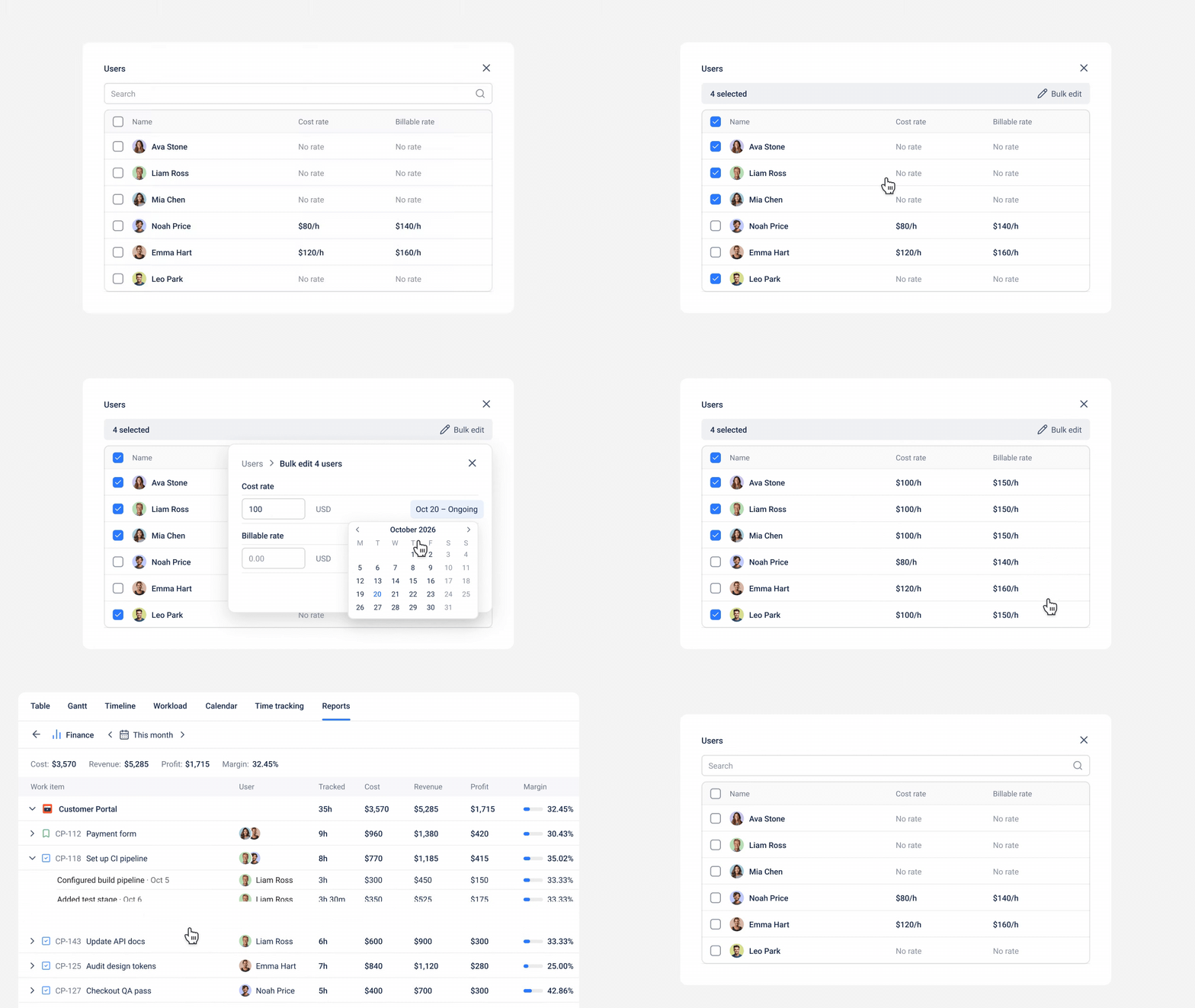
Estimate effort by role or person, then apply the corresponding hourly cost rate:
Estimated labor cost = sum of each role’s estimated hours × its hourly cost rate
Use cost rates for internal delivery costs (billable rates answer what you charge the customer).
5. Add purchases and allocated costs
Include the non-labor expenses required to complete the scope. Find them in vendor quotes, current prices, and explicit usage assumptions.
For a temporary cloud environment, record both the monthly cost and the expected number of months.
6. Assess uncertainty and contingency
Identify the parts of the estimate most likely to change. Then, you’ll need to decide what to do with them — brainstorm and find ways to account for those risks.
If your organization also uses a management reserve, identify its approval rules and treatment separately. Under the common project management convention, contingency is included in the cost baseline, while management reserve sits outside the baseline within the overall budget.
7. Check whether the schedule is deliverable
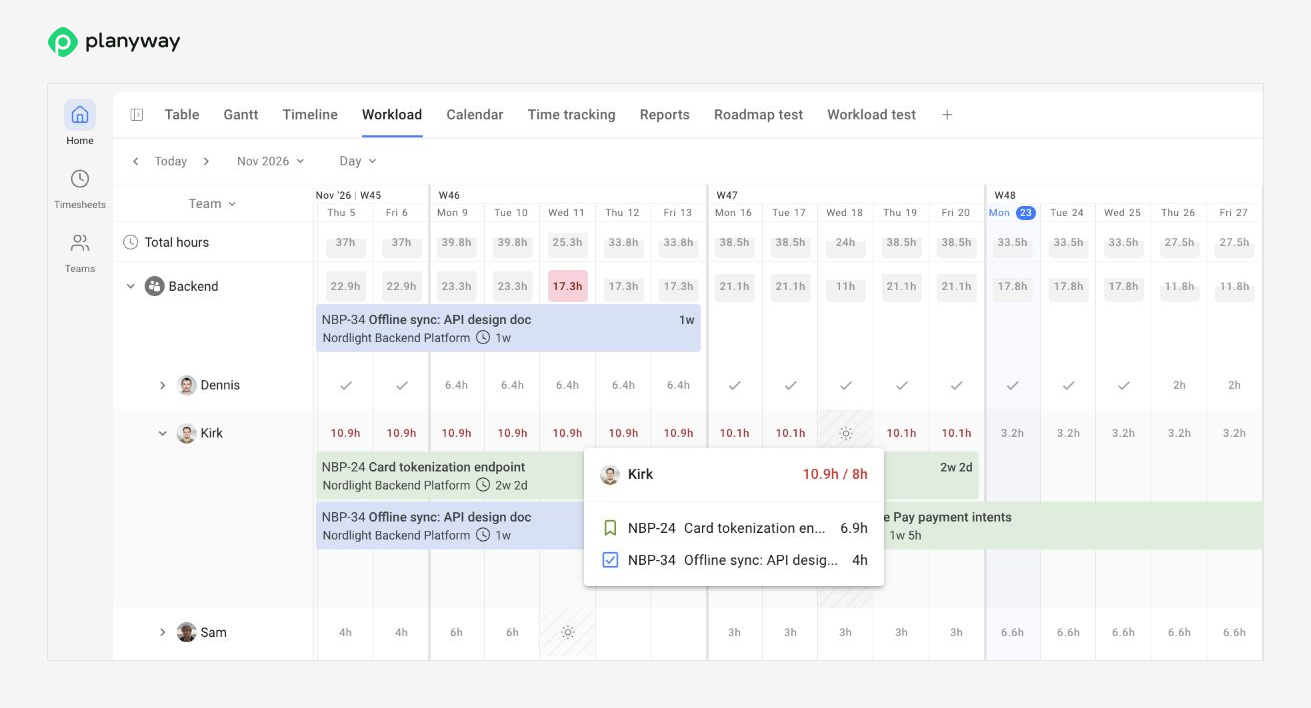
You may have estimated an effort of 160 hours for a developer, but it doesn’t equal 4 weeks. Under this estimation, it’s 40 project hours every week, with no competing commitments or absences. Sounds a tad unrealistic.
To avoid a potential bottleneck at this stage, check capacity and availability ahead.
Project cost estimation example
A software team estimates the cost of building a customer portal with authentication, an account page, and a payment integration. The scope includes testing and deployment documentation. Native mobile apps, ongoing support, and future feature requests are outside the release scope. All figures are illustrative and in USD before tax.
- Labor — $23,600. The team estimates 480 hours across five roles. Design is 40 hours at $45/hour, backend 160 at $55/hour, frontend 120 at $50/hour, QA 100 at $40/hour, and project management 60 at $50/hour. The rates already include allocated overhead.
- Non-labor expenses — $2,000. An external security review costs $1,200, two months of test infrastructure cost $500, and testing tools cost $300.
- Contingency — $2,700. The team allows $1,650 for payment integration edge cases, $800 for extra regression testing, and $250 for another month of test infrastructure.
Total estimated cost = $23,600 + $2,000 + $2,700 = $28,300.
The $25,600 base estimate is $1,600 above the $24,000 reference project. Check whether differences in scope and rates explain the gap. Also, check capacity before committing to the proposed six-week schedule. At 20 available project hours per week, the 160 backend hours alone would take eight weeks for one developer. The team may need another contributor or a revised delivery date.
What to hand over with the project cost estimate
Include enough detail for someone else to review and reconstruct the estimate.
- Agreed scope, acceptance criteria, and exclusions
- Estimate version, preparation date, and owner
- Delivery window and staffing assumptions
- Estimated hours and cost rates by work package and role
- Purchases, supplier quotes, and usage assumptions
- Contingency tied to specific risks and the total delivery estimate
- Review triggers, such as integration findings or changes in scope, supplier terms, or staffing
Attach source quotes and explain any allocation rules. A final check with the delivery lead and finance owner before requesting sponsor approval will also help.
And when your estimate is accepted, it’d be helpful to preserve that version. Revisit the calculation if and when an assumption changes. Most importantly, remember that any project management software, no matter how good, can help you estimate and track costs, but will never replace your professional judgement.
How Planyway for Jira helps with project cost management
If your team works in Jira, Planyway for Jira helps with accurate cost estimation there by connecting planned work, team capacity, and hourly cost rates. You can check whether the work fits your team’s availability, estimate labor costs from planned hours, and compare them with actual costs as your team logs time. Add non-labor expenses and contingency, and there you have it — your total project cost estimate.
Here's what exactly Planyway for Jira does to that end:
- See what your team can take on. Planyway’s Workload view shows how much time your team has overall and what’s already on each person’s plate. You can see who has room for more work and who’s already overloaded before you commit to a delivery date.
- See what the planned work will cost. Planyway uses the hours you’ve planned and what an hour of each person’s work costs your company to estimate labor costs. If you’re doing client work, you can also see what you’d charge for those hours.
- Get better at estimating. The Planned vs. Tracked report shows your original estimate alongside the hours your team has logged and the time they still expect to need. You can see which tasks took more or less time than expected and use that to plan similar work next time.
- See how much you’ve spent so far. The Costs & Revenue report shows how actual labor costs compare with what you planned. For client projects, you can also see how much you earned and how much you kept after labor costs.
Build a project cost estimate you can defend and update
A good project cost estimate gives stakeholders a clear picture of what’s included, what it will cost, and which assumptions could change the total. Break the work down, check the effort against your team’s availability, and account for expenses and contingency. Keep those assumptions with the estimate so you know what to revisit when the scope, rates, or staffing change.
If your team works in Jira, Planyway helps you keep the labor part of the estimate tied to the work. You can check whether the plan fits your team’s capacity, turn estimated hours into labor costs, and compare them with actual costs as people log time. That gives you a clearer picture of where this project stands and better data for the next estimate.


FAQ
When estimating future costs, start with a project cost breakdown that shows what contributes to the total cost across the project life cycle. Use cost data from similar work to identify four common types: direct, indirect, fixed, and variable. Direct and indirect costs describe how an expense relates to the project. On a construction project, material costs are direct, while shared office expenses are indirect. Fixed and variable costs describe whether an expense changes with the amount of work.
One way to group estimates is by purpose: order-of-magnitude, preliminary, budget, definitive, and control. Early estimates help assess project feasibility and support a cost benefit analysis. As the scope and project schedule become clearer, budget and definitive estimates use more detailed cost data. During delivery, a control estimate helps you compare the costs incurred with the budgeted cost, spot cost variance, and control costs.
A project estimate forecasts the time, effort, resources, or money needed to complete a project successfully. A project cost estimate focuses on the expected cost of delivering a defined scope. During project planning, an accurate estimate helps you decide what you can deliver with the time, people, and budget available.
Cost estimators use four common techniques to develop accurate cost estimates. Analogous estimation uses costs from similar projects, parametric estimation applies a cost per unit, bottom-up estimation adds up the associated costs of individual tasks, and three-point estimation uses optimistic, most likely, and pessimistic scenarios. For complex projects, statistical modeling can supplement a single point estimate with a range of possible outcomes.
Estimate the labor hours for each work package and multiply them by the relevant hourly cost rates. Add materials, vendor fees, and any overhead you haven’t already included in those rates. Review all the costs across the project lifecycle, then add contingency for unexpected costs tied to identified risks.
Planyway connects resource management with labor cost analysis in Jira. You can check what your team has time to take on, estimate the internal cost of planned work, and see how actual labor costs compare as people log time. Use that comparison to improve future estimates. For client work, you can also see what’s left of your revenue after labor costs, which helps you assess project profitability.