How to create a project roadmap? Your most actionable guide (+examples)

A project roadmap did not emerge as just another artifact in project management. It evolved as a direct response to high uncertainty, volatility, and potential risks that make rigid planning ineffective. In dynamic environments like IT or startups, even the most carefully built project schedules often become outdated before the entire project even reaches its midpoint.
That is why the higher the uncertainty, the more critical it becomes to create a project roadmap. Instead of locking teams into fragile assumptions, it provides a strategic overview that keeps project managers, team members, and project stakeholders aligned around project goals, key milestones, and strategic direction.
TL;DR
- A project roadmap gives a clear visual picture of the project’s goals, milestones, and major work streams across time. It helps project managers, stakeholders, and the wider team stay on the same page about where the project stands.
- Unlike a project plan or a Gantt chart, a roadmap does not try to map out every single day of a long project. It follows a rolling-wave approach: the near term is shown in more detail, while the farther-out view stays broad, because locking in exact dates too early usually creates more problems than it solves.
- Building a roadmap is fairly straightforward once you know what to include. The main steps are to define the audience, break the project into phases, place those phases on a timeline, and keep updating the roadmap as priorities shift. If it is not maintained, it stops being useful very quickly.
What is a project roadmap?
A project roadmap is a visual representation of a project's strategic goals, project objectives, key deliverables, and project milestones, structured around the project timeline.
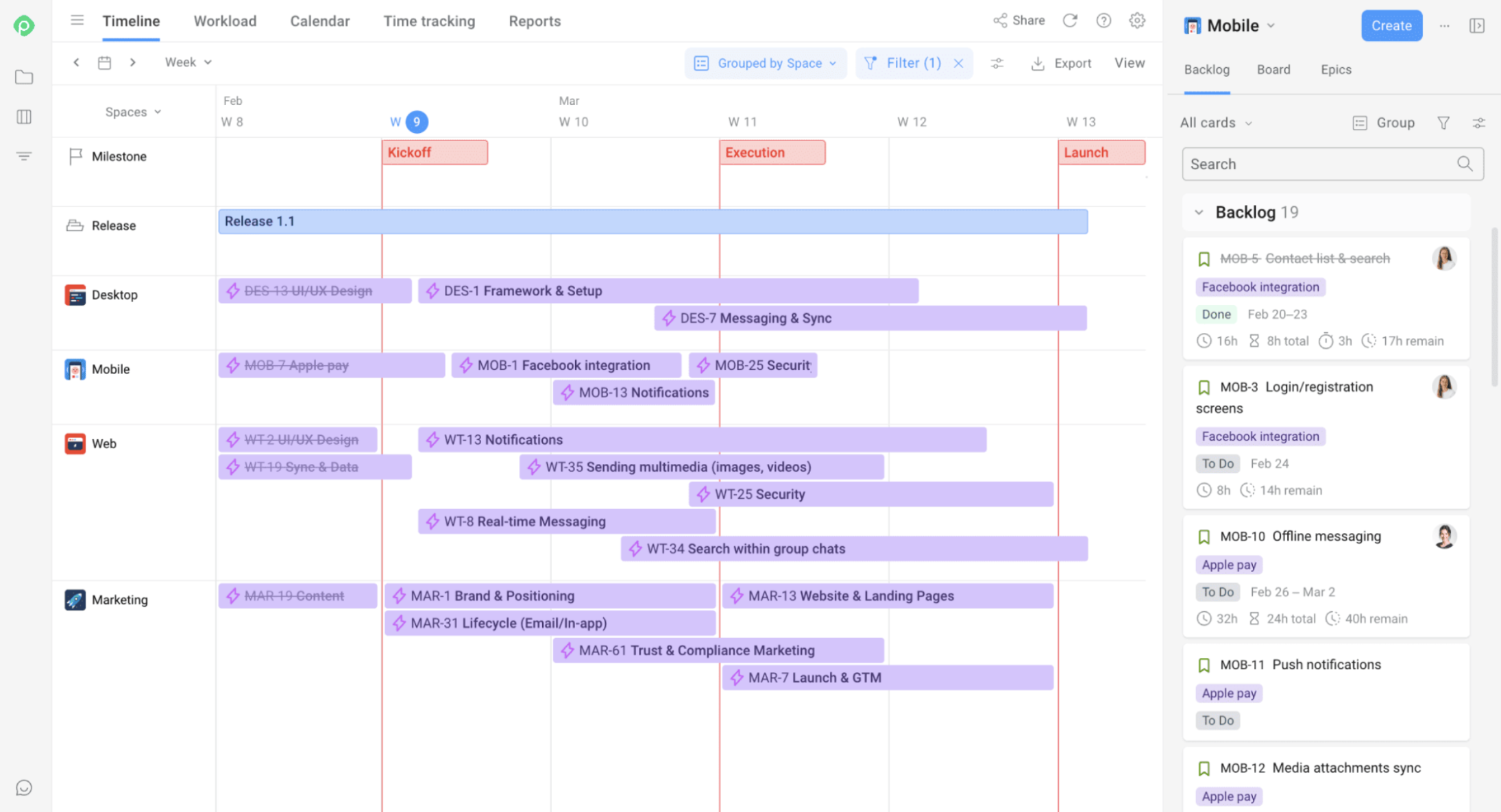
Project roadmap built in Planyway for Jira
It exists to give a high level overview that creates shared understanding across the project team and project stakeholders. It may also include resource management, dependencies, necessary resources, and potential risks — things that help communicate the strategic direction clearly and fully.
In practice, it serves two main purposes: to help project managers clarify their own thinking, and allow them to communicate complex project information in a single, accessible view.
A project roadmap is usually built around a few defining traits:
| Characteristic | Description |
|---|---|
| High-level | Summarizes, doesn't detail |
| Visual | Easy to understand and communicate |
| Strategic | Focused on goals and outcomes |
| Dynamic | Updated as project evolves |
| Collaborative | Created with the entire team, not just the PM |
That last point matters more than it might seem. A roadmap put together in isolation by one project manager and then handed down rarely earns real buy-in. It needs to feel realistic to the whole team, but more importantly, the team has to internalize it, understand the logic behind it, and treat it as their own.
Why do you need to outline a project roadmap?
A project roadmap serves as a structured yet flexible blueprint for navigating the project lifecycle, becoming essential when complexity increases and different stakeholders need different views of the same project's status. It provides a central reference point for team members.
Also, in uncertain environments, planning every day a year ahead is simply unrealistic. Project roadmaps support rolling wave planning, where the near term is mapped in detail, and the more distant future is left at a higher strategic level.
As a result, project roadmaps help teams with:
- Structured planning — connecting project scope, phases, and desired outcomes.
- Alignment — keeping team members and project key stakeholders informed.
- Tracking — helping track progress through major milestones.
- Decision-making — allowing teams to spot dependencies and prevent missed deadlines.
- Engagement — securing buy-in and managing stakeholder expectations.
Project roadmap vs. related concepts
A project roadmap is easy to mix up with related project planning tools, but each one serves a different purpose. Using them for the wrong job can blur priorities, confuse the team, and weaken alignment across the project.
Project roadmap vs. project plan
A project roadmap gives a strategic overview of the project by highlighting goals, key milestones, and major deliverables, while a project plan translates that direction into the detailed tasks and schedule that drive the actual planning process.
| Roadmap | Project Plan | |
|---|---|---|
| Focus | Strategic overview | Tactical execution |
| Level | High-level | Granular, detailed |
| Answers | “What” and “why” | “How” and when" |
| Audience | External & internal stakeholders | Internal project team |
| Contains | Goals, milestones, deliverables | Tasks, budgets, assignees, dependencies |
☝ Expert note: Create the roadmap first, then use it to build the detailed project plan.
Project roadmap vs. WBS
A WBS helps define the pieces that make up the project scope, but a project roadmap takes those pieces and places them on the project timeline, showing sequencing, priorities, and overall direction.
Project roadmap vs. product roadmap
A project roadmap focuses on a single initiative with defined launch dates and key deliverables, while a product roadmap reflects long-term evolution tied to customer feedback and strategic goals. In practice, a single product roadmap might sit above several project roadmaps that each deliver one piece of that longer-term vision.
Project roadmap vs. Gantt chart
The difference comes down to two things: the level of detail and how time itself is represented. A Gantt chart operates at the level of individual tasks, showing who does what and when. A project roadmap is one level up, being focused on full functionality and significant outcomes, deliberately staying out of the daily weeds.
The second difference lies in how each format handles time. Gantt charts use a strictly linear time scale, where equal distances always represent equal amounts of time. Roadmaps are more flexible: they often rely on rolling wave planning, where the near project phase is shown in more detail, and the farther future is compressed into broader blocks.
Neither format replaces the other. The sensible approach is to build the roadmap first to establish the strategic overview, then break those goals and milestones down into the task-level detail that belongs in a Gantt chart or detailed project plan.
Core components of a project roadmap
A project roadmap should stay focused on what matters most — project deliverables, milestones, and direction. If it gets buried in details, the bigger picture starts to blur, the goals become less clear, and the team loses alignment. That is the very problem a roadmap is meant to solve.
What to include in a project roadmap
- Goals, strategic objectives, and other measures of success;
- Key milestones: critical delivery dates, internal deadlines, external deadlines;
- Major deliverables and the benefits they're meant to unlock;
- Resource management details and the key people involved;
- Dependencies, both inside the project and coming from outside it;
- Significant external initiatives alongside the internal project phase or work stream they touch;
- Potential risks likely to affect dates, shown directly against the project timeline.
What NOT to include in a project roadmap
- Day-to-day tasks and granular execution details;
- Individual assignments and full work breakdowns;
- Excessive technical specifications that only make sense to one part of the team.
How to create a roadmap for a project? Essential steps
As we've mentioned above, the rule of thumb is to create your project roadmap before building a detailed project plan. For one, it’s a simple way to band everyone together around the project's goals, timeline, and key milestones. Once everyone agrees on the big picture, you can move on to planning tasks, assigning resources, and setting deadlines without replanning everything from scratch somewhere down the road.
Step 1: Determine target audience and structure
Figure out who this roadmap is actually for — your development phase team or your executive stakeholders — and pick the level of detail that matches. A roadmap built for engineers and one built for a board meeting shouldn't look the same.
Step 2: Break down your project into distinct phases and work streams
Lean on whatever WBS you already have and split the project into clear chunks — web development, mobile, marketing, whatever your structure actually is.
Step 3: Map against a timeline
Place each project phase, work stream, and key milestone on a timeline using the level of detail that makes sense for your project — typically by quarter for long-term initiatives or by month for shorter ones. Focus on sequencing the major pieces of work rather than scheduling individual tasks.
Step 4: Formulate strategy and set priorities
Decide what happens first, and draw the connections between the critical milestones that depend on each other.
Step 5: Identify dependencies and risks
Show how work streams depend on one another, and write down how you'll respond if something breaks — what happens, for instance, if a key deliverable hinges on a third-party vendor that misses its date?
Step 6: Visualize, publicize and maintain
Pick a tool — a spreadsheet, Miro, Planyway, Jira — build versions tailored to different stakeholder groups, and actually keep it updated as the project moves. A roadmap that's accurate on day one and frozen after that isn't a roadmap anymore; it's a screenshot.
Project roadmap examples
Let us preface by saying that you can create a project roadmap almost anywhere. You can build it in a spreadsheet, you can set it up in Miro, or you can create it in dedicated project planning tools like Planyway. It's a flexible tool, not a piece of specific software, and you can twist the look and contents, depending on your audience and needs.
High-level project roadmap (Strategic layer)
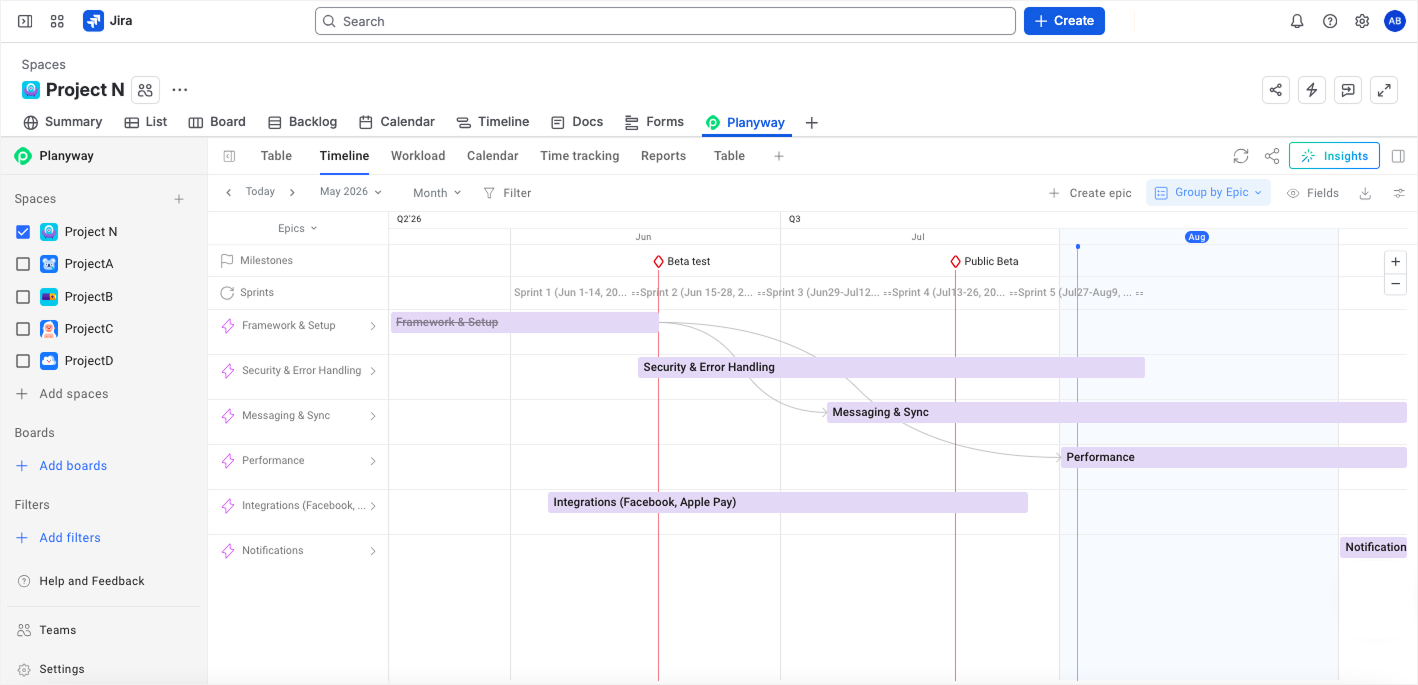
A high-level roadmap, grouped by Epics in Planyway for Jira.
A high-level project roadmap provides a clean strategic view of phases and milestones, with no underlying task-level detail.
For: executives, stakeholders, investors.
Purpose: this is the version teams usually bring to quarterly planning sessions, steering meetings, and stakeholder updates, because it keeps the focus on direction and strategy.
Cross-functional roadmap (Interdepartmental layer)
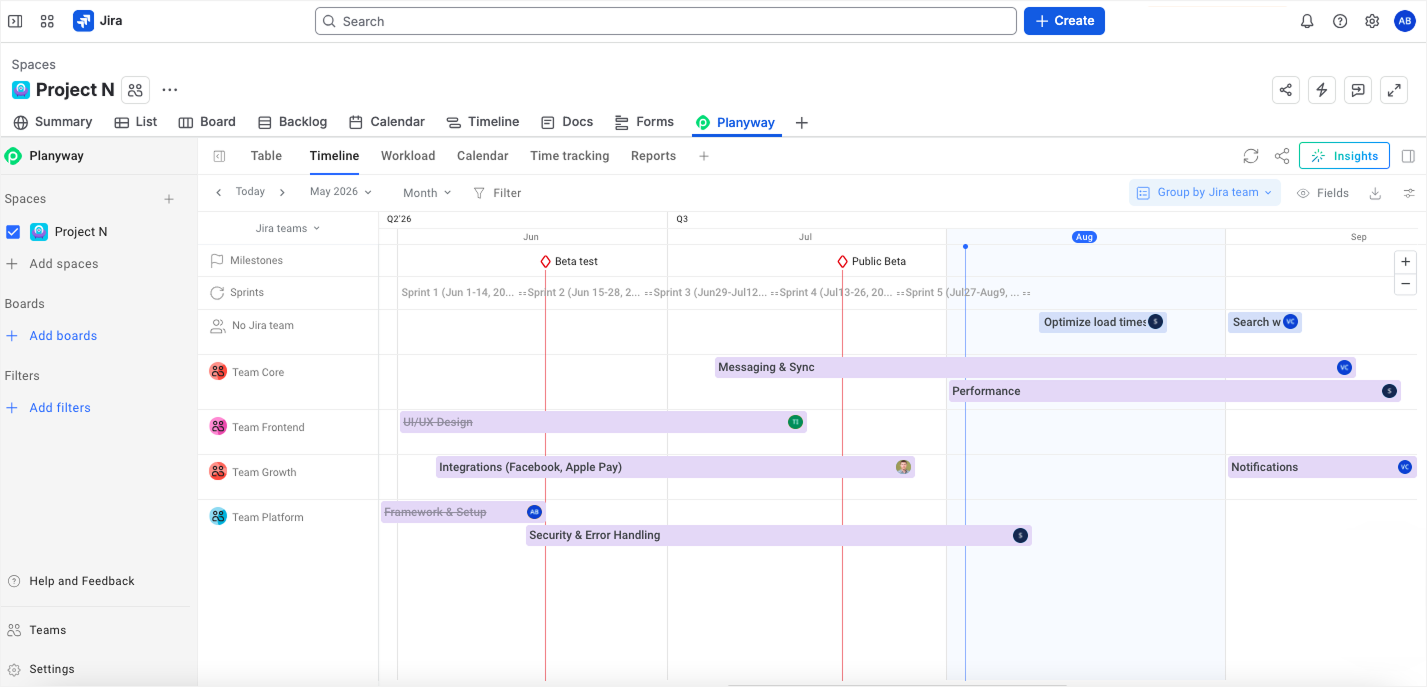
Cross-project roadmap grouped by Teams in Planyway for Jira.
A cross-functional roadmap helps different departments see how their work streams intersect and where dependencies may affect delivery.
For: teams across departments who need to see how their work streams intersect.
Purpose: to show how separate project phase tracks line up against the same milestones and against each other. It is especially useful when several teams need to coordinate timing, priorities, and handoffs around shared milestones.
Delivery roadmap (Executional layer)
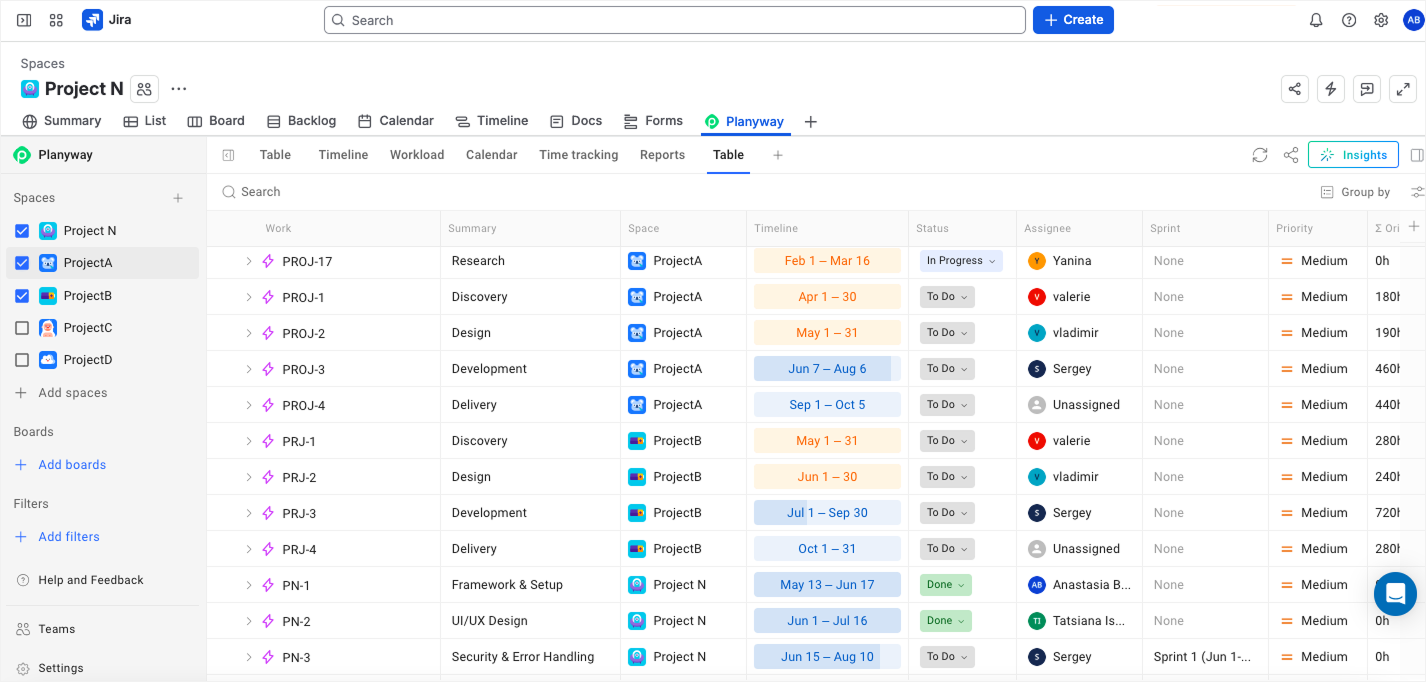
A delivery roadmap displayed in Planyway's Table View.
This is a practical working tool for delivery teams, giving them enough data and structure to keep execution moving without losing sight of outcomes, sequencing, and coordination.
For: delivery teams and project teams working on execution.
Purpose: to support day-to-day delivery, keep project progress visible across phases, and help teams stay aligned on next steps.
Portfolio roadmap (Initiative portfolio layer)
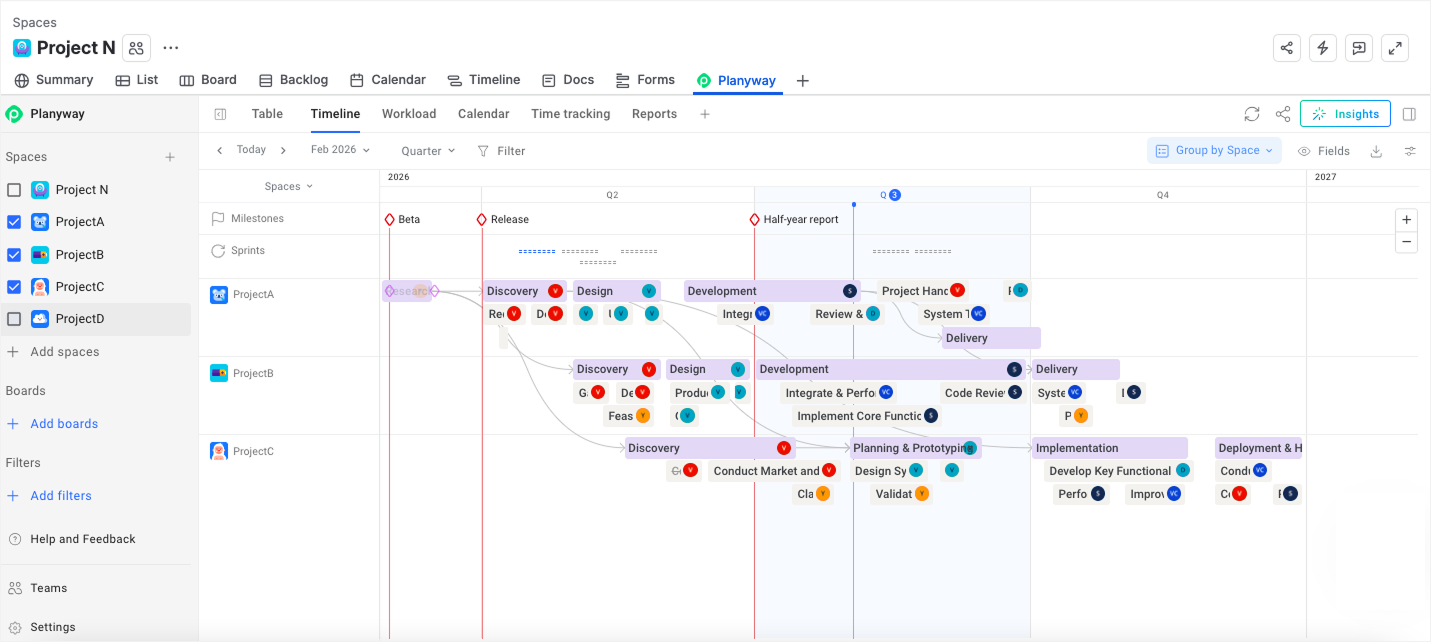
A portfolio roadmap in Planyway, grouped by Jira Spaces.
Portfolio roadmap shows the hierarchy of strategic goals and connects several major projects, showing how they support one another and contribute to larger business goals.
For: portfolio managers, PMOs, and leadership teams overseeing multiple initiatives.
Purpose: to prioritize investments, align projects with business goals, identify dependencies, and track portfolio progress.
☝ Because Planyway's roadmap connects directly to your live Jira data, it evolves alongside the project — no manual updates needed. You can also save tailored roadmap views for different audiences, export any of them to PDF or Excel, or share a live workspace with a single link.
How do you make roadmaps actually useful: best practices for expert-level roadmapping
The best roadmaps stay useful because they are built and used with a few clear rules in mind.
Prioritize before you map it
If a roadmap keeps getting reopened after it’s published, the problem is usually not the roadmap itself. The team simply never finished the harder conversation about what matters most this quarter. Once those priorities are clear, putting them on a timeline becomes straightforward.
Show capacity before making commitments
Stakeholders often underestimate how much work a team can actually take on in a quarter. A roadmap helps close that gap by making committed work and remaining capacity visible.
Build views for different audiences
A roadmap detailed enough for engineers is often too busy for executives. At the same time, a simplified version for leadership can leave delivery teams without the context they need. The better approach is to keep one source of truth and create separate views for different audiences, each with the level of detail they actually need.
Put risk where it matters
Potential risks are easier to spot when they sit next to the milestone they could affect. If a vendor delivery slips two weeks before a launch, that connection is obvious the moment someone looks at the roadmap. It gives the team enough time to get ahead of the problem.
Make “focus on outcomes” mean something specific
“Focus on outcomes, not features” is standard advice, and it's almost useless without a number attached. A roadmap item like “redesign checkout” doesn't tell anyone what actually needs to change. Reframe it as “reduce checkout drop-off by 15%,” and the same roadmap now does two jobs at once: it tells the team what to build, and it tells every stakeholder reading it how you'll know whether it worked.
Build your roadmap once, adapt continuously
A project roadmap is one of the most important tools in strategic planning, and it becomes especially valuable in high-uncertainty environments such as IT, startups, and R&D. Unlike rigid plans and Gantt charts, which are tied to detailed tasks and fixed dates, a roadmap works at a higher level of abstraction: it answers the “what” and “why,” and brings the team and stakeholders together around a shared view of goals, key milestones, and outcomes.
A well-structured roadmap makes it possible to use flexible approaches such as rolling wave planning, track critical dependencies and risks in time, and adapt the strategy as the project evolves. Modern platforms like Jira and Planyway make it easier to connect that high-level strategic direction with tactical execution in backlogs and sprints, eliminating the need for manual duplication and keeping the roadmap up to date throughout the project lifecycle.


FAQ
ChatGPT and other AI tools can help draft a project roadmap, suggest structure, and identify key components. Human validation is still essential for priorities and context.
You can definitely create a roadmap in Excel, in fact, many teams start with spreadsheets. However, dedicated project management software and project management platforms provide better visualization and real-time updates.
A basic roadmap typically includes project goals, key milestones, project timeline, deliverables, dependencies, and risks.
A roadmap is a strategic overview that shows where the project is heading and how value will be delivered over time.
A roadmap and a Gantt chart are not the same thing. A roadmap is strategic; a Gantt chart is execution-focused with detailed tasks.
Goals, milestones, deliverables, timeline, dependencies, risks, and high-level resources are usually included in a project roadmap.
A detailed project roadmap built for a delivery team will show more granularity than a high-level one built for executives, but both stay timeline-based and focused on outcomes rather than tasks.