Project scope: example, template, and process

Many project managers catch themselves torn between a sponsor who wants a detailed, locked-down plan before work starts, and a team that knows no one can specify all details on day one.
The classic "iron triangle" of project management — schedule, cost, and scope — puts scope at the base for a reason. Schedule and cost are usually easier to negotiate. But scope is what actually defines what "done" means.
This article walks through a practical algorithm for planning, baselining, and controlling project scope — the same logic found in standard project management frameworks like the PMBOK Guide's Project Scope Management knowledge area.
TL;DR
- Project scope defines what a project will deliver, what it won’t deliver, and the boundaries the team needs to work within
- Define and structure the scope by gathering requirements, documenting them in a Scope Statement, and breaking the work down with a WBS.
- Manage scope throughout the project by establishing a baseline, tracking dependencies and changes, validating deliverables, and preventing scope creep.
What is a project scope?
A project scope is the definition of the project’s boundaries that details what it is expected to deliver, what work is required to achieve those results, and what falls outside the project.
An effective project scope statement has to answer two questions:
- What needs to be done?
- How do we make sure the team commits to exactly that work without wasting focus on unnecessary things?
It also creates a shared understanding between the project team and stakeholders, providing the foundation for planning, execution, control, and acceptance.
Project scope example
Just like a clear scope makes sure the team doesn’t waste time, we won’t drag things out and start out with an actual project scope example.
To save you time and effort, we created a simple and intuitive Excel project scope template — you can use it straight away or take inspiration and adjust it to your particular needs.
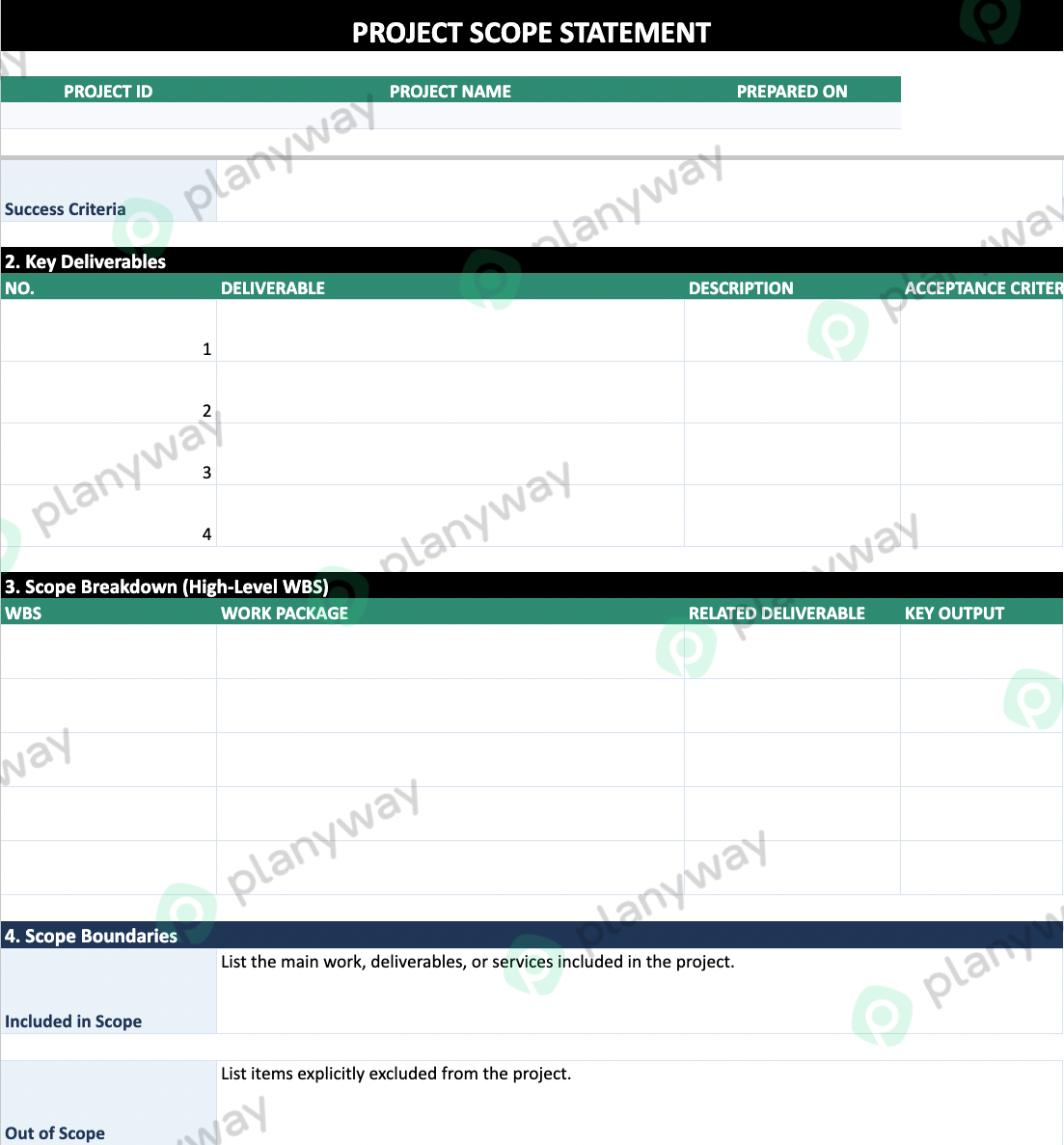
But if you need a clearer understanding of what a project scope means, what it has to include, and how to create it, we’ll break it down below.
The project scope management flow
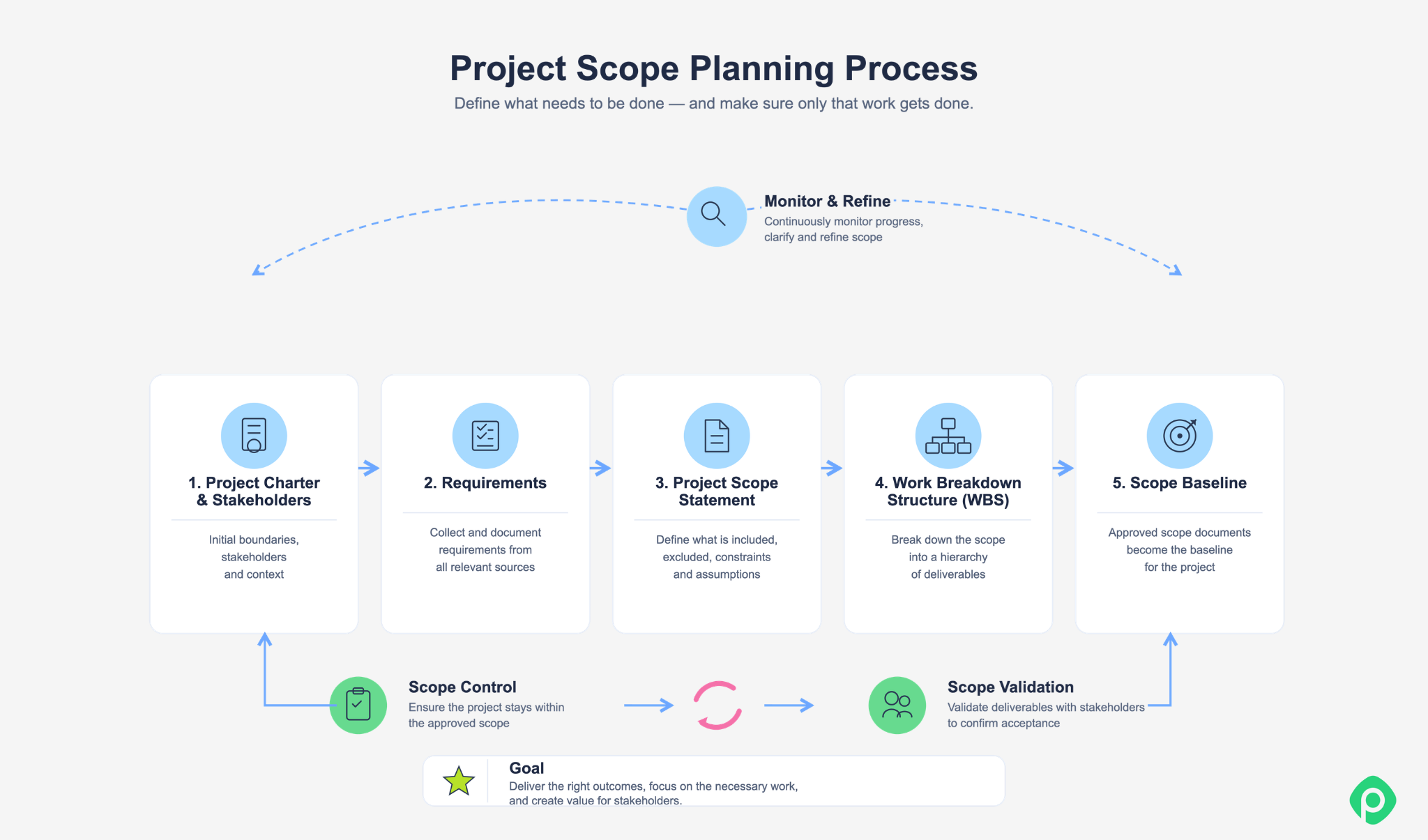
Scope does not (and cannot) appear fully defined at the beginning of a project lifecycle. Usually, it evolves from an initial project idea into a clear set of major deliverables, boundaries, and requirements. From there, the scope needs to be structured, agreed on, and monitored throughout the project.
Here’s a project scope planning flow you can stick to to make sure everything works out.
1. Start with the project charter and stakeholders
Before defining detailed requirements, clarify the project's purpose, goals, high-level deliverables, and key stakeholders.
The project charter provides the starting point. It establishes why the project exists and what it is expected to achieve, while stakeholder input helps uncover expectations, constraints, and potential conflicts early.
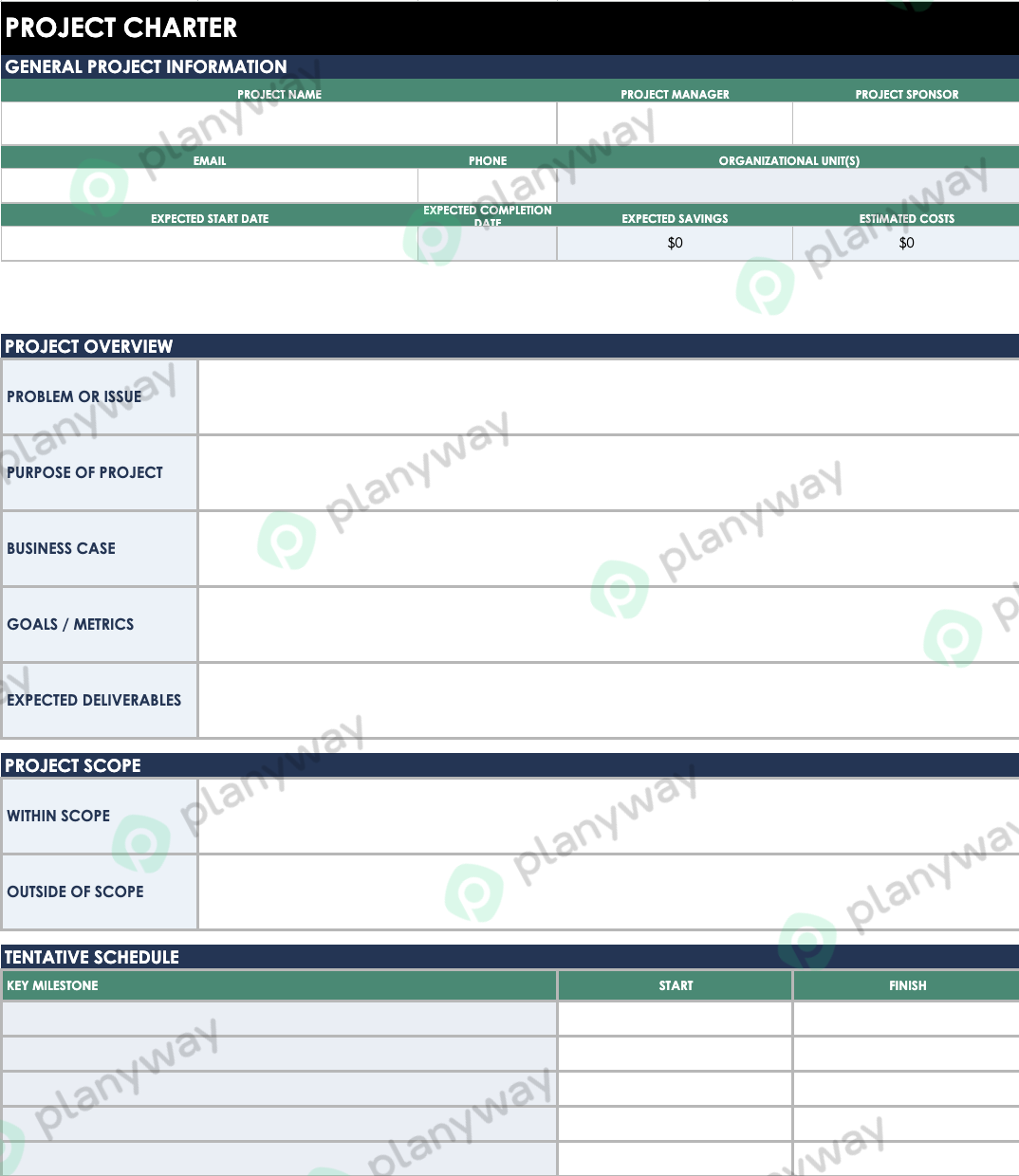
For example, a company might launch a project to improve its customer portal. In this case, the goal defined by the charter could be to reduce support requests by making common account actions easier to complete.
➡️ Want to go deeper? Read our full guide to project charters, with free templates.
2. Define and collect requirements
Next, find out what the project actually needs to deliver.
Requirements shouldn’t come from the customer alone. Product managers, end users, developers, designers, support teams, compliance specialists, and other stakeholders may have different needs, constraints, and expectations.
Depending on how complex project is, requirements can be gathered through:
- Interviews
- Surveys
- Workshops and brainstorming sessions
- Prototyping
- User observation
- Benchmarking
- Focus groups
- Document analysis
Once collected, requirements should be documented and tracked in a structured way. A requirements matrix can record each requirement, its source, status, specification, implementation, and acceptance criteria.
For a Jira team, this traceability can be especially useful. A requirement can be connected to the relevant epic, user stories, tasks, and acceptance criteria, making it easier to see how stakeholder needs translate into actual work.
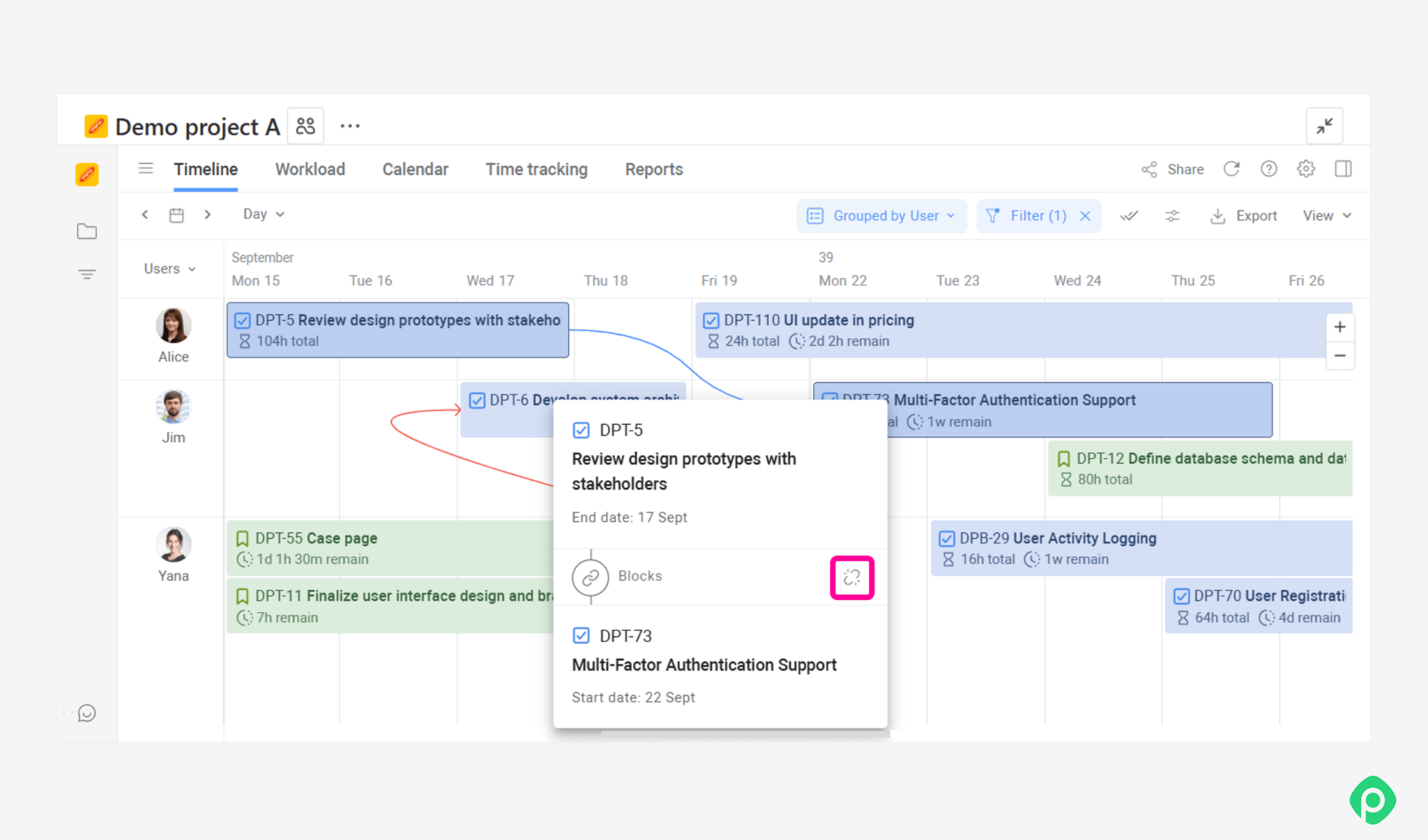
This is also where dependencies can start to matter. One deliverable may depend on another team, technical component, or piece of work being completed first. In project management tools like Planyway for Jira, you can connect Jira work items with dependencies and visualize those relationships on the Timeline.
3. Create the Project Scope Statement
Once the requirements are understood, consolidate them into a clear description of the project's boundaries and expected results.
The project scope statement goes into more detail than the project charter. The scope document defines what the project will deliver, what it won’t deliver, and the conditions the team needs to work within. This gives everyone a shared reference before detailed execution begins.
Below is a list of things you can typically find in a project scope statement.
What is included
This may cover:
- The product, service, or feature being delivered
- Key project deliverables
- Acceptance criteria
- Required documentation, reports, or supporting outputs
What is excluded
Defining what’s out of scope is just as important as defining what’s in there.
If a project covers a new customer portal we’ve already mentioned, you might explicitly exclude a mobile app, a complete redesign of the company website, and integrations with systems that aren’t required for the initial release.
Clear exclusions make it easier to handle requests later. Instead of debating whether something should be included, the team can simply check the agreed scope.
Constraints
Constraints are resource limitations that affect how the project can be delivered. Common examples include:
- Budget
- Deadline
- Available people or skills
- Technology
- Regulatory requirements
Assumptions
Assumptions are conditions treated as true for planning purposes, even though they haven’t been fully confirmed. For example, a team might assume that an existing payment API will remain available throughout development (it might not be the case).
Assumptions should be reviewed as the project progresses because a change in an assumption can affect the scope, schedule, or budget. The scope statement turns a collection of requirements into a coherent definition of the project.
4. Structure the scope with a WBS
The next step is to organize the project scope into a clear hierarchy.
A Work Breakdown Structure (WBS) breaks the overall project scope into smaller components. Its purpose is to show the complete structure of what needs to be delivered and accomplished.
A work breakdown structure should follow several basic principles:
- The top level represents the main project result.
- The next level should provide a clear picture of the project as a whole.
- The structure should follow the 100% rule: all required work must be included.
- Elements should use consistent naming.
- Every element should represent a clear and understandable result.
- The scope can be progressively detailed using the rolling wave approach.
- Decomposition continues until the required level of planning and control is reached.
For a Jira team, the WBS can provide a useful structure for organizing epics, stories, tasks, and subtasks. However, the WBS itself isn’t a schedule. It shows how different components belong to the overall project rather than the order in which work must be performed.
5. Establish the scope baseline
The project scope statement, WBS, and supporting requirements documentation together provide a detailed definition of the agreed project scope.
Once they have been reviewed and approved, they form the scope baseline.
The baseline is the reference point for the team. When someone requests a new feature, adds a deliverable, or changes an existing requirement, the team can compare the request with the baseline and determine whether it represents a scope change.
This matters in Jira projects, where new issues can famously be created quickly. But a new Jira ticket doesn’t automatically mean the work belongs in the current project scope.
The baseline gives the team a practical way to separate:
- Work that was already agreed
- Work that is needed to deliver the agreed scope
- New requests that may require a change to the scope
6. Scope control and validation
Defining the scope is not the final step, because it needs to be maintained and reviewed throughout the project.
Two things you need to distinguish and make part of your routine at this stage are:
Scope control
Scope control is monitoring the project against the agreed scope and managing changes to it. The team reviews actual work, identifies gaps or deviations, and evaluates new requests before they become part of the project. The goal is to make sure that the project remains aligned with the planned scope.
Scope validation
Scope validation is confirming that completed key deliverables meet the agreed requirements and are accepted by the relevant stakeholders. Validation happens throughout the project. Reviews, demos, user feedback, and acceptance checks give stakeholders opportunities to confirm that the work is heading in the right direction.
The final purpose is to confirm that the delivered result meets expectations and can be formally accepted.
| Scope control | Scope validation | |
| Question answered | Are we doing the right work according to the plan? | Does the stakeholder agree that the result meets their expectations? |
Managing scope throughout delivery with Planyway
Defining the scope and establishing a baseline is a good start. But to ensure successful project execution, the team still needs to make sure that planned work, timelines, and available resources remain aligned with the project's original goals.
Planyway for Jira can help with that if you’re using Jira as your master system. It brings project planning, resource management, time tracking, and reporting into Jira to give teams a clearer view of how the agreed scope is progressing in practice.
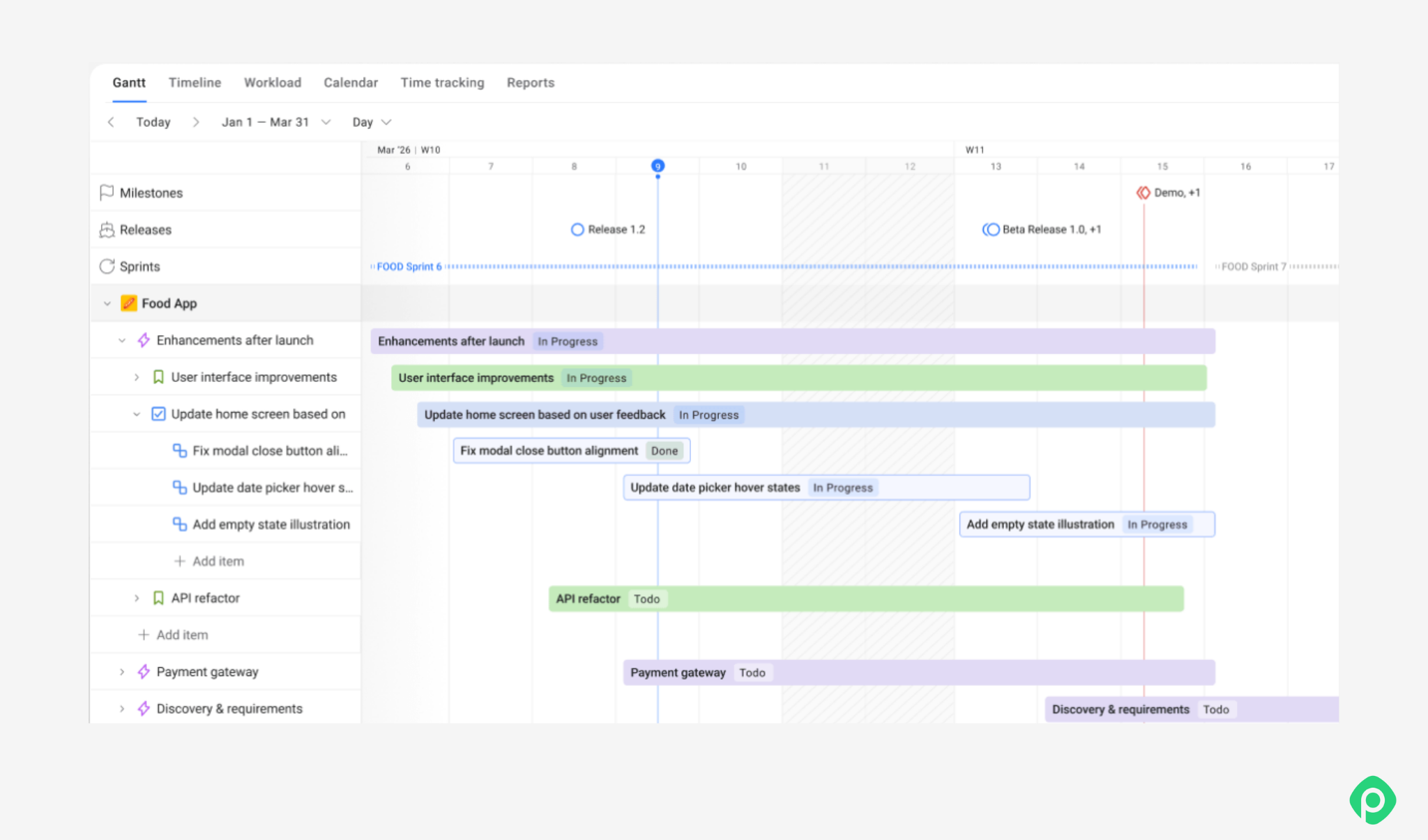
With Planyway, you can:
- Break scope into epics, stories, and tasks and review it in Table view
- Visualize project work on the Gantt chart and Roadmap
- Track deliverables, epic milestones, and dependencies
- Balance workloads against actual team capacity with resource management and the Workload report
- Track time and compare planned vs tracked effort
- Identify potential delivery risks with the Risk AI Agent
Once you know what needs to be delivered, Planyway helps you plan the work and keep everything on track.
What is scope creep?
Scope creep is the gradual expansion of a project’s scope without adjustment to its timeline, budget, resources, or other project constraints.
Most often, it happens one small request at a time. Projects evolve, and legitimate new requirements may emerge as the team learns more about the work. The problem starts when changes are accepted informally, making the team lose track of how they affect the original plan.
Example:
Let’s get back to that new customer portal imaginary scenario. Say the agreed scope includes the following:
- User registration and login
- Profile management
- Order history
- Basic account notifications
During development, the team receives a series of additional requests:
- Add social login.
- Let users change their email address.
- Add two-factor authentication.
- Add notification preferences.
- Redesign the profile page to accommodate the new settings.
None of them look unreasonable, but they all weren’t a part of the original scope. If the team simply creates new Jira issues and adds them to the backlog, the project may start taking longer or force the team to drop other planned work.
How to avoid scope creep?
The best way to avoid scope creep is evaluating change requests against the original scope. If the answer is “hey, so this wasn’t a part of what we initially agreed on”, the request can be evaluated as a potential change rather than just becoming additional work.
It doesn’t necessarily guarantee protection from scope creep, but at least it gives you a more disciplined approach to project changes and better workload balance.
How is a project scope statement different from other project management documents?
The project scope statement is a foundational document, but it differs from other project management documents:
- Project Charter: The project charter is a high-level document that outlines the project's purpose and stakeholders. It’s broader than the scope statement and doesn’t go into as much detail.
- Work Breakdown Structure (WBS): The WBS breaks down the project into smaller, manageable parts. While the scope statement defines what’s included in the project, the WBS details how the work will be done.
Putting it all together
Defining project scope and managing it is a disciplined sequence: gather what you really need to achieve project objectives, document it in a way that helps catch gaps early, break it into a detailed structure, lock that structure in as a baseline, and make sure it “talks” to every other part of the work as the project evolves.
For Jira teams, the challenge is often not a lack of information but keeping all that information connected. Requirements live in issues, work is spread across epics and projects, and dependencies can easily get buried in the backlog.
Planyway takes part of that load off by extending Jira's default capabilities and keeping your scope, timelines, and team workload in one view.


FAQ
The four key elements are scope planning, scope definition, scope validation, and scope control. Planning sets how scope is managed within the project master plan, alongside risk management and quality management. Definition gives a detailed description of project requirements, deliverables, and project exclusions. Validation manages stakeholder expectations through formal acceptance, and control keeps the project on track for successful project delivery.
There is no mandatory format, but a good scope statement is a detailed outline of the project charter, deliverables, acceptance criteria, in-scope and out-of-scope work, key milestones, constraints, and assumptions. The document serves to define deliverables, define success through measurable outcomes, and, in construction projects, confirm regulatory compliance. Listing out-of-scope work helps manage expectations, and free templates make the statement faster to write.
The six steps are to start with the project charter and stakeholders to set goals and objectives and measurable business outcomes, collect requirements, create the scope statement, break the scope into a WBS, set the scope baseline, and control and validate the scope through to successful completion.