What is resource management? Lessons from one PM’s real-world challenges

Instead of looking at resource management as a set of processes and definitions detached from real project work, let’s approach it from a more practical angle. We’ll take one project, one team, and one project manager — and then change the circumstances around them to see how it impacts a resource management strategy in each case.
Meet Sam. Sam became a project manager only a couple of years ago, so he has some experience, but doesn’t know everything. He’s working on a mobile app for electrical engineers that can digitize a circuit from a photo, with a team of one designer, three Android engineers, three iOS engineers, two backend developers, and two QA engineers.
Hold onto that setting.
TL;DR
- Resource management is about knowing what your project needs, who can do the work, and when they’re available.
- Things rarely go exactly as planned. When resources change, scope grows, or workload gets out of hand, resource managers (or project managers) need to make the right trade-offs.
- Good resource visibility gives you more options. When people in charge of resources can see workload, capacity, and actual time, they can spot problems earlier and act before the problems become crises.
What is resource management?
According to PMI, project resource management includes the processes to identify, acquire, and manage the resources needed for the successful completion of the project.
And it’s a pretty good definition, but let’s restate it to be less formal and more overarching. So, resource management is when you know who is going to complete any task and you ensure they have everything they need to do it, including allocating resources to the right tasks at the right time.
Allocation of resources to specific projects and programs across the organisation works more like bandwidth than resource allocation, so we'd rather call it capacity management, and it’s a topic of a separate article.
So what do we do when we manage resources?
- Map out the skills and capabilities required and available, verify that there’s a match, and manage the situation when there’s a gap identified — these are the core resource requirements of the project.
- Map out the people who possess the skills, determine when they are required and when they are available.
- Piece it all together into a comprehensive resource management plan — a solid resource management plan that reflects the team's resource constraints.
- Monitor and act if things don’t go according to plan.
Keep in mind that in the majority of cases today, we are going to talk about human resources, yet resource management is not limited to humans. Resource management processes can involve anything that’s critical for a project’s completion: from resource management tools and physical resources to budgets and space accessibility.
What makes resource management important? Benefits of resource management
Effective resource management pays off in ways that are easy to underappreciate until you've lived without them. Done well, it helps projects:
- Stay on schedule. Projects finish closer to their original project timeline because gaps get caught before they become crises, not after — supporting successful project delivery.
- Balance workload and prevent burnout. Visibility into people's commitments helps managers spot over-allocation and redistribute work before project team members start running on empty, while keeping an eye on team capacity.
- Control project costs. Knowing what resources are needed, when they are needed, and for how long makes hiring, contracting, and other resource-related costs more predictable.
- Reduce resource-related risks. A project can be vulnerable to unexpected absences, scarce skills, dependencies, or unavailable equipment. Planning for these risks gives managers more options when something changes.
None of this is glamorous - it's mostly the absence of chaos, but that absence is exactly what's hard to manufacture on the fly once things go wrong.
Resource manager’s biggest headaches and how to deal with them (spoiler: it depends)
Back to our setting.
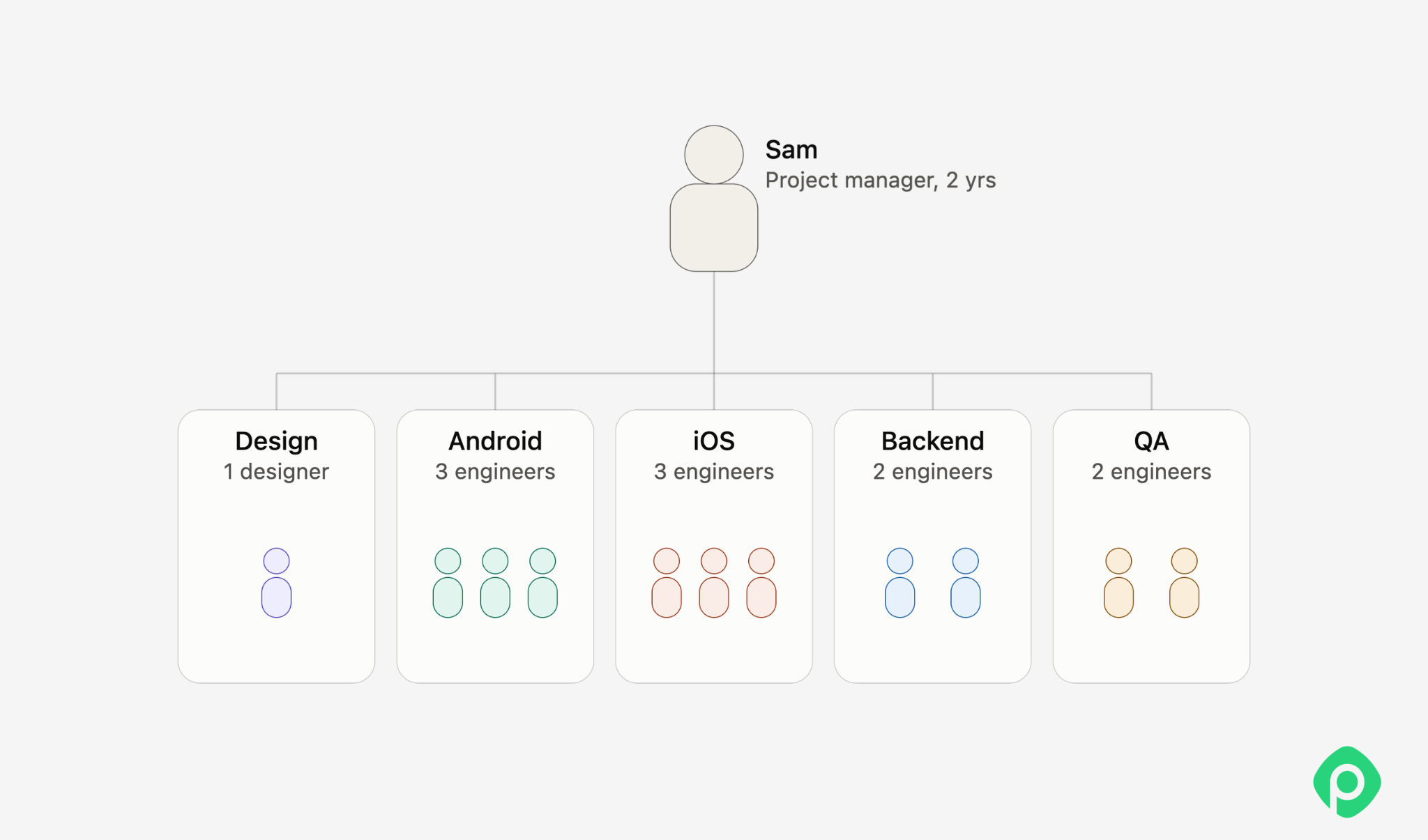
At first glance, Sam’s resource plan looks straightforward: the team is defined, the roles are clear, and everyone has a job to do. But real projects rarely stay that way. So, let's put Sam under some pressure (and common resource management challenges) to see what happens to his resources, what options he has, and what trade-offs come with each decision.
Sudden capacity drop
Sam comes to the Monday stand-up to find one of his QA engineers missing. Their account has been removed, and a quick check with the QA department reveals that their contract expired during a renewal issue. Now Sam is one QA engineer short, but the project still needs to be delivered. A rite of passage.
The project still has the same scope and deadline. Sam just has one fewer person to deliver it. Here are the main options Sam has:
| If... | Sam could... | How good is it? |
| Sam has a good relationship with the person who owns the resources, or the company’s resource management process allows for it and Sam is willing to escalate if needed. | Pull QA from bench or another project or team. | Best if available. Fast, but depends on resource ownership and company processes. |
| Sam has a good relationship with the team, and the company culture (or Sam’s own efforts) has created a strong sense of ownership for the end product. | Ask remaining team to absorb QA work temporarily. | Good short-term option. Keeps the decision within Sam’s control, but shouldn't become the default. |
| Sam is a good risk manager, and the project budget accounts for this type of risk. | Hire an emergency contractor/freelancer. | A wildcard. Can solve the capacity gap quickly, but finding the right person may take time. |
| Sam has established a good and trusting relationship with the customer. | Re-scope or delay due to unforeseen circumstances. | Often the healthiest option (but the last resort). Makes the trade-off explicit instead of hiding it in team workload. |
| The budget allows, and employees are willing to step in. | Offer higher overtime rates for the teammates. | Short-term only. It can help in a pinch, but prolonged overtime creates fatigue and another resource problem. |
There’s no elegant solution to a “black swan” event like this (unless the QA department that caused the mess happens to have a huge bench and plenty of spare capacity). Someone will have to absorb the impact, but smart preparation can minimize the fallout for everyone involved and make managing project resources a little less painful.
Single point of failure
Designers on projects like this usually don’t stay until the end. They create the necessary assets during the first few stages and then move on to other projects.
That’s exactly what happened on Sam’s project. When the customer came back with a large number of requests that required a different design approach, the only specialist in the company who could both read circuit schematics and design digital interfaces was already working full-time on another project — and wasn’t going to be available again anytime soon.
Let’s look at Sam’s options to deal with the resource constraints.
| If... | Sam could... | How good is it? |
| The two skills (circuit literacy + UI design) can be split between two people instead of requiring one. | Pair a generalist designer with someone who can review schema accuracy (a backend engineer, or even a fractional specialist). | Often the most practical fix. It makes the work less dependent on one person and lets two people contribute what they do best. |
| Sam can negotiate with the other PM, or the org allows temporary partial reallocation. | Ask for a part-time specialist. | Good if it works, but depends on the other project’s needs and the other PM being willing to cooperate. |
| The other project doesn’t actually require this designer’s circuit-schema expertise. | Negotiate with the other PM to swap in a substitute designer there, freeing the specialist fully for Sam's redesign. | Potentially the cleanest fix. It solves the root cause, but requires a substitute to have capacity and the other PM to give the green light. |
| The redesign isn’t time-critical, or the customer can accommodate project delays. | Sequence the redesign when the specialist is available. | Honest and low-risk technically, but may demand some expectation-setting with the customer. |
| The project budget allows, and the market has the right people. | Hire a freelance designer who understands technical/schematic drawing. | Worth considering if the right person is available. However, the rare skill combination might be hard and expensive to land. |
| Sam is thinking beyond this one crisis, and the customer is likely to keep adding requirements for a long time. | Cross-train a second person on schema literacy. | A useful longer-term investment. It doesn't solve the problem at hand, but gives the team more flexibility in the future. |
As you can see, the options are quite similar to those in the previous scenario, with one notable exception: overtime isn’t particularly helpful here. When a project depends on a very specific skill combination, working more hours doesn’t necessarily solve the problem — especially when that expertise may not be needed elsewhere in the company.
Scope creep
The change requests keep coming. After the release, demand turned out to be much higher than expected, which brings an influx of ideas for improving and expanding the platform. Soon, Sam realizes the backlog has grown to six months’ worth of work. The customer is frustrated by missed opportunities, and the team is starting to feel the strain.
Unlike the previous cases, this one is of the preventable kind. If Sam has done his scoping, stayed on top of change control, and checked his plans more often than once in a blue moon, he should be just fine. But let’s look at what else he could do:
If the customer is willing to pay:
| If... | Then... | How good is it? |
| Customer has the budget and wants speed. | Increase throughput directly - added staff, overtime, premium contractors - in exchange for additional payment. | Straightforward and fast, but doesn't fix the root cause: backlog will keep growing to match whatever capacity you add. A release valve, not a cure. |
| Contract/pricing model allows renegotiation. | Convert from fixed scope to an ongoing retainer or phased contract reflecting the new reality - this is expansion, not the original project. | The more durable version of "paying more": fixes the business relationship, not just this backlog. |
If the customer doesn’t have the budget or isn’t willing to spend it:
| If... | Then... | How good is it? |
| Sam has, or can build, a prioritization framework the customer accepts as fair. | Introduce formal prioritization (impact/effort scoring) and only commit to the top slice each cycle. | The real long-term fix within a fixed budget: turns "everything is urgent" into a visible, defensible order. |
| The product can ship value incrementally. | Re-sequence into smaller phased releases, shipping highest-value items sooner instead of batching everything. | The trade-off option. Doesn't reduce total work, but reduces the feeling of being buried and gives visible progress. |
| Sam is willing to have an uncomfortable conversation. | Push back directly: show the backlog math, name the trade-off (this pace means missed deadlines or reduced quality), let the customer choose. | Usually the fastest way to reset expectations. Such a conversation is often what surfaces whether they're actually willing to pay (bucket 1) or not. |
This case tells us that the demand for work can also grow unsustainably and, if not managed well, can become a headache on its own. However, a timely ramp-up or a good prioritization technique can make all the parties happy: the customer will get their functionality, while Sam will have a successful project and better project outcomes.
Lack of visibility
As the project grows, so do the team’s responsibilities. One day, Sam checks the progress report and sees that backend tasks are 30% behind schedule. It looks like the team has simply slowed down — but then he remembers his recent 1:1s:
- Other teams consistently praised the backend team for being helpful and responsive.
- Backend team members said they were exhausted and overwhelmed with work.
There could be several reasons for the slowdown, but one thing is clear: Sam should have spotted the problem earlier if he’d had better visibility into his team’s workload. Let’s look at a few possible solutions.
| If... | Then... | How good is it? |
| Sam hasn’t yet had a direct conversation about where the team’s time is going. | Ask the team: "Where's the time actually going that isn't in the tracker?" - then use whatever surfaces to decide whether tracking or reprioritization is the real fix. | Simplest option and often the fastest, but works best paired with the right resource management software |
| The team is doing valuable work that isn't captured anywhere officially. | Add lightweight time tracking (temporarily or permanently) directly inside the existing workflow. | The direct fix: turns a guessing game into data, and works best when it's built into project management tools the team already uses. |
| Sam can't see the whole team's load at a glance - only individual tickets. | Move from a ticket-by-ticket view to a visual workload/calendar view showing each person's committed hours across all projects, not just Sam's. | Good for spotting overcommitment early. Cross-team requests that never make it into the backlog can still show up as people running at or over capacity. |
Visibility is key and at the same time very underestimated. Managers very often rely on their gut feeling instead of looking at actual numbers, while they should combine both approaches to understand project progress and team capacity.
To conclude
This is the reality of resource management: Sam has to balance speed, cost, quality, workload, and customer expectations — and choose the trade-off that makes the most sense for the situation. There’s rarely a perfect solution, but proper resource management and a good resource management process give him more options when things don’t go according to plan.
How Planyway resolves the resource visibility headache
More often than not, preventing and solving resourcing problems comes down to visibility. A team member quietly picking up untracked work for another team, a person getting double-booked across two projects, a project plan that sounds fine in theory but doesn't live up to the reality: all of these are cases where the information existed somewhere, just not anywhere a manager could see it in time.
Planyway for Jira addresses this directly by pulling the pieces that are usually scattered - calendars, Jira boards, individual working hours and holidays, logged time - into one shared view.
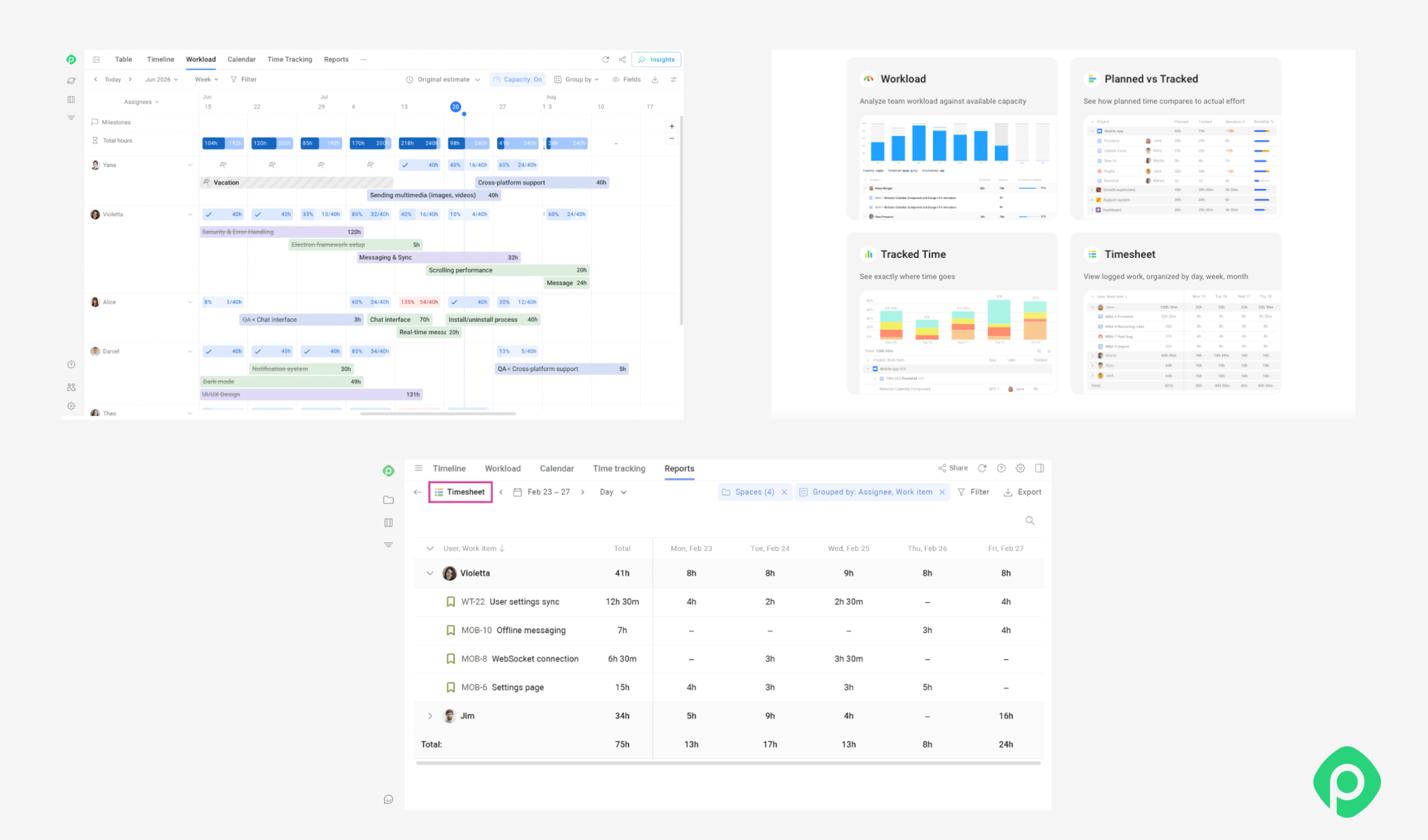
- A workload view shows exactly who's over or under capacity across every project they're on, not just the one you're managing, so overcommitment is visible before it becomes a crisis instead of after.
- Time tracking, logged directly against Jira tasks rather than a separate timesheet, means "where did the hours actually go" has an answer instead of a guess.
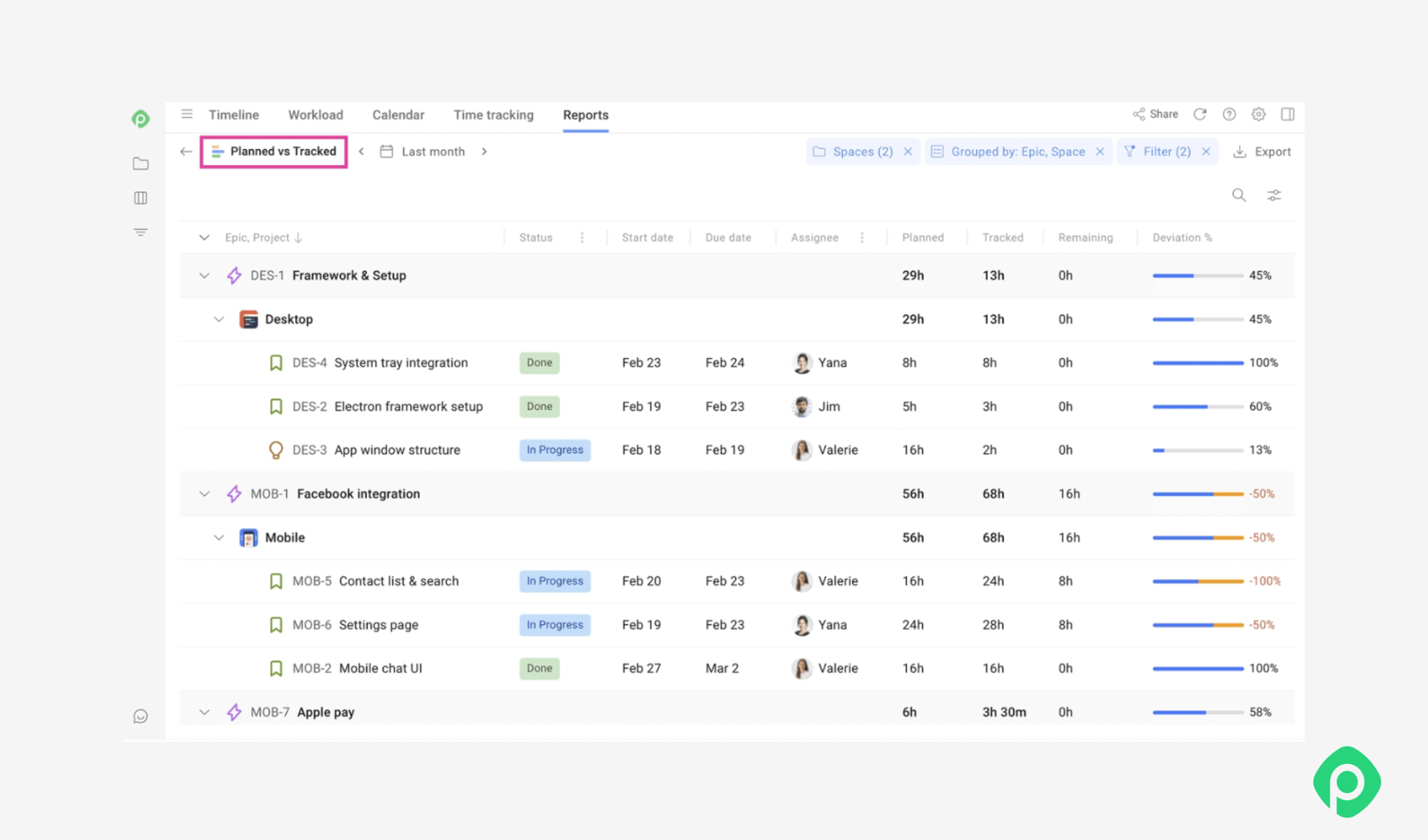
- And reports comparing planned versus actual time turn monitoring from a gut feeling into something you can point to.
None of this replaces good judgment or a healthy team culture - no resource availability tool does that - but it removes the excuse of not knowing.
Resource management lifecycle: a high-level process
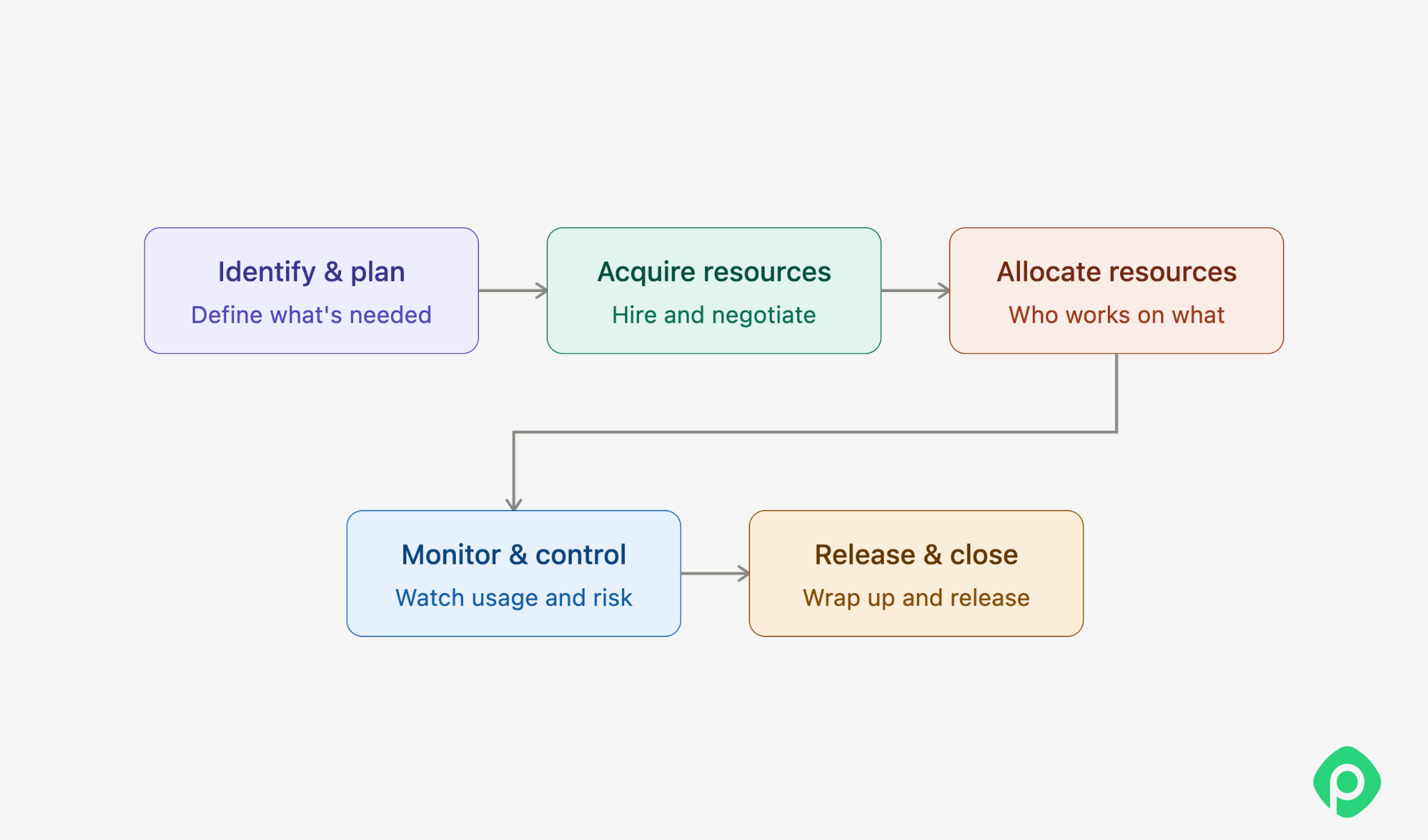
Wherever you work and whatever the corporate or project environment, resource management generally follows the same basic process, with some variations depending on the specific context. An effective resource management process typically includes the following activities:
Resource identification and planning
This stage includes:
- figuring out what’s (or who’s) needed and where to find it (or them);
- determining, on a high level, where and when a particular resource can be acquired, utilized, and then released, without particular detail.
During identification, keep in mind that resources can mean any resource: skills, human resources, rooms, equipment, tools, budget - anything that’s required for a successful completion of the project.
Resource acquisition
This is the process of obtaining the resources needed for the project. It’s treated as a separate stage because, while it may seem relatively straightforward, it often involves a fair amount of paperwork and coordination. This can include:
- searching for and hiring personnel, including contractors;
- negotiating the acquisition of necessary equipment;
- booking testing tools and other resources.
Resource allocation and scheduling
This is essentially just matching the availability of resources to the tasks at hand. We need to decide who works on what, which equipment can be utilized and when, while minimizing overbooking and idle time as much as possible.
In practice, this is also where resource management most often breaks down - not because anyone plans badly, but because availability lives in too many disconnected places: one person's calendar, another's Jira board, a spreadsheet someone forgot to update.
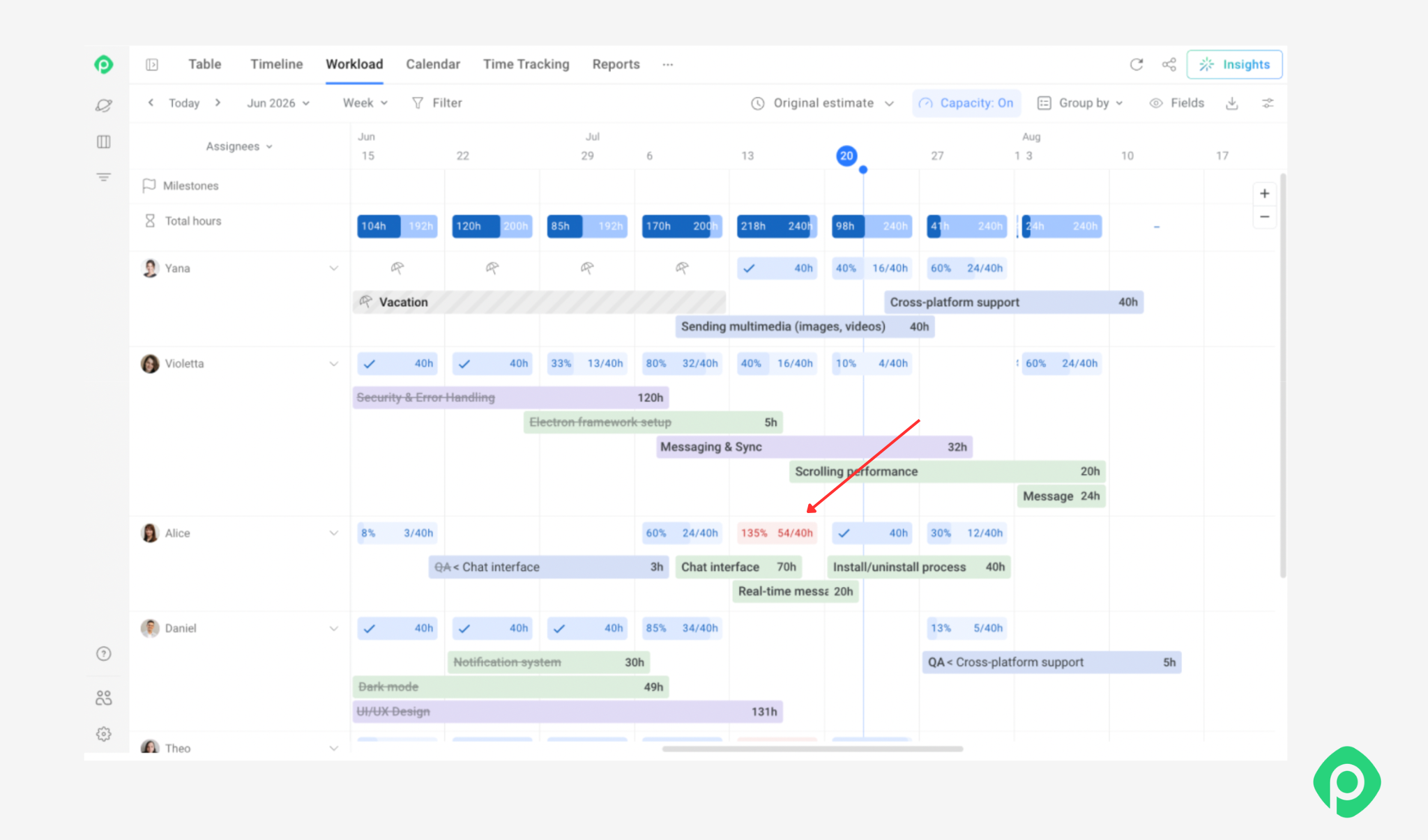
Planyway for Jira brings this information together in one workload view. Teams can see capacity, holidays, and existing assignments across projects and individual team members. Overloaded team members are highlighted in red, making potential overbooking easy to spot before assigning new work.
Resource monitoring and control
It involves 2 main things:
- tracking whether the plan is holding up in practice: is utilization matching expectations, are people overloaded or underused, is anything drifting off course;
- taking care of your resources to make sure they’re in good shape and preventing resource-related risks from playing out.
And this is a constant process during the entire lifecycle, which should never stop until the resource is released.
The hard part here isn't deciding to monitor — it's having the data to monitor with and a well-built UI to view it. Planned hours are easy to write down; whether they matched reality is much harder to know without something logging actual time against actual tasks. This is where reporting that compares planned vs. actual hours earns its keep - it turns "I think we're on track" into something you can actually check.
Resource release and closure
Once the work assigned for the resource is done, you are a million percent sure you will no longer need it, the resource should be released from the project (but think twice before doing that). So here you do all the necessary actions that accompany this release, including, but not limited to:
- ensuring all of the work where this resource is needed has been done;
- contracts have been closed;
- equipment has been handed over or repurposed.
And here’s the resource management lifecycle: 5 stages that cover the entire journey of a resource on a project from identification to release.
How each methodology adds its own twist to the project management lifecycle
Now let’s have a look at different methodologies and how they suggest resource management should be done. To do that, let’s return to Sam and apply a few common approaches to the same project. P.S. Even though Scrum is not a methodology, it still affects the way resources are distributed and assigned to complete a task, so we’ve mentioned it on par with other methodologies.
Resource identification and planning
| Methodology | How it approaches resource management | What this means for Sam |
| PMI | Maps roles, skills, effort, and cost to project tasks in a formal Resource Breakdown Structure before work begins. | He'd most likely have a formal Resource Breakdown Structure prepared before work even starts - the designer's schema skill documented as a specific line item, effort and risk mapped out in advance. |
| Scrum | Keeps upfront resource planning lightweight, relying on a cross-functional team and addressing specific needs sprint by sprint. | Sam probably wouldn't do much formal planning at all; the framework relies on the team to raise resource needs when they become relevant. |
| Lean | Maps the value stream to identify resource-related waste such as waiting, handoffs, and rework before assigning resources. | Sam would map the whole value stream first, looking for where waste - waiting, handoffs, rework - is likely to happen before assigning anyone. |
| Kanban | Keeps upfront planning light; resource needs surface as work enters the board or during cadence meetings. | For Sam, the need would likely surface when a work item reaches the board or when the resource issue comes up in a cadence meeting. |
| Critical Chain | Identifies the resource most likely to become the project bottleneck rather than planning every resource in equal detail. | Sam wouldn't map every resource evenly, but he would specifically go hunting for exactly this kind of bottleneck ahead of time, since that's the one thing the method cares most about getting right early. |
| SAFe | Determines shared resources and cross-team dependencies collectively across the value stream. | Sam wouldn’t plan in isolation. He’d work with other teams that might need the designer to identify and account for the shared dependency upfront. |
Resource acquisition
| Methodology | How it approaches resource management | What this means for Sam |
| PMI | Follows a documented acquisition plan - formal hiring/contracting process, sign-off required before a resource is confirmed. May also involve an entirely separate procurement process. | Getting the designer's time (or backfilling if needed) would likely mean a documented process, possibly running through procurement rather than something he decides on his own. |
| Scrum | Relies on the company hiring policy. The team is mostly fixed at the project start; "acquisition" mainly means backfilling if someone leaves, handled quickly and informally. | Staffing is mostly handled outside the Scrum process, while Sam focuses on making the existing team work effectively. |
| Lean | Acquires only what's needed to unblock the current bottleneck; avoids acquiring resources "just in case," since idle capacity is itself waste. | He'd secure as little as possible, only enough to unblock what's currently stuck, since anything extra sitting idle is treated as waste. |
| Kanban | Pulls in resources reactively, as WIP limits reveal a stage is under-resourced - often surfacing as a topic at the replenishment meeting rather than a standalone decision. | He probably wouldn't acquire anything until the board itself made the shortage obvious. |
| Critical Chain | Prioritizes securing and protecting the bottleneck resource above all else. | He'd be acquiring loosely for everything except the bottleneck resource, which he'd go out of his way to protect. |
| SAFe | Coordinates team composition and shared-resource needs across teams during Program Increment planning. | Sam raises the need for the designer during PI planning, especially if several teams need the same person. |
Resource allocation and scheduling
| Methodology | How it approaches resource management | What this means for Sam |
| PMI | Assigns people to tasks against a detailed schedule (e.g., a Gantt chart), tracking planned vs. actual assignment closely. | He'd be assigning the designer to specific tasks against a schedule, tracking whether reality matches the plan. |
| Scrum | Lets the team self-allocate work during sprint planning based on its capacity and judgment. | He wouldn't be assigning anyone at all - the team would decide together whether this or that skill/individual is needed this sprint. |
| Lean | Allocates work to whoever can remove the current bottleneck fastest, rather than assigning people rigidly by role. | Resource allocation follows the flow of work and changes as bottlenecks shift. |
| Kanban | Uses WIP limits to control how much work moves through each stage, preventing overcommitment. | He wouldn't need to trust anyone's judgment on this - a full WIP column simply blocks new work, overcommitment included. |
| Critical Chain | Keeps the bottleneck resource focused and protects their time from competing work. | Sam would do everything to protect the bottlenecked resource specifically: no multitasking, a buffer built around their schedule alone. |
| SAFe | Coordinates the designer's work across teams using the shared Program Board. | He'd be doing something similar across teams, visualized on a shared Program Board instead of just in his head. |
Monitoring and control
| Methodology | How it approaches resource management | What this means for Sam |
| PMI | Tracks resource utilization and variance against the original plan via formal status reports, Gantt charts, and change control. | He'd find out about resourcing trouble through a structured check-in - a status report. |
| Scrum | Monitors via sprint velocity and burndown; if the team consistently under-delivers, that surfaces resourcing issues indirectly, in retrospectives. | He'd likely find out indirectly, watching velocity slip or hearing it come up in a retrospective. |
| Lean | Continuously looks for waste, bottlenecks, and opportunities to improve the flow of work. | For Sam, monitoring is embedded in day-to-day improvement rather than tied to formal reporting cycles. |
| Kanban | Monitors flow metrics (cycle time, WIP) directly on the board; a stalled card is an instant signal, and deeper resourcing health gets reviewed at cadence events like the operations or service delivery review. | The workflow itself provides an immediate signal when capacity becomes a problem. |
| Critical Chain | Watches buffer consumption specifically - how much of the built-in buffer around the bottleneck has been used, as an early warning system. | Sam would monitor the buffer consumption since it acts as the early-warning system for resource and schedule problems. |
| SAFe | Brings cross-team resourcing issues into Inspect & Adapt when they affect the wider train | Monitoring happens at both team and program level, with systemic issues addressed collectively. |
Release and closure
| Methodology | How it approaches resource management | What this means for Sam |
| PMI | Formally closes resource assignments, documents their release, and captures lessons learned. | Sam would formally release resources, complete the necessary documentation, and capture lessons learned. |
| Scrum | Leaves resource release largely to company policy; the team may simply move to the next backlog or project. | Sam might simply move the team to the next project or backlog without a formal release process. |
| Lean | Releases resources as soon as their value-adding work is done; holding onto them "just in case" is treated as waste. | Sam would release resources as soon as they no longer add value to the project. |
| Kanban | Has no formal release event; resources simply stop pulling new work when their involvement ends. | Sam would stop assigning new work to a resource when their involvement is no longer needed. |
| Critical Chain | Keeps the bottleneck resource engaged until the constraint is no longer needed, then releases it deliberately. | Sam would deliberately keep the bottleneck resource until the constraint is cleared, then release them deliberately. |
| SAFe | Coordinates resource release across teams when shared resources are involved. | Sam would coordinate the designer’s release with the other teams relying on her. |
Five resource management anti-patterns
Have you ever forgotten to account for national holidays, assumed someone could instantly cover for a sick teammate, or simply failed to revisit your resource plan as the project changed?
The point is, many project managers have been there — and have seen their initially great resource management efforts become less effective as the project changes. Resource management challenges and hiccups tend to follow familiar patterns — which means they’re often preventable. Here are some of the most common ones.
- Equating booked hours to working hours. People are never fully predictable. An 8-hour booking rarely means 8 hours of actual productive work, as unexpected dependencies and interruptions can eat into planned capacity. Treating booked hours as productive hours can quietly turn a fully staffed project into a late one.
- Putting resource utilization before goal achievement. Let's keep it real: no one ever is working 100% of their time spent at work. Keeping everyone busy 100% of the time leaves no room for breaks, collaboration, or the unexpected — and a team that looks perfectly utilized on paper can still be heading straight for burnout.
- Thinking that context switching and ramp-up do not count. Switching people between tasks or projects comes with a hidden capacity cost: they need time to refocus, get context, and ramp up. If Sam plans only the hours spent actively working, he’ll overestimate his team’s available capacity and create an unrealistic resource plan.
- Assuming non-human resources manage themselves. People aren’t the only resources that need planning — Sam also needs to account for testing devices, licenses, and other project essentials. Forgetting them can leave the team unable to work when they need those resources most.
Every anti-pattern above points to a simple resource management best practice:
- Plan for actual capacity, not just booked hours.
- Optimize for project goals, not 100% resource utilization.
- Account for context switching and ramp-up time.
- Plan non-human resources alongside your team.
Resource plans are people-first, after all
Sam’s project never had a single villain. A contract fell through, a rare skill became unavailable, the customer expanded the scope, and the team quietly took on too much — all perfectly normal project problems.
Resource management won’t prevent every surprise. What it can do is make resources, capacity, and trade-offs visible early enough for Sam to act.
The tools and methodologies may differ, but the goal is the same: know what you have, know what you need, and spot the gap before it becomes a crisis. Because behind every resource plan are real people — and managing them well takes more than numbers on a schedule.


FAQ
Resource management processes can involve anything that’s critical for a project’s completion, including financial resource management, equipment, tools, materials, and space. In general, you can theoretically split all of the resources into three categories: human resources (people and their skills), material resources (equipment, tools, rooms, and other materials), and financial resources (budget).
The main goal of resource management is to make sure the right people have what they need to complete a task, and to know about it if that stops being true. In other words, resource management ensures that the right resources are available when they’re needed. It’s as much about efficiency as it is about visibility - most resourcing failures trace back to something being invisible until it was already a problem.
To manage resources, one needs to map the skills and capabilities a project needs against what's available, map the people who hold those skills and when they're free, combine that into a project plan, and then monitor and adjust as reality diverges from it. This is the basis of an effective resource management process, and this generally helps teams complete projects with the resources they actually have. Also, the process gives a clearer picture of the available resources and helps teams plan for future projects.
Resource management techniques differ based on the corporate and project environment. Building a Resource Breakdown Structure (PMI), capping work-in-progress to prevent overcommitment (Kanban), protecting a bottleneck resource from multitasking (Critical Chain), self-organizing allocation within a fixed team (Scrum), and tracking planned vs. actual time to catch drift early (monitoring/control) can all be considered examples of resource management practices.