Best Tempo alternative for time tracking and resource planning in Jira

Disclaimer: This post is written by the Planyway team, so it might come off as biased and one-sided. Well, we hope it doesn’t. We did our best to weigh the pros and cons of our plugin as an alternative to Tempo Timesheets and Tempo Planner and to present an honest review based on the actual features, pricing, real use cases, and customer feedback published on Atlassian Marketplace, Capterra, and other review platforms.
Somewhere down the road of using Tempo Timesheets and Tempo Planner, some users might start noticing that those plugins no longer suffice for their needs. For some, it might be the pricing. Others grow tired of interface complexity and plugin-stacking. Whatever it is, there usually comes a point when a tool that once felt “good enough” starts creating friction. In this article, we’ll look at why that happens and what alternatives are here to consider.
TL;DR
- Planyway is an all-in-one tool for project planning, resource management, and time tracking with a focus on visual ease. It’s great for those who want to avoid complexity and reduce costs, as all the features are bundled into one reasonably priced package.
- Tempo Timesheets is best for detailed time tracking, especially in large teams that request business-oriented analytics. However, to get a complete set of key features (such as planning, budgeting, and advanced reporting), you’ll need to purchase additional Tempo plugins.
- Tempo Planner is a feature-rich resource management tool well-integrated with Tempo Timesheets, but without Timesheets data, its forecasting abilities are quite limited.
#1 Time tracking
We divided our comparison into several parts for a reason. As you may know, in Tempo, every functionality lives in a separate interface and plugin, and yes, you have to pay for each. Timesheets for time tracking, Planner for resource scheduling, Financials for budget tracking… it adds up quickly. By the way, this is one of the most common reasons users start looking for Tempo alternatives, according to reviews:
“What we use quite extensively are Tempo add-ons, specifically Structure, Timesheet, and Capacity planner. The problem is that if we pay for all the add-ons on Jira cloud as well, the cost will increase significantly. What we are considering now is finding equivalents for these add-ons inside the native capabilities of the Jira premium version.” — Tempo user on Reddit.
Anyway, let’s move on to the comparison.
Tempo Timesheets
Tempo Timesheets is the first and most popular app developed in the Tempo Empire, currently used by thousands of users. Since time tracking is the backbone of Tempo, all other Tempo plugins are designed to build on it and enhance its functionality.
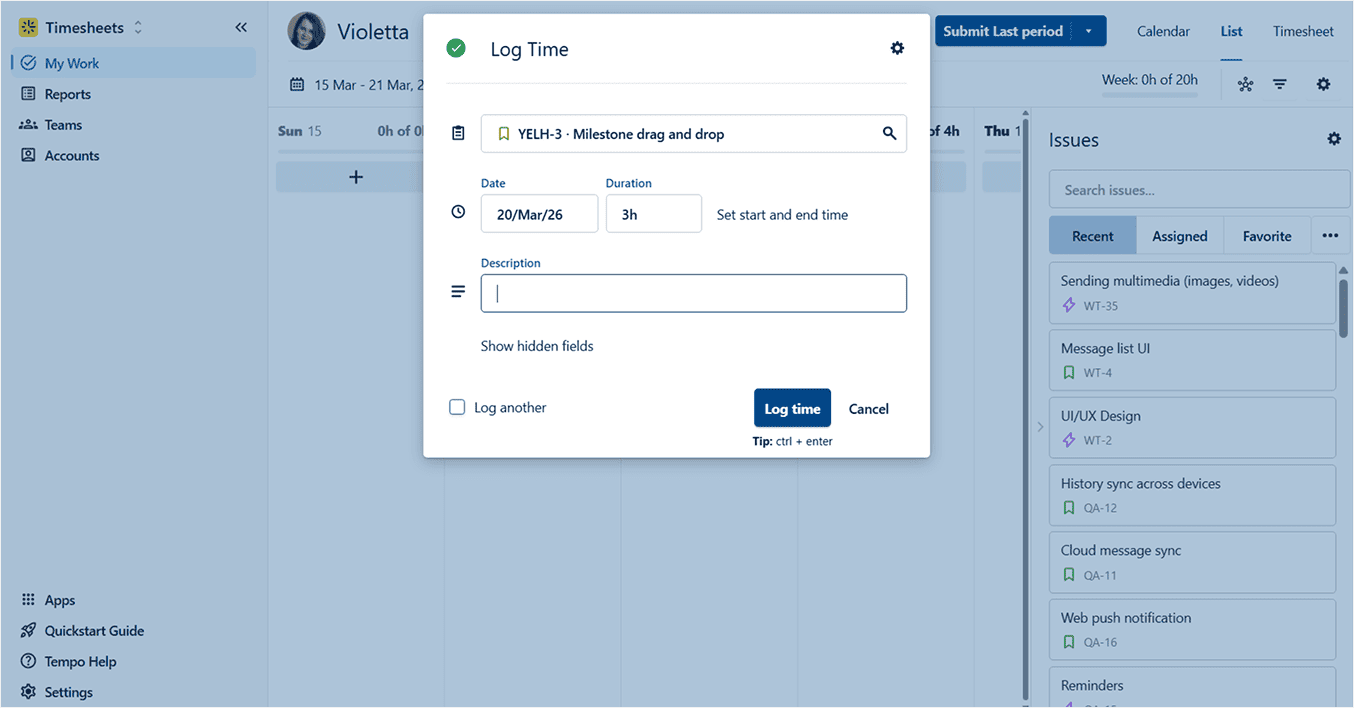
As a time tracking plugin, Tempo Timesheets allows you to:
- Track time directly in Jira work items
- Log time in the list view, calendar, or timesheet
- Connect Google or Office 365 calendars to log time in external events
- Use a timer or manual time tracking input
- Tag billable hours / non-billable hours
- Approve timesheets
- Report for teams, projects, or clients
- Create work logs on the go with the mobile app
Looks solid. But there’s the rub: Tempo is not the kind of tool you install and instantly get perfect reports from. Billing rates, permissions, report views, and worklog rules all need to be set up properly, so teams should expect a bit of admin overhead upfront.
Pros of Tempo Timesheets for time tracking:
- Timesheet approval workflow and team-level reporting are highly valuable for big enterprises.
- Integration with external calendars eliminates the issue of tracking meetings and other non-Jira events.
- Focus on client invoicing (in combination with the Financial Manager plugin).
Cons of Tempo Timesheets for time tracking:
- The price is high compared to competitors, with fees ranging from $0.25 to $5.20 per user. For context, most time trackers are usually priced between $0.01 and $0.08 per user. Plus, there is no free version for small teams.
- You might end up needing to buy additional plugins to see the full picture, e.g., Tempo Planner to link tracked time against planned, or Financial Manager for deeper cost tracking.
- Teams that just want to log time and easily export it, Tempo Timesheet can feel like overkill due to its complexity and broad feature set.
Planyway as a Tempo Timesheets alternative
Planyway is a full-fledged resource management and project planning tool that gives teams flexible ways to visualize their work streams. Here, time tracking is mostly a side feature. However, it's still implemented in a way that helps teams map their plans to reality and get work done in the most efficient way.
Planyway comes as a single package deal, bringing roadmapping, resource capacity planning, portfolio, calendar, time tracking, and customized reports under one roof. This means you don't have to purchase a time tracking tool as a separate plugin — Planyway covers it all in one app under one price.
Here are the main time tracking features that our users love in Planyway:
- Logging time right inside the Jira work item
- Creating worklogs in dedicated views: list, calendar, or timesheet
- Starting a live timer or using manual input
- Reporting data across teams and multiple projects
- Comparing tracked time vs planned to evaluate team productivity
- Exporting data in Excel or CSV with filters applied
- Seamless integration with resource planning and roadmaps in the same app
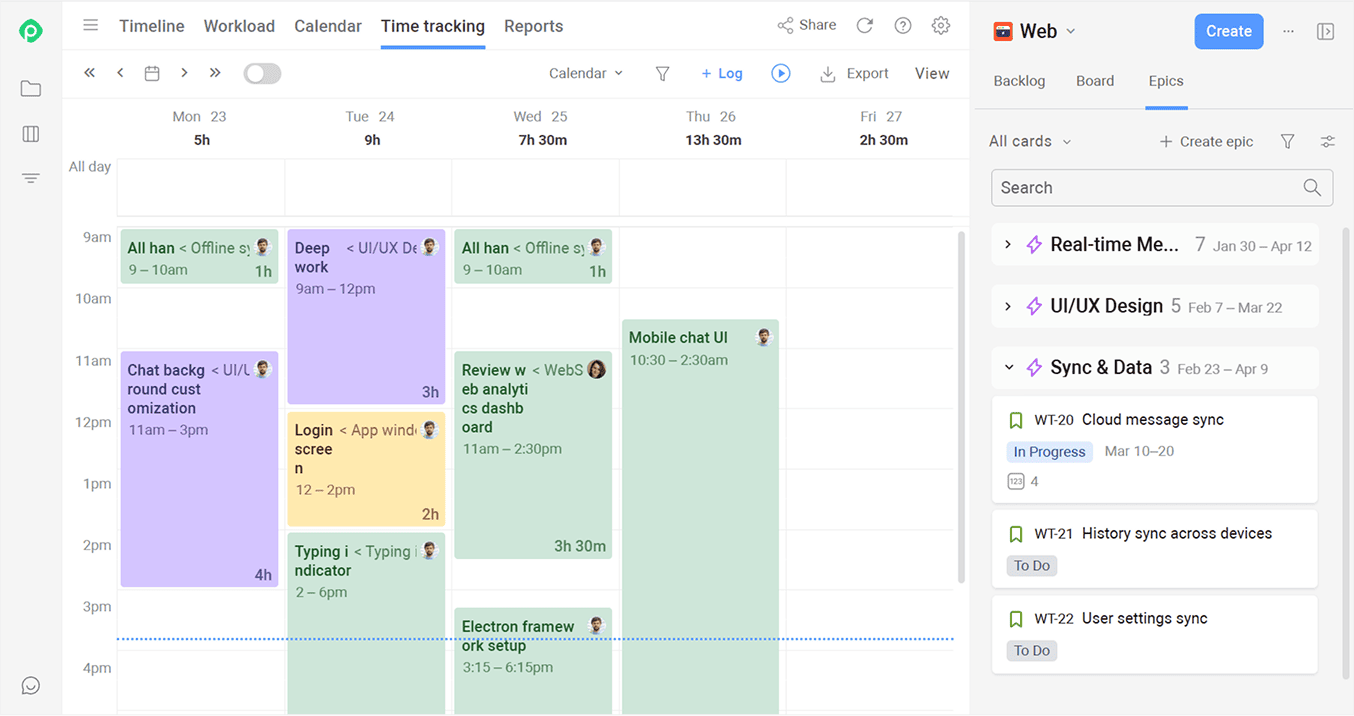
“Planyway combines roadmapping, resource planning, and time tracking in a single app, making it a fantastic value for teams looking for seamless project planning. For a price lower than some other tools that only cover a single use case.” — Tempo user on Atlassian Marketplace.
Pros of Planyway for time tracking:
- Time entries link directly to tasks and projects, so you can see exactly how tracked hours affect resource allocation.
- Multiple intuitive ways to log time (live timer, manual logging, drag-and-drop logging).
- Reports keep all applied filters when exporting to Excel or CSV.
- All-in-one tool — users don't have to switch between multiple plugins to log time and plan resources.
- Planyway offers a comprehensive feature set at a single price, covering time tracking, resource planning, reporting, and scheduling.
Cons of Planyway for time tracking:
- It doesn’t support any cost management.
- Reporting can feel too basic for big companies.
- Timesheets approval cycles are not supported.
#2 Resource planning and scheduling
Since Tempo Timesheets doesn’t answer resource questions, most teams end up buying Tempo Capacity Planner on top of their existing Tempo Timesheets to fill in the resource management gap. Tempo Timesheets tracks actual hours worked, while Tempo Capacity Planner helps managers plan tasks, allocate resources, and visualize team capacity. Together, they cover the full workflow.
Tempo Capacity Planner
Tempo Capacity Planner is billed as a tool for advanced resource planning, offering detailed insights and forecasting options to support large teams and complex projects. If you compare it to other similar plugins, it stands out for its in-depth focus on matching resources to tasks based on their skills and roles, which guarantees that the right people are assigned to the right work.
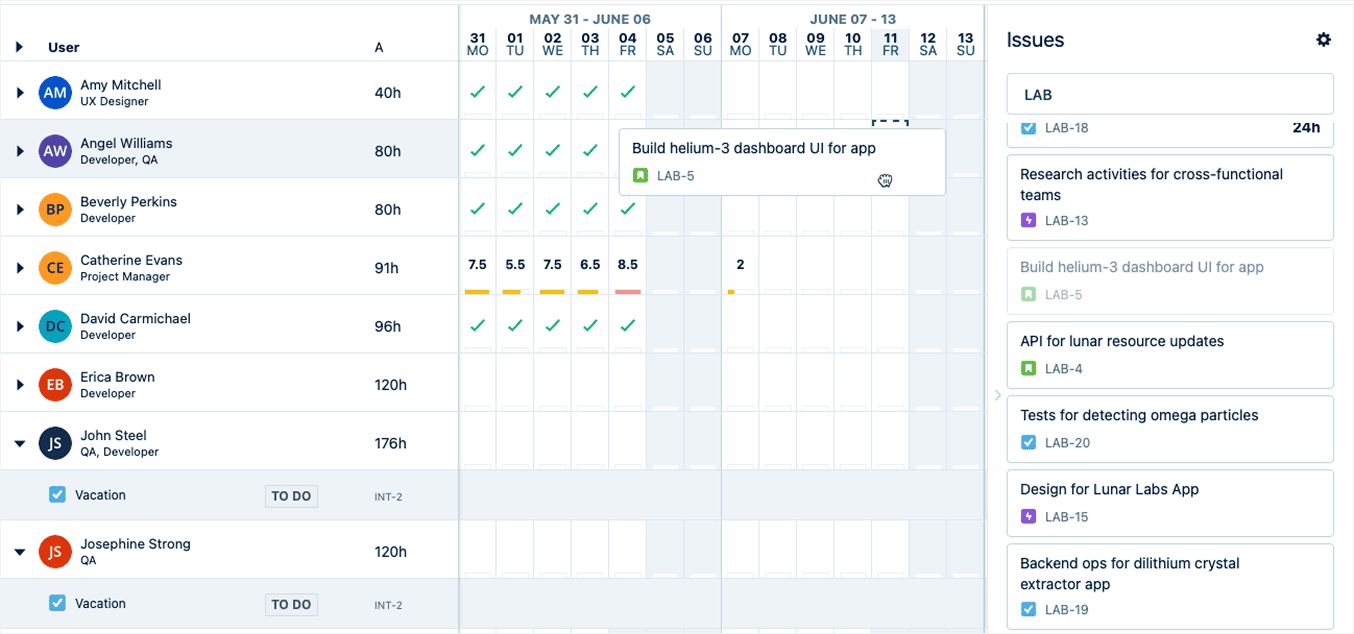
In Tempo Planner, you can:
- Visualize the user’s capacity for work
- Assign team roles and skills
- Decide who can only view plans, manage, or approve
- Plan vacations, holidays, or medical leaves
- Connect Google or Outlook 365 calendars to view full availability
- Book temporary resources (potential hires, etc.)
- Create a planned vs actual report (in combination with Tempo Timesheets)
Pros of Tempo Planner
- It has support for various organizational structures and use cases.
- Clear color-coding helps quickly identify workload imbalances.
- Resource planning takes skills and roles into account.
- It seamlessly integrates with Timesheets and Financial Manager for deep analysis.
Cons of Tempo Planner
- You need to recreate Jira teams in Tempo to plan them out.
- Tracking how the original plan stacks up against real time spent is only possible with another plugin — Tempo Timesheet.
- Users mention performance and UI issues (UI can feel heavy or slow with larger organizations).
- It focuses more on formal resource performance rather than on the real work execution, so it can be hard to align with the actual delivery plan.
Planyway as a Tempo Planner alternative
As Planyway acts as a single app, it explicitly incorporates resource planning into the whole planning process. You can’t set a deadline if you don’t know who is available. In Planyway, you don't just dump tasks into a sprint; you distribute them across your team's actual capacity, seamlessly switching from your project plan to resource map and back to see if it fits. This is what creates a truly working resource plan, not just a detached picture of assignments.
With Planyway, you can:
- Visualize what each team member is working on — on a clear timeline
- Create a capacity heatmap to see if someone is overworked or underutilized
- Split work items into parts, allocate them to multiple assignees, and track separately
- Drag and drop or stretch work items to optimize workload
- Plan vacations, holidays, or days off
- Set custom capacity per individual users
- Build estimate vs tracked report
- Share a URL link or a PDF with stakeholders
Pros of Planyway:
- Planyway combines project plans, resource capacity planning, and timesheets in one plugin, which is cost effective.
- It seamlessy syncs with Jira dates, estimates, and tracked time.
- The plugin tailors capacity planning to fit your team's specific needs, including you in-house teams, part-time employees, and freelancers.
- It helps you create slide decks for clients and top management in seconds thanks to smart filters and quick sharing.
- Planyway supports a smooth transition from high-level project plan → team assignments → detailed resource plan by individual → performance report.
Cons of Planyway:
- It doesn’t take into account non-Jira assignments (like external calendar events)
- No skill or role management
- No resource utilization reports
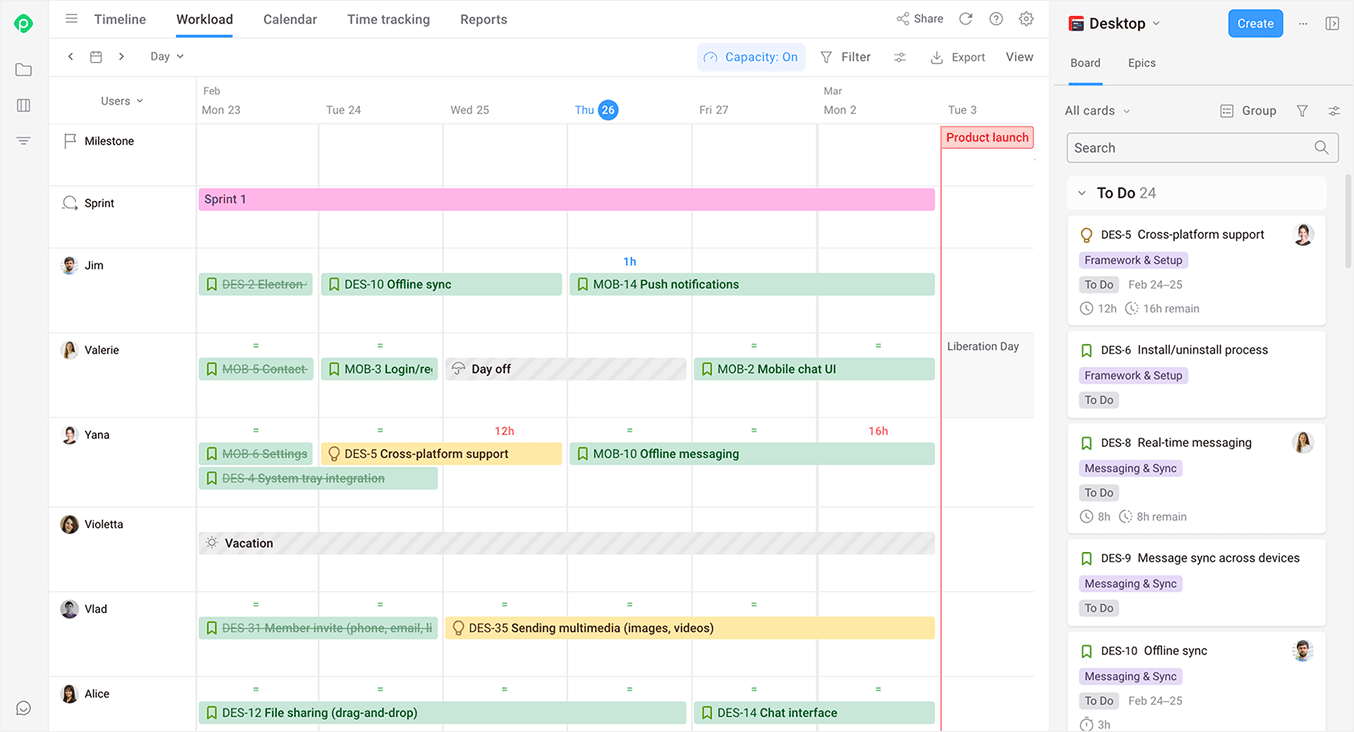
“Finally, I ended up with Planyway, and now it seems exactly what I was looking for. Smooth transition from the project plan to work distribution. Love being able to set different capacities and highlight vacations. It’s clean, transparent, and the UI is super easy.” — Tempo user on Atlassian Marketplace.
#3 Reporting and analytics
The real challenge is not logging time in Jira — it is turning time entries into reports you can trust. Time reports should give you numbers you can actually use in team reviews, stakeholder updates, and client reporting without wasting hours on Excel spreadsheets.
Tempo ecosystem
We won’t beat around the bush: Tempo really excels at reporting.
It doesn’t stop at aggregating time logs — it turns them into actionable business insights. Whether you're focused on billing, tracking compliance, or forecasting resource utilization, it gives you clearly structured data to drive the right decisions.
However, users often have to use a combination of several Tempo plugins to achieve that.
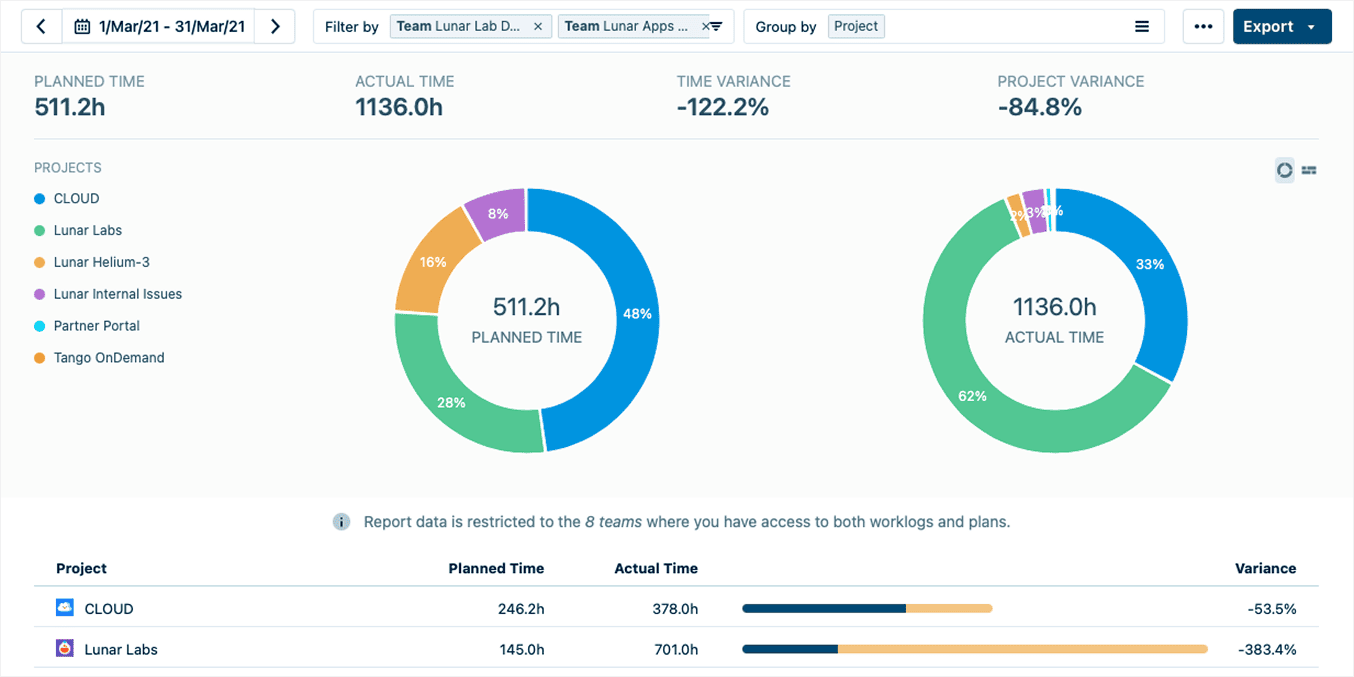
Here is what Tempo has to offer:
- Logged time report (Tempo Timesheets)
- Planned time report (Tempo Capacity Planner)
- Planned vs actual report (Tempo Timesheets+Tempo Capacity Planner)
- Cost & revenues (Tempo Timesheets+Tempo Financial Manager)
- Team member capacity report (Tempo Capacity Planner)
“I'm very encouraged by the initial functionality of Tempo Financial Manager. The report creator's intuitive design allows for quick generation of essential financial overviews, which is a significant time-saver.” — Tempo user on Atlassian Marketplace.
Pros:
- Tempo plugins generate a wide variety of reports, from a simple logged time report to a cost-effectiveness analysis.
- Tempo allows for easy client billing based on actual hours worked and billing rates.
- Here, users can calculate costs and revenues to understand the financial health of their projects.
- Users can separate capital (CAPEX) and operational (OPEX) expenses for accurate accounting and comprehensive reporting.
- Users can forecast potential resource shortages or over-allocation.
- Tempo plugins allow saving report templates to reuse them in the future.
Cons:
- Different types of reports live in different plugins.
- Permissions have to be properly managed across different teams and projects, which can be time-consuming and error-prone, especially in large enterprises.
- Some configurations need to be set up multiple times in different places.
Planyway
Reporting in Planyway is fully focused on time tracking and productivity insights. It mostly serves as a navigator that lets the team know if they are on course or not. So, while Tempo is more kitted out for accurate numbers and control, Planyway shows whether your plan actually works and helps you make decisions.
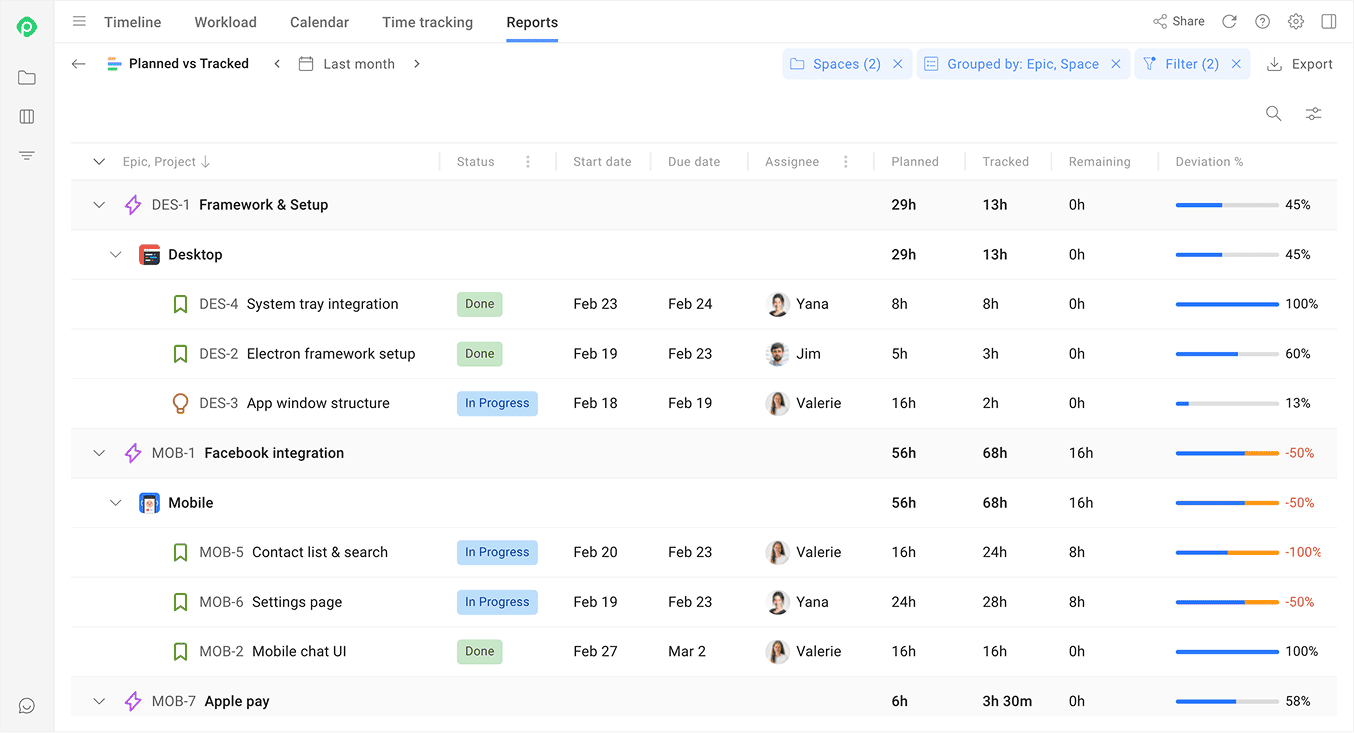
What you get in Planyway in terms of reporting:
- Tracked time report (multiple filters and configurations)
- Planned vs tracked time report
- Detailed timesheet
- Export to Excel or CSV
- URL sharing
Pros:
- Planyway works as a feedback loop: plan → execution → improvement.
- The plugin helps users highlight project health and risks by comparing actual time tracked against estimates.
- Planyway allows users to leverage pre-built templates and to apply filters without configuring each report from scratch.
Cons:
- Doesn’t include any financial metrics
- Hard to use for billing and invoicing
- No PDF export
#4 Ease of use and UX
Jira is complex enough, so spending a bajillion hours on finding their way around plugins is the last thing users want. Plus, the simpler and more user-friendly the interface is, the faster the team can adapt, and the fewer mistakes and misunderstandings happen.
Tempo
Both Tempo Timesheets and Tempo Capacity Planner pack a lot of advanced features, which makes them both powerful and complex. The interface of both plugins might feel confusing, especially in the beginning, when it’s not always clear how to move between key features. Detailed permissions and configurations add more flexibility, but also add to the learning curve.
There’s a fine line between tool complexity and user accessibility, and many feel that Tempo could do more to make the interface simpler and more intuitive for users.
“The process works, but I feel like it is not smooth from a UX perspective. Navigating between team members to approve their timesheets and then back to the team members list bounces me back to the current week without remembering where I was before, overall adding to the frustration of using this tool. As our team grows I feel like it may become even more frustrating to use. On the bright side, Tempo appears to be adding features all the time, so maybe a rework of the overall navigation is already in the works.” — Tempo user on Atlassian Marketplace.
Planyway
The Planyway team’s motto is to make work visually intuitive. Our team actively collects user insights from support tickets, customer interviews, and surveys to use them to refine our design. Unlike other plugins, we aim for minimalist interface so that users can quickly access what they need without feeling overwhelmed by excessive features.
“The design is clean, user-friendly, making it a joy to use every day. One of my favorite key features is the drag-and-drop, which not only moves tasks around but also adjusts the task duration based on the estimation. It’s such a time-saver!” — Planyway user on Atlassian Marketplace.
Final comparison of Planyway vs Tempo Timesheets vs Tempo Planner
Now, let’s sum up what each tool does best and where they differ:
| Category | Jira Scrum board | Jira Kanban board |
|---|---|---|
| Philosophy | A Scrum board is more prescriptive: built for structured, time-boxed iterations. | A Kanban board is more forgiving: built for a flexible flow and continuous delivery. |
| Planning Style | Upfront: the team plans a fixed scope at the beginning of each sprint. | Along the road: work is pulled from the backlog as capacity opens up. |
| Backlog | On by default. All issues live here until pulled into a sprint. There is a product backlog (everything) and a sprint backlog. The board only shows what's in the active sprint. | Off by default. Without it, all the tasks land directly on the board. Can be enabled in board settings to keep the board clean. |
| Key configurations | Enabling story points, setting sprint length and sprint goals. | Setting limits per column and due dates on cards. |
| Work Transitions | Batch: a group of issues moves into a sprint during planning, then progresses through columns. | Continuous: issues are pulled one by one as soon as a column has room. |
| Default Statuses | To Do, In Progress, Done. Board is empty until a sprint is started. | To Do, In Progress, Done. All matching issues appear on the board immediately. |
| Estimation | Story points or time estimates. | Optional. Kanban focuses on cycle time and throughput rather than estimation. |
| WIP Limits | Implicitly controlled by sprint scope — the team commits to a fixed amount of work per sprint. | Explicitly set per column. The column turns red when exceeded, but Jira doesn't block new cards from being added. |
| Reporting | Burndown chart, burnup chart, sprint report, velocity chart, epic report, and more. | Control chart (cycle time) and cumulative flow diagram. |
| Visibility | Only the active sprint is shown on the board. Backlog and future sprints are in a separate view. | Everything is visible on the board at once (unless backlog is enabled or sub-filters are configured). |
| Best use case | Best for teams that need to track and manage sprint-scoped work with a predictable delivery cadence: product development, feature delivery, roadmap-driven teams, cross-functional teams of 5-9 people. | Best for teams that need to track and manage a continuous flow of incoming work: support teams, DevOps / IT operations, bug triage, continuous delivery pipelines, content creation and marketing teams. |
Farewell
When searching for Tempo Timesheets alternatives or a replacement for Tempo Capacity Planner, think of what you really need to achieve, rather than getting caught up in a long list of features.
If you are looking for an intuitive tool to gain visual clarity of what’s going on in your complex projects, what your team is doing, and if you are delivering on time without the hassle of multiple plugins and high costs — Planyway is the clear winner.
If your business goals, financial metrics, and budget management come first, then Tempo Timesheets, in combination with Tempo Planner, are your best friends.


FAQ
Planyway is considered to be the best alternative to Tempo Timesheets among existing tools, especially if you're looking for a plugin that makes time tracking visual, intuitive, and built into your planning Jira workflows. Unlike other time tracking apps, Planyway doesn’t make you buy separate plugins to unlock specialized features beyond logging, and keeps time tracking connected to your actual plans and workload.
It depends on what you’re comparing. For the Tempo Timesheets alternative in Jira, Planyway covers everything that Tempo offers logging-wise. As for reporting, Planyway lacks some views, but mostly the same ones that also require extra plugins in Tempo, like Financial Manager for budget management.
When it comes to resource planning and capacity management, Planyway and Activity Timeline are close matches to what Tempo Planner offers. Planyway, however, brings planning, capacity, and time tracking in a single plugin and has a distinctive visual approach.
Atlassian Marketplace and Reddit reviews often mention a cluttered interface, a steep learning curve, and a complex setup compared to other time tracking apps. The other drawback is that costs add up quickly as Tempo’s plugins are quite limited without each other.
There’s no one-size-fits-all answer, but if you want detailed automatic time tracking with deep reporting and billing focus, Tempo Timesheets really holds its own. If time tracking must be tied into your planning and capacity management workflow to deliver productivity insights, then Planyway is a good choice. Planyway is also cost effective and is supposed to have a more beginner-friendly UX.
For sure, Planyway wins on pricing as a Jira Tempo alternative simply because it gives you multiple tools — resource capacity management, roadmaps, progress and time tracking, reports, portfolio, and calendar — all under one price. Meanwhile, Tempo splits core capabilities into multiple paid plugins, which means the total cost will be significantly higher.