What is a timesheet? Meaning, templates & a better way to track hours

Project work rarely goes without a hitch. A task takes longer than expected, a meeting overlaps, someone puts in half a day fixing an issue that wasn't even on the radar. By the end of the week, it can be surprisingly hard to say where all those hours actually went. That’s why we need timesheets — little tools on a mission to turn time and effort into usable data.
If you manage projects, you've probably filled out plenty of timesheets and grumbled about a few of them, too. This guide will help you make peace with that. We'll cover what a timesheet actually is, what it should track, why teams bother with them at all, and how to build one in manual timesheets, simple templates, or automated time tracking in project management tools.
TL;DR
- A timesheet is a record of how working time was spent — by whom, on what, and for how long — and can come in many forms, be it paper-based timesheets, spreadsheets, or reports built into project management software and time tracking tools like Planyway.
- Timesheets help teams understand where time goes, compare estimates with reality, plan resources, track profitability, support reporting, and improve employee productivity over time.
- Time tracking is the raw record of entries; a timesheet is the structured, periodic summary built from it.
What is a timesheet?
A timesheet is a document that records the working hours spent by an employee or team member during a specific period. It includes daily start and end times, breaks, overtime, paid leaves, time off requests, out-of-office times, as well as other specific time slots that may need recording.
In project-based teams, a timesheet can also record time spent on specific projects, tasks, or clients. This makes it useful not only for payroll but also for project planning, resource management, reporting, and client billing.
Weekly timesheets and monthly timesheets are two of the most common formats, depending on whether the team needs frequent reviews or a broader reporting period.
What does a timesheet look like?
There’s no benchmark for a good one. They can be old-fashioned paper timesheets, tiresome Excel files or Google Sheets, or they can be built into your project management software and automated through time-tracking tools.
Here’s what a timesheet looks like in Planyway for Jira:
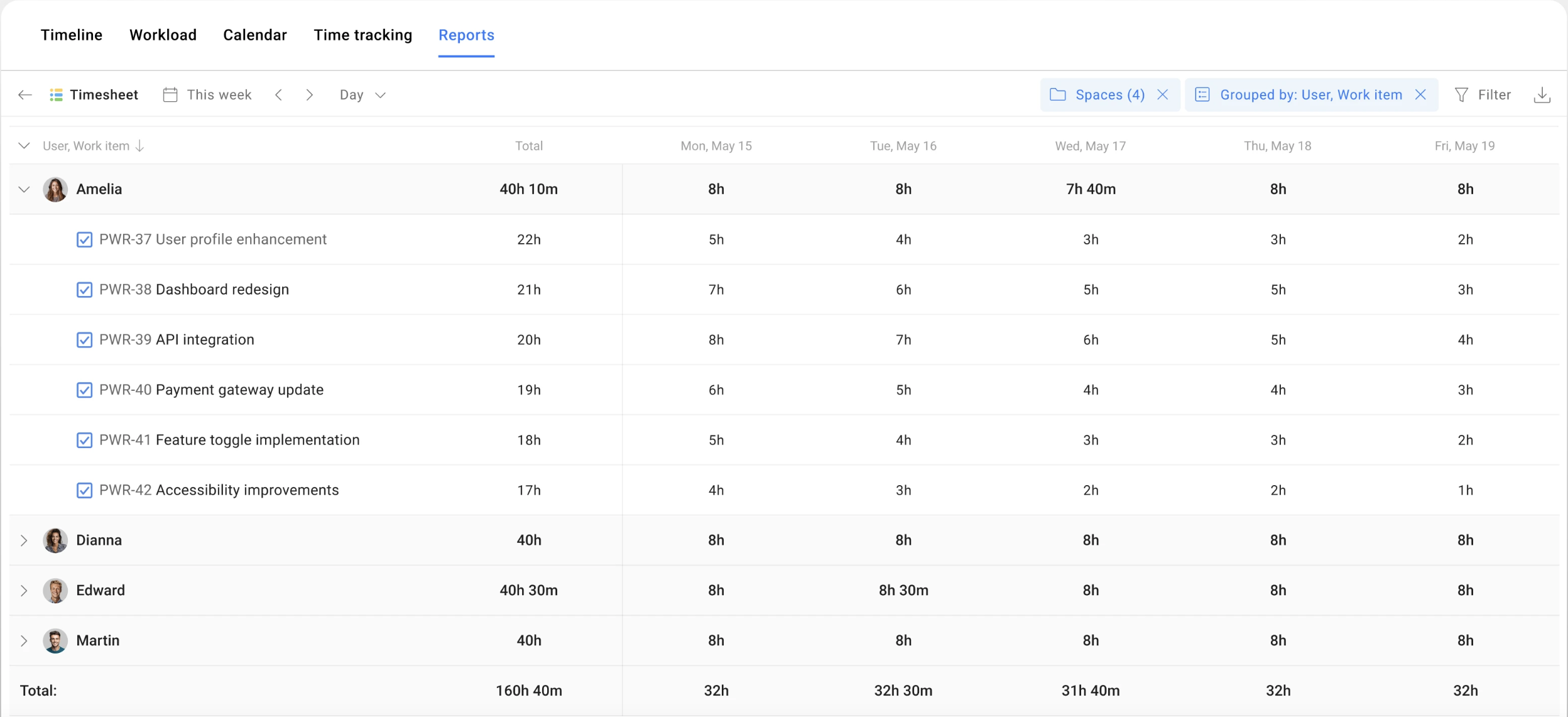
The best timesheet version for your project depends on your particular case. A five-person team might do just fine with a spreadsheet, but a 50-person agency juggling client budgets probably needs something more connected.
What information does a timesheet track?
It depends mostly on why you're tracking time in the first place.
As a firm, you may need your timesheet for client billing. Dev teams need it to understand capacity and build sprints. And that 50-person services agency from the previous paragraph often needs both, plus a clear line between billable and non-billable hours.
Still, most types of timesheets usually share a similar set of fields:
| Field | What to put there |
| Time spent | The number of employee work hours/minutes logged |
| Project or task | What the time was spent on |
| Team member | Who logged the time |
| Date | When the work happened |
| Billable status | Whether the time can be invoiced to a client |
| Notes | Some context if necessary |
Why do teams use timesheets and why should you?
It's easy to think of timesheets as an administrative chore and just fill them in right before a client call. But at their best, timesheets are one of the few tools that turn "I think we spent a lot of time on that" into an actual answer. Here's what they're really for.
To understand where time goes
Without timesheets, teams will have to rely on assumptions when answering some of the most important questions. Which tasks took the most effort? How much time did a project actually require? Is there anything consuming too much capacity, like meetings, support requests, or unexpected work?
Timesheets turn daily work into measurable data. The measurable data, in turn, comes in handy when it’s time for client calls, performance reviews, 360s, and whatever else. Accurate records of working hours also make it easier to understand how much time different types of work actually consume.
To compare estimates with reality
Projects aren’t exactly famous for going according to plan. Tracking actual time helps teams compare estimated hours vs. actual hours, planned workload and real effort, as well as expected delivery dates and current project progress.
Thus, improving future planning and identifying problems earlier immediately becomes more bearable and predictable.
To plan resources and balance workloads
Managers need to know who is overloaded, who has available capacity, and whether new work can fit into existing schedules. Accurate timesheets give them a clearer, more objective picture of how work is actually distributed across the team.
They can also use this data to understand team velocity and make more realistic plans. If a team consistently spends 80 hours on a certain type of work, for example, that gives a PM a better basis for planning the next sprint or project than an estimate pulled out of thin air.
Over time, these insights make it easier to spot capacity issues, adjust workloads, set realistic delivery expectations, and plan future work based on what the team can actually handle.
To track project profitability and costs
For agencies, consultants, and project managers, timesheets help answer the questions that keep finance and C-levels happy:
- How many hours were spent on a client project?
- Did the project stay within budget?
- Are billable hours being captured accurately?
It keeps everyone in the loop and makes calculations easier.
To improve accountability and reporting
Timesheets provide a shared record of progress. Teams can use them to create client reports, update stakeholders, explain project progress, or support retrospectives. No one will have to reconstruct the last two weeks from memory or make things up just for them to fit into the project plan.
To improve processes
Over time, timesheet data reveals patterns. There can be recurring tasks that take longer than expected, bottlenecks slowing delivery, or areas where automation could help with resource allocation.
While being a record of the journey that’s already happened, accurate timesheets help with understanding what to fix and where to move forward.
Timesheet vs. time tracking: what’s the difference?
Time tracking is the ongoing act of recording how time is spent — starting a timer, logging employee work hours against a task, dragging a card onto a calendar slot, or creating a time entry manually. It happens continuously, usually at a task-by-task level.
A timesheet is the resulting document. It is a structured, periodic summary of tracked time, organized by day, week, or month. It can be formatted for a specific purpose: payroll processing, billing, reporting, or review.
Naturally, the two are related, but mixing them up can result in clunky processes. In a well-built system, you don't have to choose one over the other. Ideally, time tracking feeds the digital timesheets automatically.
Best practices for timesheet management
A timesheet is only as useful as the habits built around it. Here are five things that will separate your timesheet (a perfect and useful tool) from yet another corporate document (a forgotten file everyone politely ignores):
Define the “increment” and the SOP for interruptions
Make sure your team has decided on a minimum logging unit (e.g., 15- or 30-minute blocks) in your time tracking process and is sticking to it. Also, make it a team-wide habit to jot down interruptive tasks immediately, rather then letting them disappear into the ether. Those tiny fragments can add up to 2+ hours worth of work a week and go unpaid for unless logged.
Bridge estimates to actuals (the planning loop)
Require a planned estimate before work starts, then compare that planned estimate against the actual time logged during the review cadence. This turns the timesheet from a historical record into a scoping tool. When estimates consistently miss by 30%, you have a data-driven trigger at your disposal to revisit your sprint planning practices or client quotes.
Normalize non-billable and overhead time with zero stigma
If internal syncs, admin work, and professional development don’t have their own dedicated categories, they will likely be bundled into billable project codes because they look cool and productive.
If, however, the team has explicit overhead labels (and a baseline for them) and uses that data to understand how much capacity is there for client work, then overhead is no longer the shame category and the team can use it for workload balancing. To this end, positioning zero overhead as a red flag also helps.
Build a lightweight correction and delegation workflow
Errors happen all the time, and it’s fine as long as they don’t creep their way into your time data. To prevent the latter, make sure you have a painless path for fixing errors, such as a 48-hour grace period, that doesn’t feel like a punishment or a bureaucratic ordeal.
You can also pair that self-correction window with middleman authority, so that team leads (not the PM) review entries for their own pods when they submit timesheets and can catch miscategorizations with real context about the work.
Frame it as a capacity map, not a surveillance tool
Employee timesheets tend to have an inherent suspicion baked into them. For example, employees may assume the data is being used to catch them slacking, while managers may assume entries are being padded to look busy. Breaking that cycle requires flipping the narrative entirely and positioning the timesheet as a telescope into the system’s health, not a microscope on somebody.
When you share back aggregated insights that lead to tangible improvements (like reallocating resources, killing low-value meetings, or making the case for new hires), you show that accurate time tracking can serve the team's collective wellbeing.
How to create a timesheet (with examples)
There are many ways to build a timesheet, and fortunately, they can all be right for you. It mostly comes down to how much structure and automation your team actually needs.
Option 1: Excel timesheet template
Let’s assume you’re from a small team that just needs something simple and free. In your situation, a spreadsheet is a perfectly good starting point.
A basic Excel timesheet usually contains:
- Date
- Project/task
- Start/end time
- Total work hours
- Notes
- Billable status
To save you the setup work, here are three ready-to-use templates, adjusted for different tasks.
| Template |
What’s inside |
Best for |
| Project Timesheet & Activity Log | Daily, task-level log with date, project/task, start and end time, total employee hours, and billable status | Tracking individual work in detail |
| Monthly Attendance & Hours Tracker | Grid-style tracker with one row per person and one column per day | Teams that mainly need to confirm hours worked across a month |
| Monthly Timesheet & Work Log | Team-level monthly summary covering working days, hours, overtime, leave, and total paid hours | Department-level reporting |
Make a copy, adjust the columns to fit your workflow, and you've got a working timesheet in about five minutes.
Option 2: Digital timesheet in project management software
Companies… they grow up so fast. And spreadsheets can work just fine for a small team of less than five, but as business scales, processes may become increasingly complicated. That's usually when teams move their .xlsx’s into a project management tool or time tracking software.
Across good timesheet software, their advantages are usually the same:
- Connected to tasks — Time is logged directly against the work it belongs to.
- Fewer manual updates — Less copying, duplicate data entry, and version-control headaches.
- Easier reporting — Data rolls up automatically, which helps reduce human error and save time.
- Team visibility — Managers can see workload and progress without chasing individual updates.
Not all software has the same approach to timesheets, though. If you want a Jira-native tool that was built with timesheets in mind, Planyway may be the right choice.
Make timesheets work for you with Planyway
If you're managing Jira projects and currently stitching timesheets together from spreadsheets, Planyway can be a saver. Here, time tracking and timesheets are in the same flow, built directly on top of your Jira tasks.
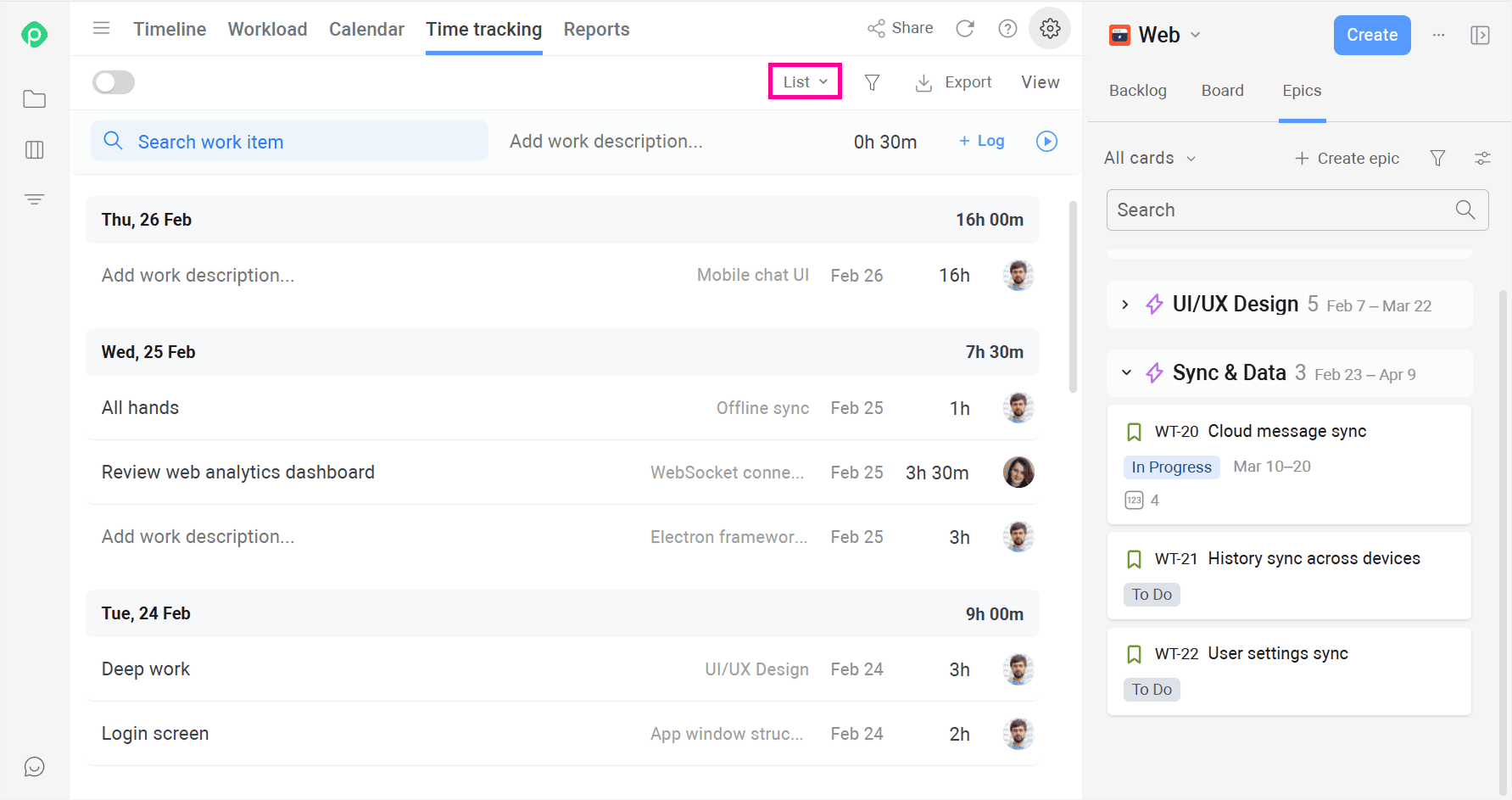
- Log time without leaving your workflow. You can track time right inside a Jira work item, either manually or by starting a built-in timer. Once you stop the timer, a work log entry is automatically created.
- Make time tracking easy to log and review: Team members can add and review time in List or Calendar views, while managers can quickly check the team's entries in one place.
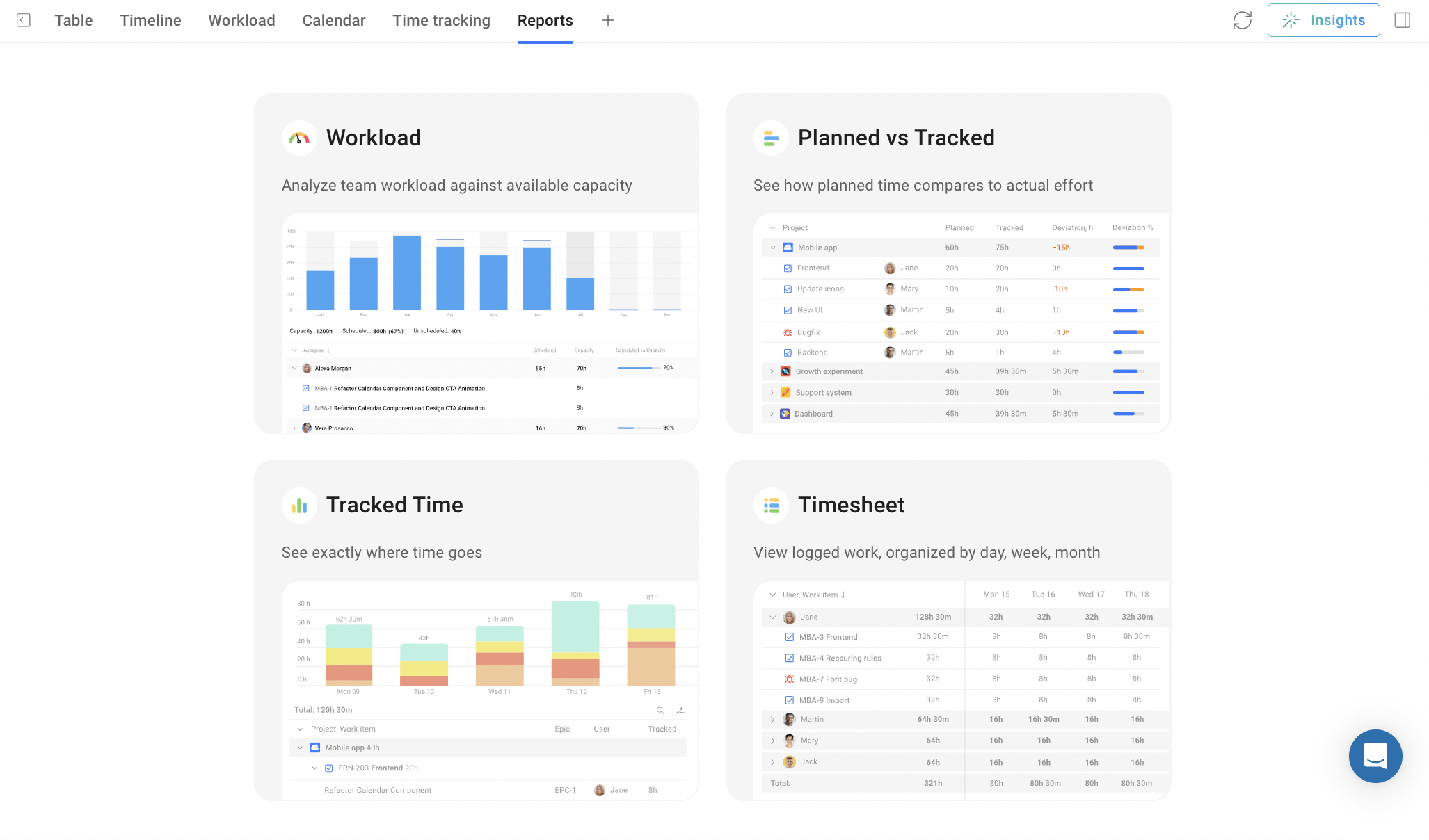
- Use dedicated, easily exportable reports: Analyze logged time with Timesheet, Time Tracking, and Planned vs. Tracked reports to understand actual effort, compare it with estimates, and spot discrepancies.
And since Planyway brings time tracking, project timelines, and resource management together, actual time data can feed back into your plans. Managers can see how much capacity work really consumes, compare it with estimates, and use those insights to make future schedules and resource allocations more realistic.
There’s a lot more to timesheets
On the outside, a timesheet is, technically, just a record of hours. But if you use it well, it can tell you a lot more: where the team’s time goes, what projects actually cost, who has room for more work, and whether your plans have any connection to reality.
The trick is to make time tracking part of the workflow instead of another chore sitting next to it. That's where connected time tracking tools like Planyway come in: your tracked time, your work, workload, and reports can sit conveniently within the same system, giving you useful data without creating yet another spreadsheet to juggle.


FAQ
A timesheet's core purpose is to turn time into measurable data. Depending on the team, that data supports payroll and billing, project budgeting, resource planning, and reporting progress to stakeholders or clients.
Start by deciding what you actually need to track — employee hours, tasks, billable status, or all three. Then pick a format: a spreadsheet template if you want something quick and free, or a connected timesheet system inside your project management tool if you want it to update itself. Define consistent categories, set a regular cadence, and adjust the structure if/when your needs change.
A time log is the raw record of time entries — what was worked on, when, and for how long. A timesheet is the structured, usually periodic document built from those entries, formatted to track labor costs, track work hours, sum up hours worked by each worker during a pay period, and ensure accurate payroll, billing, or reporting.