Project scheduling techniques and tools for better project management

Do you even need certain techniques to make a schedule for a project? Yes, because project scheduling goes far beyond putting dates in a calendar. A good schedule gives the team a shared view of what needs to happen, when it should happen, and how one piece of project work affects another. For project managers, it’s an essential tool to spot bottlenecks, balance workload, and adjust the plan.
In this article, we’ll look at key project scheduling techniques and cover project scheduling tools that can make these practices easier to apply.
TL;DR
- Project scheduling is a project plan turned into a workable timeline, and it defines what needs to be done, when, and in what order. A schedule should include clear deliverables, manageable tasks, dependencies, estimates, resources, and milestones
- Choosing the right scheduling tool depends on the goal: Gantt charts for timelines, workload views for capacity, calendars for deadlines, and Kanban boards for day-to-day execution.
- Advanced project scheduling techniques include CPM, PERT, fast-tracking, crashing, Monte Carlo simulation, and resource optimization.
What is project scheduling?
Project scheduling is the process of deciding what needs to be done, in what order, and when to complete a project. The result is predictably called a project schedule — it’s a timeline that shows how individual activities fit together and what it will take to reach the finish line.
Let’s break that down with an example of a pretty mundane project: window installation. What’s important to decide first?
- Timing: When will the windows be installed? Between September 11 and September 17.
- Sequence: What needs to happen first? The openings must be framed and the windows delivered before installation can begin.
A project schedule brings these details together in one view. It typically includes planned start and end dates, assigned resources, dependencies between tasks, and key milestones. It should answer three basic questions:
- What work needs to be done?
- Who will do it?
- When does it need to happen?
Besides, schedules exist at multiple levels. In enterprise environments, we usually differentiate between the three.
| Schedule type | What it does | How it helps |
|---|---|---|
| Master Schedule | Combines multiple projects into a single high-level view | Makes it easier to track timelines and spot conflicts across initiatives |
| Milestone Schedule | Focuses on major events, deadlines, and decision points | Gives executives and project stakeholders a quick overview with no task-level detail |
| Detailed Schedule | Includes individual activities, dates, assignees, dependencies, and other planning details | Helps keep the project progress on track, stay in the loop, and provides an operational view |
Good scheduling requires balancing time, resources, cost, and quality so the team can deliver the intended project outcomes. Simply lining tasks from start to finish doesn’t do the trick.
Project scheduling vs. project planning: the critical distinction
Even seasoned project management professionals can stumble here. But project planning and scheduling are, in fact, not the same. So what is project scheduling in management that project planning isn’t?
- Project planning focuses on the big picture, business goals, and approach.
- Project scheduling turns the approach into a timetable.
When you’re planning a project, you’re deciding what the team needs to accomplish and how you can get there strategically. When you’re scheduling, you map these decisions onto a calendar, track dependencies, and come up with tactical ways to achieve the goal.
| Project planning | Project scheduling |
|---|---|
| Defines the project scope and objectives | Sets dates and sequences for the work |
| Identifies tasks and deliverables | Maps tasks, dependencies, and milestones onto a timeline |
| Estimates resources, costs, and effort | Allocates time and resources across the schedule |
| Sets the framework for execution | Turns the framework into an actionable timeline |
| The outputs: Scope definition, feasibility studies, WBS, quality criteria, procurement strategy. | The outputs: Gantt charts, network diagrams, resource management calendars. |
When a mobile app development agency plans a project for a new app, they define the scope, identify the major deliverables, estimate the resources needed, and decide which development approach to use. But during scheduling, those deliverables become a sequence of activities: design the interface, build the features, integrate the API, run QA, fix bugs, and prepare the release. A project manager also needs to assign dates and milestones to each activity.
The two have to be aligned, but never confused or replaced by each other. The distinction matters because a solid plan can still have a weak schedule: you may know exactly what the project needs to deliver but have no realistic picture of when the work can happen or how delays in one task will affect others.
The 5-stage foundation of a solid schedule
Before opening Jira or Excel to assign dates, you must have a foundation. A practical scheduling process can be broken down into five stages:
1. Define hard constraints
No project starts in a vacuum. First, gather all time- and date-related data:
- Fixed project milestones (immovable fates like official start, release dates, delivery obligations);
- Discretionary milestones (internal reporting deadlines and target dates);
- Calendar constraints (public holidays, company days off, regional differences if you work in a distributed project team);
- Resource availability (material delivery schedules, equipment constraints);
- Working hours (differences in hour allocations, “zero hours” on weekends).
2. Identify task framework
This is where you introduce the “how” and “how long”.
- Highlight project tasks. Use the Work Breakdown Structure (WBS) to decompose deliverables into activities.
- Estimate effort. Avoid providing a single-point estimate without a buffer.
- Identify dependencies. Define the logical relationships (Finish-to-Start, Start-to-Start, Finish-to-Finish, Start-to-Finish).
- Apply lags and leads. A lag is a forced waiting period (e.g., waiting 3 days for concrete to dry). A lead is a negative lag (e.g., starting Task B two days before Task A finishes).
- Allocate resources effectively. Match the required skills with available resources.
- Calculate project duration.
3. Turn data into a plan
It’s time to turn the information you gathered into something actionable.
- Calculate the Critical Path (CPM). Identify the longest sequence of tasks (more on that below). Any delay here delays the whole project.
- Manage the float. The amount of time a task can wait without pushing the final deadline is called float. Too much of it means inefficiency, but too little means excessive risk.
4. Review
There are two types of review you’ll want to subject your project schedule to.
- Internal team review. Your colleagues can help you subject the draft to scrutiny for errors, missing dependencies, or false assumptions.
- External review. If your project is critical, consider bringing in external experts who may be harsher in their scrutiny.
5. Sign-off
When the review is done, it’s time for the final steps:
- Create the final draft (typically in a Gantt chart)
- Submit to the project board or sponsor for approval
- Publish Version 1.0 and place it under Version Control
Go-to project scheduling tools
Once you understand how to build a project schedule, the next step is to represent and manage it in practice.
The right scheduling tool depends on what you need to see. A project manager may need a high-level timeline for stakeholders, a detailed dependency map for the team, or a workload view to check whether someone has too much on their plate.
Below are the five basic project scheduling tools you’ll likely need the most.
Gantt charts
| What they do | Best for |
|---|---|
| Visualize project tasks, durations, milestones, dependencies, and progress on a timeline | Sequencing work and communicating the schedule |
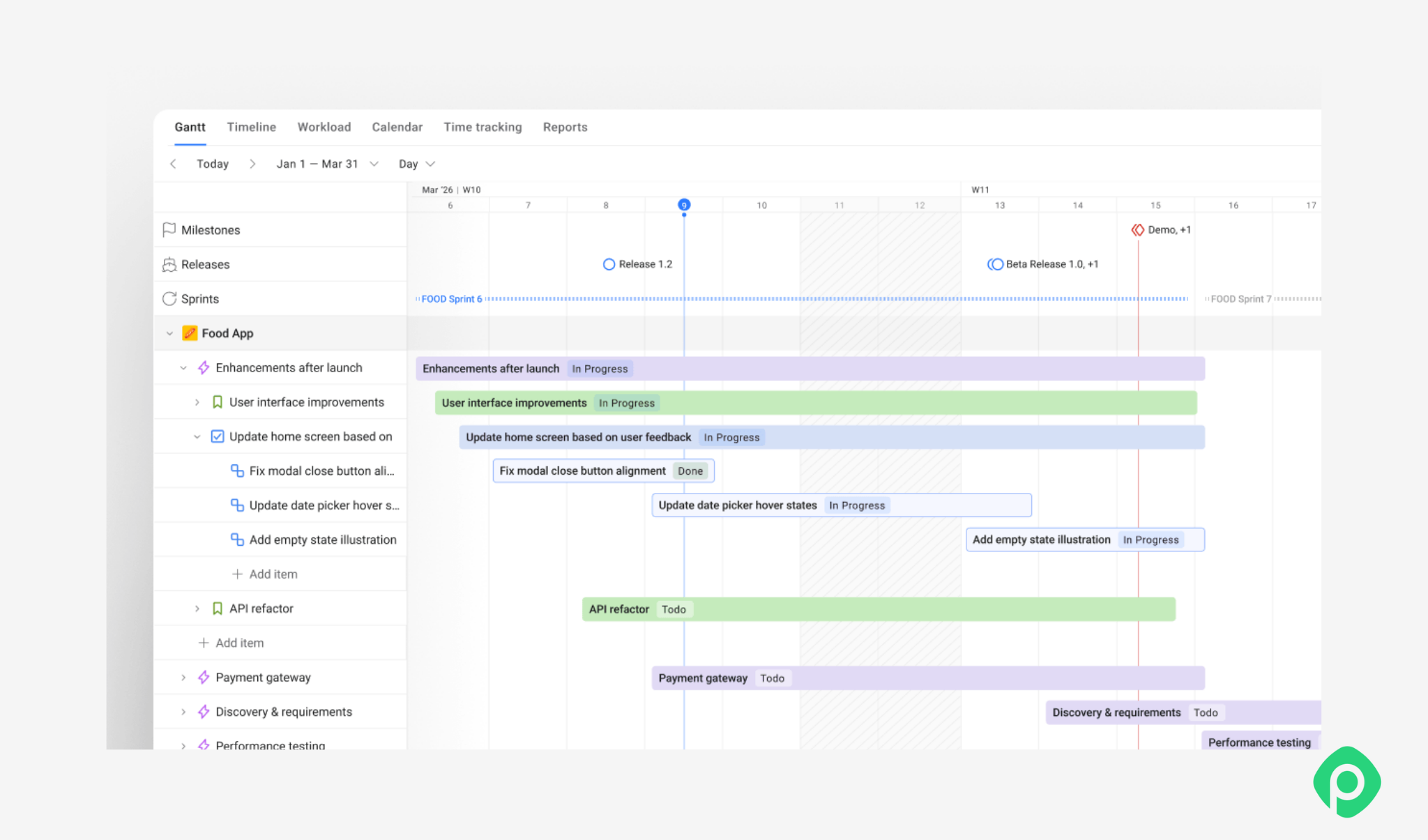
Gantt charts are merely a representation of a schedule, not a scheduling methodology themselves. It’s one of the most popular outputs of a project schedule, but with certain additional tools, you can even go beyond the regular Gantts.
For Jira teams, Planyway adds a Gantt view to the existing work, combining the issue hierarchy with the timeline. You can see parent and child issues, dates, durations, and dependencies together, then adjust the schedule directly without recreating Jira issues in a separate tool.
Network diagrams
| What they do | Best for |
|---|---|
| Show logical relationships between activities — like which activities depend on others and how work flows through the project | Dependency analysis and project’s critical path analysis |
Network diagrams are better for understanding sequencing than for day-to-day schedule management. They are particularly useful during the planning stage, especially for complex projects where understanding dependencies matters more than having a polished timeline.
Project calendars
| What they do | Best for |
|---|---|
| Show work against actual dates | Deadlines, launches, holidays, availability, and date-specific events |
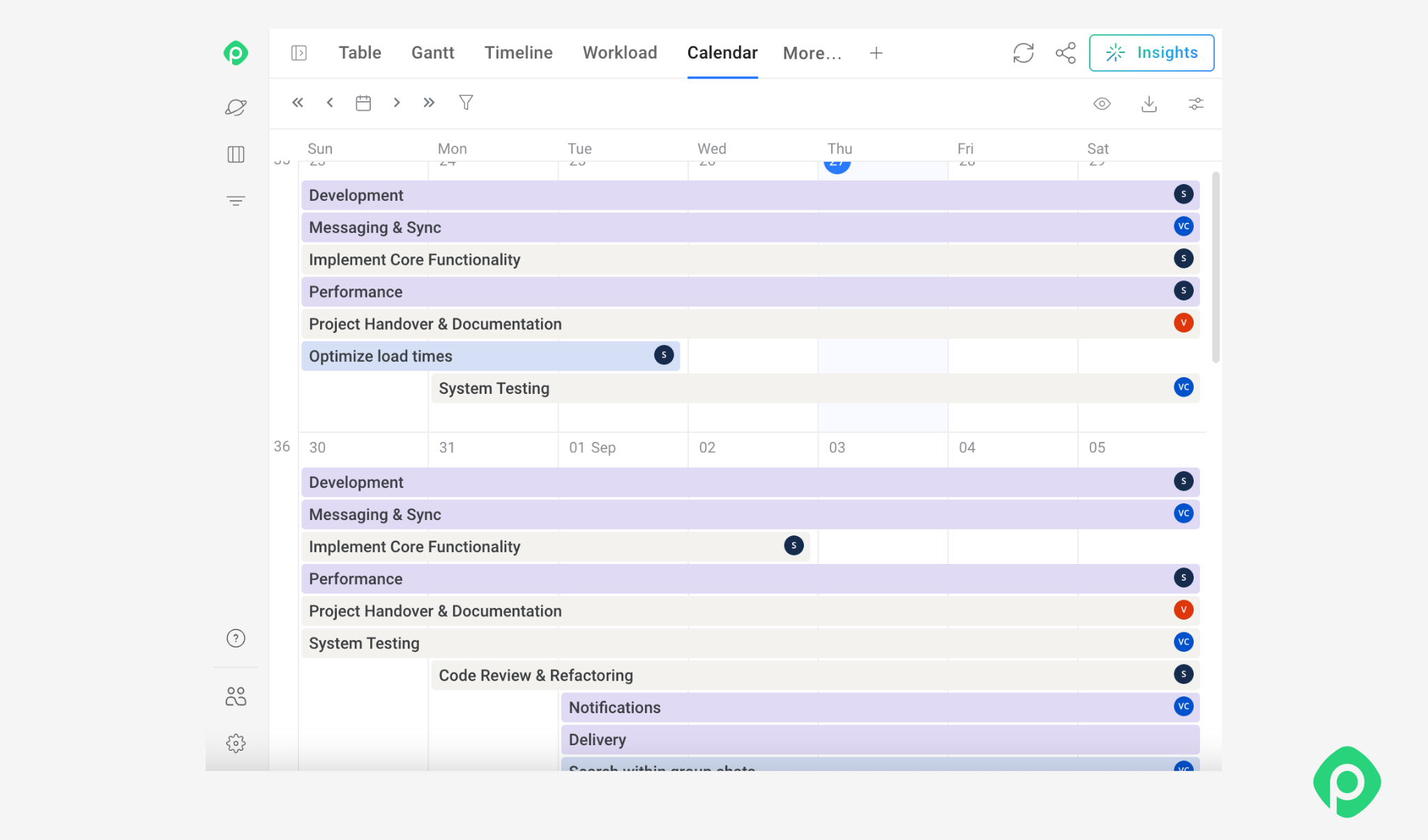
Calendars work particularly well if your team has a “when” question. They're also useful for spotting scheduling conflicts — like when several deliverables, reviews, or launches are clustered around the same date.
To avoid that, you can go beyond Jira’s built-in calendar capabilities. For example, Planyway’s Calendar puts tasks, deadlines, and milestones from multiple projects in one view. You can drag issues to reschedule them, adjust deadlines, and see related subtasks, making it easier to coordinate dates and spot conflicts early.
Workload/resource views
| What they do | Best for |
|---|---|
| Show scheduled work against team capacity | Identifying overallocations and resource bottlenecks |
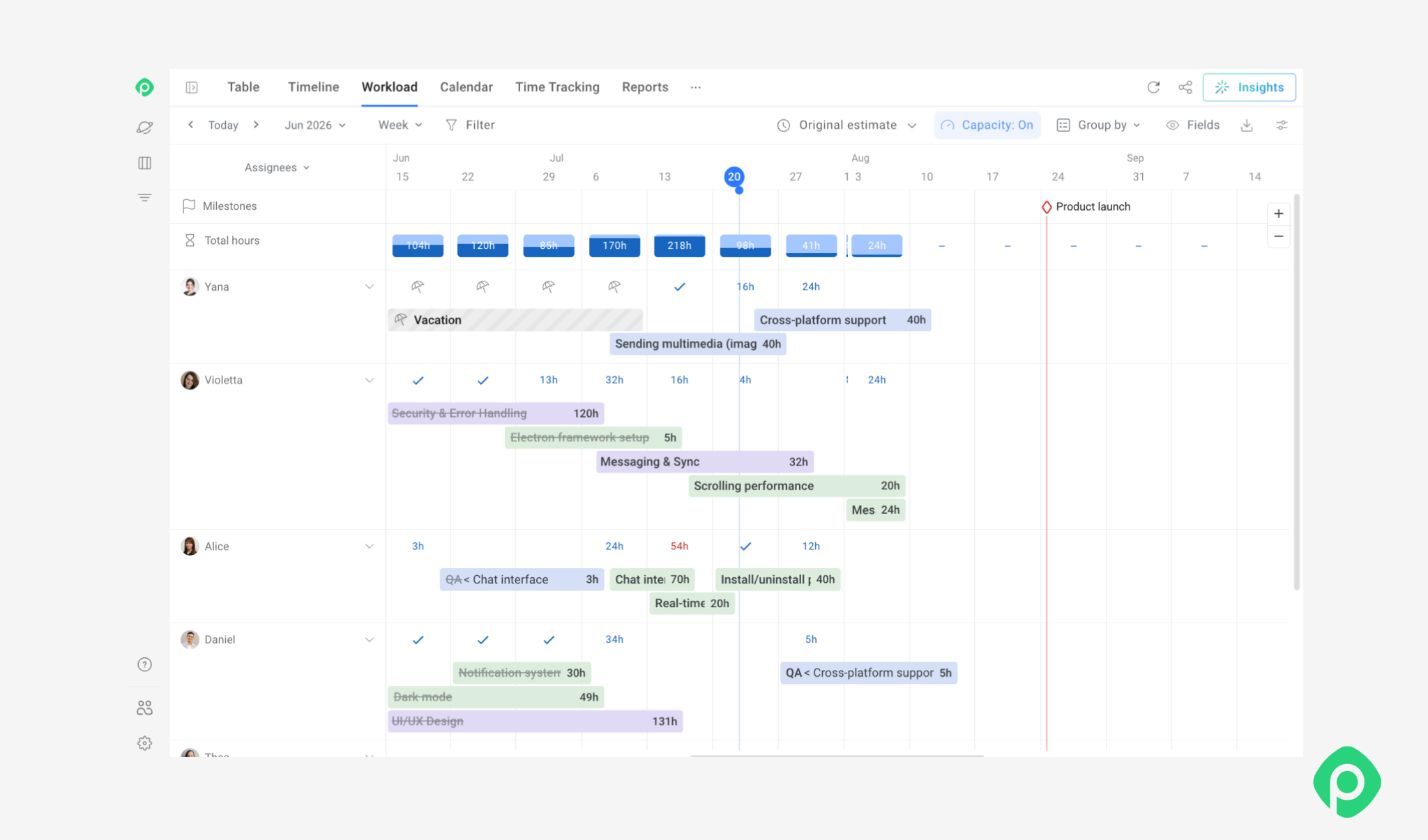
Workload and resource views show how key tasks are distributed across people or teams. If one designer is assigned three time-sensitive tasks for the same week, a workload view makes the conflict much easier to spot.
Planyway's workload view is designed for this type of capacity check. Once Jira work is scheduled, team members can see how assignments are distributed across people and projects and adjust the plan when someone's workload exceeds their available capacity.
Kanban/task boards
| What they do | Best for |
|---|---|
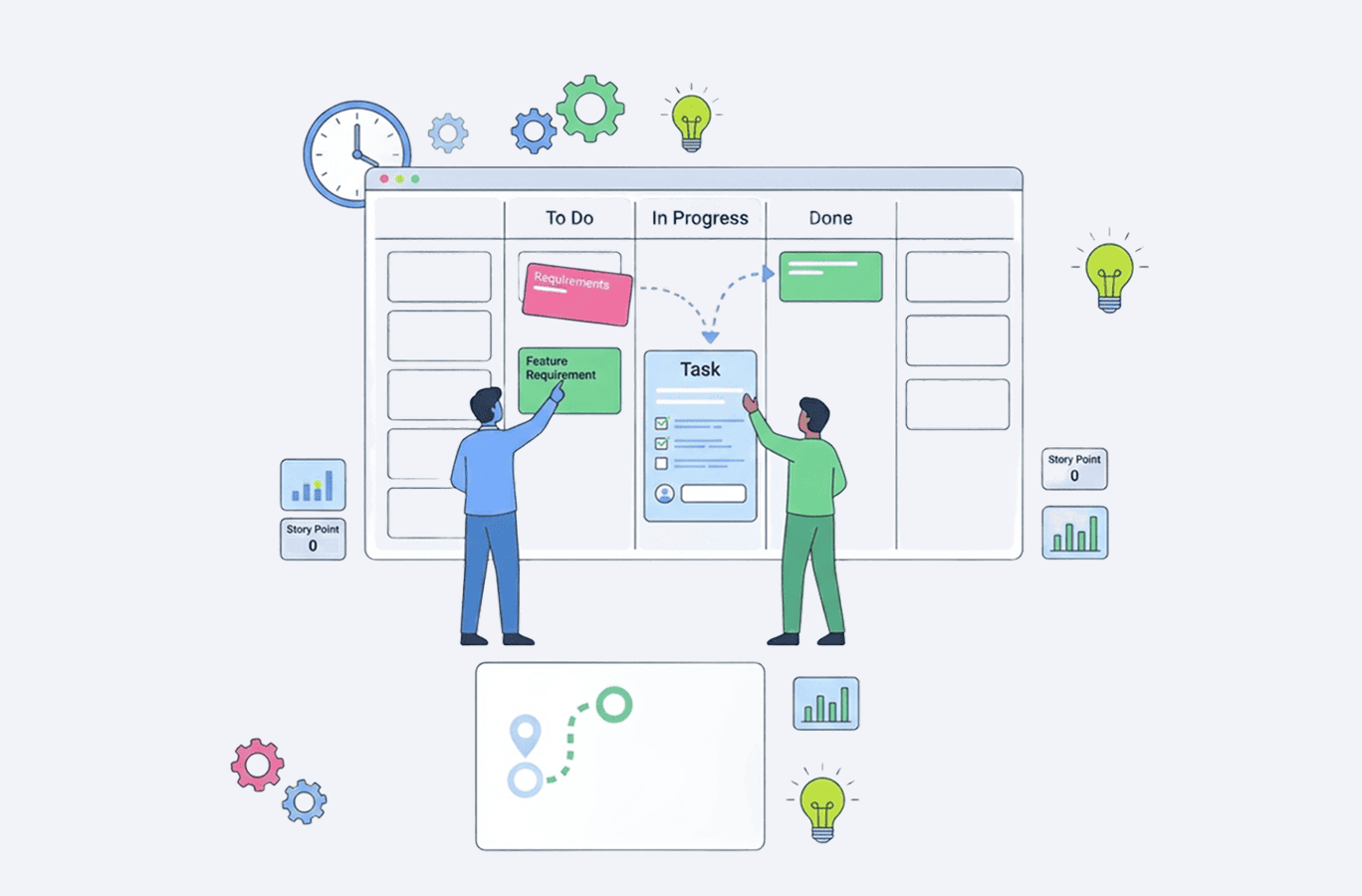
| Organize work into columns that represent stages of a workflow (To do, In progress, Review, and Done) | Managing project execution |
While Kanban boards don’t provide the same timeline detail as Gantt charts, they offer an excellent day-to-day view of execution. However, they are not as effective for long-term sequences, dependencies, and capacity on their own.
For example, a Jira team might manage individual issues and their status in Jira while using Planyway to schedule those issues across projects, visualize dependencies, and balance workloads. Thanks to this, the schedule remains connected to the work, and project managers don’t need to maintain a separate copy of it.
Advanced project scheduling techniques
A simple project schedule works fine as long as your work doesn’t involve complex dependencies, limited resources, tight deadlines, or an explosive mix of it all. When it gets too tangled, advanced scheduling techniques give project managers more structured ways to cope with complex projects.
Here are six methods worth knowing.
1. Critical Path Method (CPM)
The Critical Path Method (CPM) identifies the longest sequence of dependent tasks that determines the project’s shortest possible completion time.
It’s a mathematical approach to calculate the longest and shortest project timelines. Activities with dependencies are mapped in a network diagram. With that, you can identify which tasks are time-sensitive and which have float.
Let’s apply that to something real. Say you have a product launch where development takes 10 days, testing takes 5 days, and release preparation takes 2 days. If each activity depends on the previous one, those 17 days form part of the critical path.
More on how to use Critical Path Method ->
2. Fast-tracking
Fast-tracking shortens the schedule by running activities that would normally happen one after another in parallel.
For example, a design team that uses fast-tracking can begin preparing some development-ready assets before the entire design package has been approved. This can save time, but is also risky: if the upstream work changes, some of the parallel tasks may need to be redone.
3. Crashing
Crashing means adding resources to critical activities to reduce their duration. That is, bringing in another developer, paying for overtime, or assigning a specialist to a task that is holding up the schedule.
It doesn’t necessarily change the sequence of activities, ensuring efficient resource allocation instead. The trade-off is straightforward: you gain time at an additional cost.
4. Simulation (Monte Carlo)
Some schedules are difficult to predict because task durations are uncertain. Monte Carlo simulation helps project managers model that uncertainty by running many possible schedule scenarios.
The simulation uses ranges or probability distributions for variables such as task duration and produces a range of possible project outcomes.
Monte Carlo analysis is valuable for uncertain projects, and a single fixed completion date gives a false sense of precision.
5. PERT (Program Evaluation and Review Technique)
PERT is another technique for dealing with uncertainty in task duration. Instead of relying on one estimate, it uses three scenarios:
- Optimistic: The shortest reasonable duration
- Most likely: The duration you expect under normal conditions
- Pessimistic: The longest reasonable duration
These estimates are combined into a weighted average to produce an expected duration:
Expected Duration = (O + 4M + P) / 6
This is invaluable for R&D or novel projects where historical data is scarce.
Learn how to create a good PERT chart ->
6. Resource optimization
Even a mathematically sound schedule can fail if the people needed to execute it aren’t available. Resource optimization adjusts the schedule to make better use of the team’s capacity.
Two common approaches are resource leveling and resource smoothing.
- Resource leveling changes task dates or sequencing to resolve over-allocation. This can extend the overall project duration if necessary.
- Resource smoothing works within existing schedule constraints, shifting work where possible without changing the project’s critical completion date.
For example, if one developer is assigned to two critical tasks at the same time, resource leveling might move one task to a later date. Or you might reassign another task to a teammate with available capacity.
Here is a quick look at all advanced project scheduling techniques with their pros and cons so your choice is easier and more informed:
| Technique | What it does | Good for | Not the best for |
|---|---|---|---|
| Critical Path Method (CPM) | Identifies the longest chain of dependent tasks that determines the shortest possible project duration. | Finding schedule-critical work and understanding where delays will affect the finish date. | Projects with little task dependency or highly unpredictable workflows. |
| Fast-Tracking | Overlaps activities that would normally happen sequentially to save time. | Shortening timelines when some tasks can safely run in parallel. | Work with heavy dependencies or a high risk of costly rework. |
| Crashing | Adds resources to critical tasks to reduce their duration. | Meeting tight deadlines when additional budget or people are available. | Tasks that can’t be meaningfully accelerated by adding resources. |
| Monte Carlo Simulation | Runs many schedule scenarios to estimate the probability of different completion dates. | Risk management and dealing with uncertain task durations. | Small, straightforward projects where detailed probability analysis adds little value. |
| PERT | Uses optimistic, most likely, and pessimistic estimates to calculate an expected task duration. | Estimating work with significant uncertainty or limited historical data. | Routine tasks with stable, well-known durations. |
| Resource Optimization | Adjusts task timing or allocation to match the team’s actual capacity. | Resolving over-allocation and creating a schedule the available team can realistically deliver. | Projects where resources are fixed and there’s little flexibility to change task timing or assignments. |
The schedule lifecycle: baseline, monitor, and control
As soon as the project is underway, the schedule should serve as a reference point for monitoring progress and making adjustments, rather than a plan that sits untouched.
- Set the baseline: Once the schedule is approved, save the original version as the baseline. It gives you a clear reference for comparing planned and actual progress.
- Track actuals: As work moves forward, record actual start and finish dates, completed work, and remaining effort. This shows where the project is following the plan and where it is starting to drift.
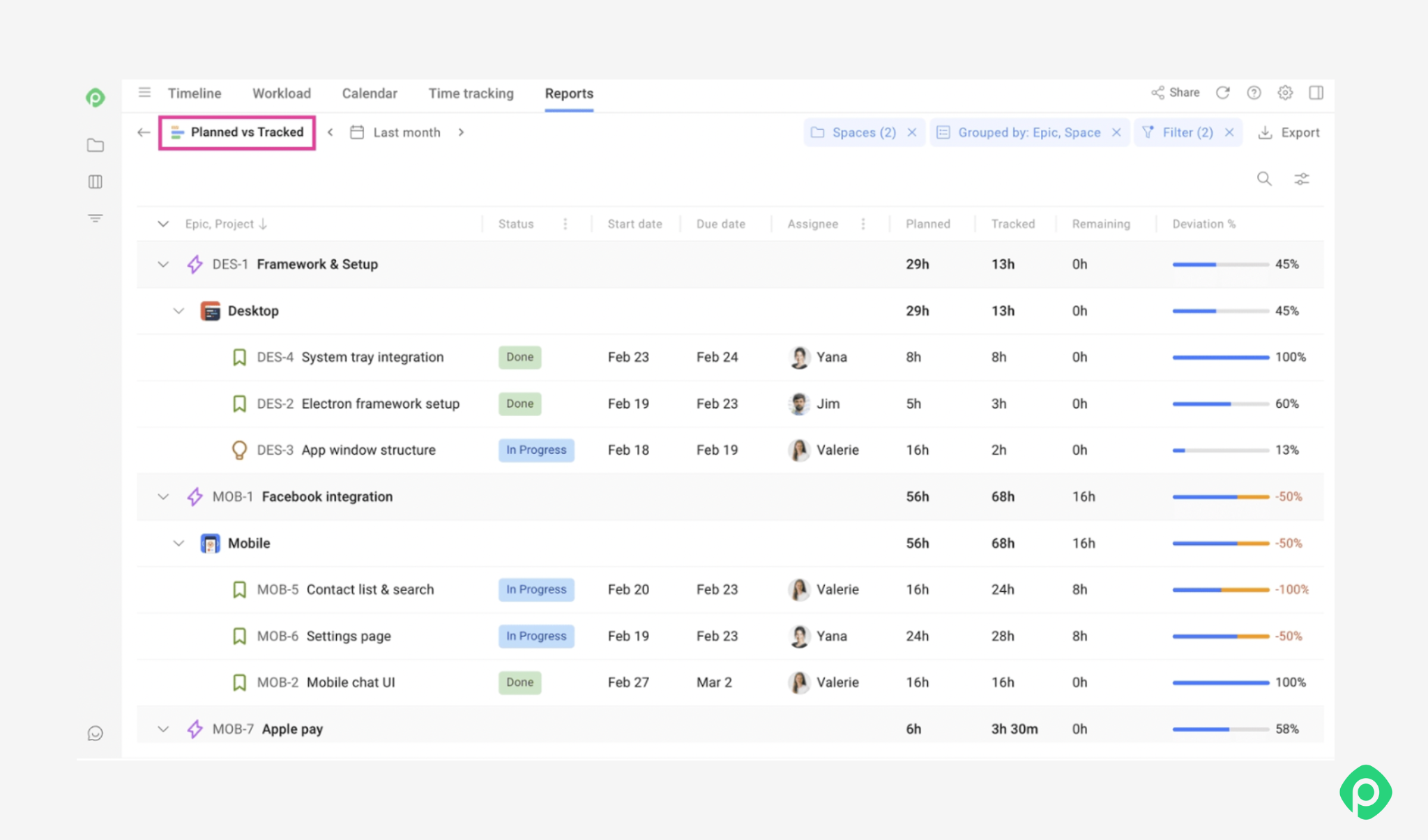
Monitoring planned vs tracked in Planyway for Jira.
Measure schedule performance: For projects using Earned Value Management, Schedule Variance (SV = EV − PV) indicates whether progress is ahead of or behind the planned value. A negative SV signals that the project is behind schedule.
Take corrective action: If the project starts slipping, look at the cause before changing dates. Depending on the situation, you can fast-track work by overlapping activities or crash critical tasks by adding resources.
A project schedule is a living artifact
Creating a detailed project schedule only to have it approved and forgotten may not be the best way. Your schedule needs to evolve and move along with your project life cycle, reflecting the reality you’re working in. But remember that it’s just a project management tool that can’t replace common sense, communication with your team, or your flexibility to adapt.
If you’re working in Jira, Planyway can help you make the best of your scheduling. It brings visual timelines, Gantt charts, workload planning, calendars, and task boards together, so you can plan the work and adjust the schedule without losing the bigger picture.


FAQ
Project scheduling is the process of defining when project activities will happen, in what order, and who will be responsible for them. It creates a timeline that helps the team coordinate work, manage dependencies, and track progress.
The three common types are master schedules, milestone schedules, and detailed schedules. A master schedule provides a high-level view across projects, a milestone schedule focuses on key events and deadlines, and a detailed schedule covers individual tasks, dates, resources, and dependencies.
Common project scheduling tools include Gantt charts, network diagrams, project calendars, workload/resource views, and Kanban boards. Depending on the goal, the best tools may vary: for timelines, Gantt charts work the best, while workload views help manage capacity and Kanban boards support day-to-day execution.
A project schedule should include tasks and deliverables, start and end dates, task durations, dependencies, milestones, owners, and resource requirements.