Workflow management: how processes, systems, and software work together

Every team has a workflow, whether anyone designed it or not. Work comes in, passes through a few hands, waits somewhere, and eventually comes out the other end. Workflow management is the practice of making that journey deliberate: defining the steps and rules, making queues and blockers visible, and improving the process as the team learns.
While most guides jump straight to workflow management software tools and workflow automation, ours starts from the very basics, with the flow itself: what it is, why it breaks, and how project managers can build a team focused on managing it. Because even the best workflow management software can't fix a process nobody understands, and that's why it's essential to get the fundamentals right before choosing a workflow tool or trying to automate processes.
TL;DR
- Workflow management is designing, maintaining, and improving the steps, rules, and responsibilities through which work moves from start to finish. Project management is broader and also covers budget, scope, resources, and risk.
- Unmanaged flow fails in familiar ways: work piles up before a bottleneck, nobody owns the whole flow, and everything is started while little is finished.
- The fix comes in three steps: define the system, manage the flow (visible queues, WIP limits, clear handoffs), and track throughput, cycle time, and work item age.
- Choose software only after the flow is defined. Look for custom workflows, visibility, metrics, automation, and integrations.
What is workflow management?
A workflow is a sequence of steps, decisions, and rules through which work moves from initiation to completion. For example, in car manufacturing, the workflow might span everything from designing a new model to assembling the vehicle and preparing it for sale.
Workflow management is the practice of designing, maintaining, and improving these workflows. It involves defining the steps and responsibilities, establishing rules for how work progresses, and identifying bottlenecks that slow it down, whether in internal processes or in client-facing ones such as client onboarding.
In our car manufacturing example, this could mean coordinating the timing of component deliveries with assembly schedules to prevent production delays and parts accumulating in the warehouse. The goal isn't simply to make sure every task gets done, but to ensure that work flows through the process efficiently and predictably.
What goes into designing a workflow?
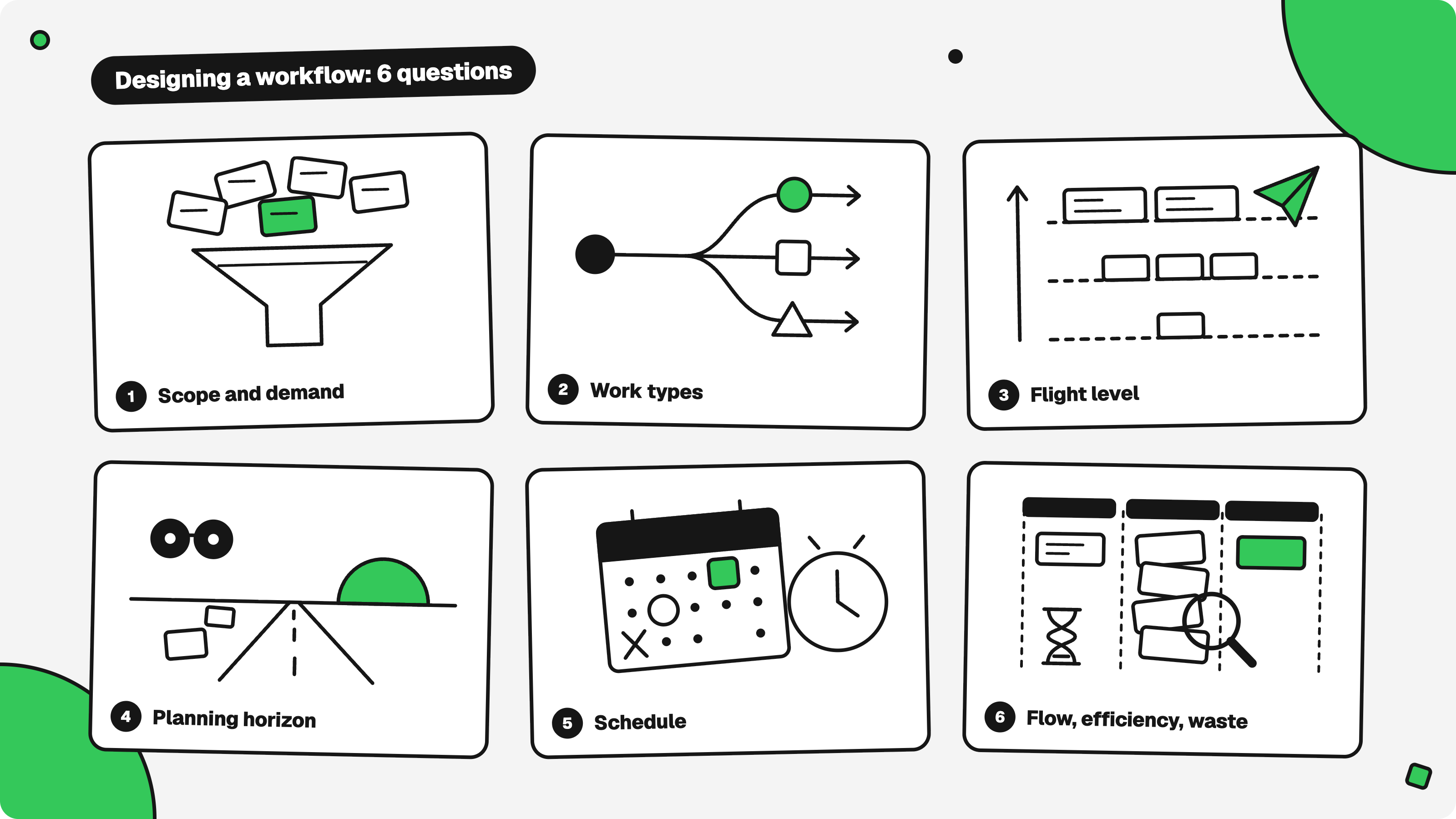
Before managing a workflow, you need to define how it should work. This means answering six questions that cover the key elements of any workflow:
- Scope and demand: What are we working on, and how much of it arrives?
- Work types: Is all work the same, or do different types need different paths?
- Flight level: At what altitude are we looking, from single tasks to work spanning several teams?
- Planning horizon: How far ahead can we foresee demand?
- Schedule: Which events does the flow depend on?
- Flow, efficiency, and waste: Where does work accumulate, how much do we finish, and which activities consume time without adding value?
In its simplest form, a workflow might be nothing more than task management: moving a ticket from one column on a Kanban board to another. But once you want to understand why work gets stuck, predict delivery, and improve performance, workflow management becomes more than tracking task status. It becomes the practice of understanding and improving how work moves through a system, and it gets more demanding on complex projects, where multiple workflows run side by side.
Workflow management vs project management
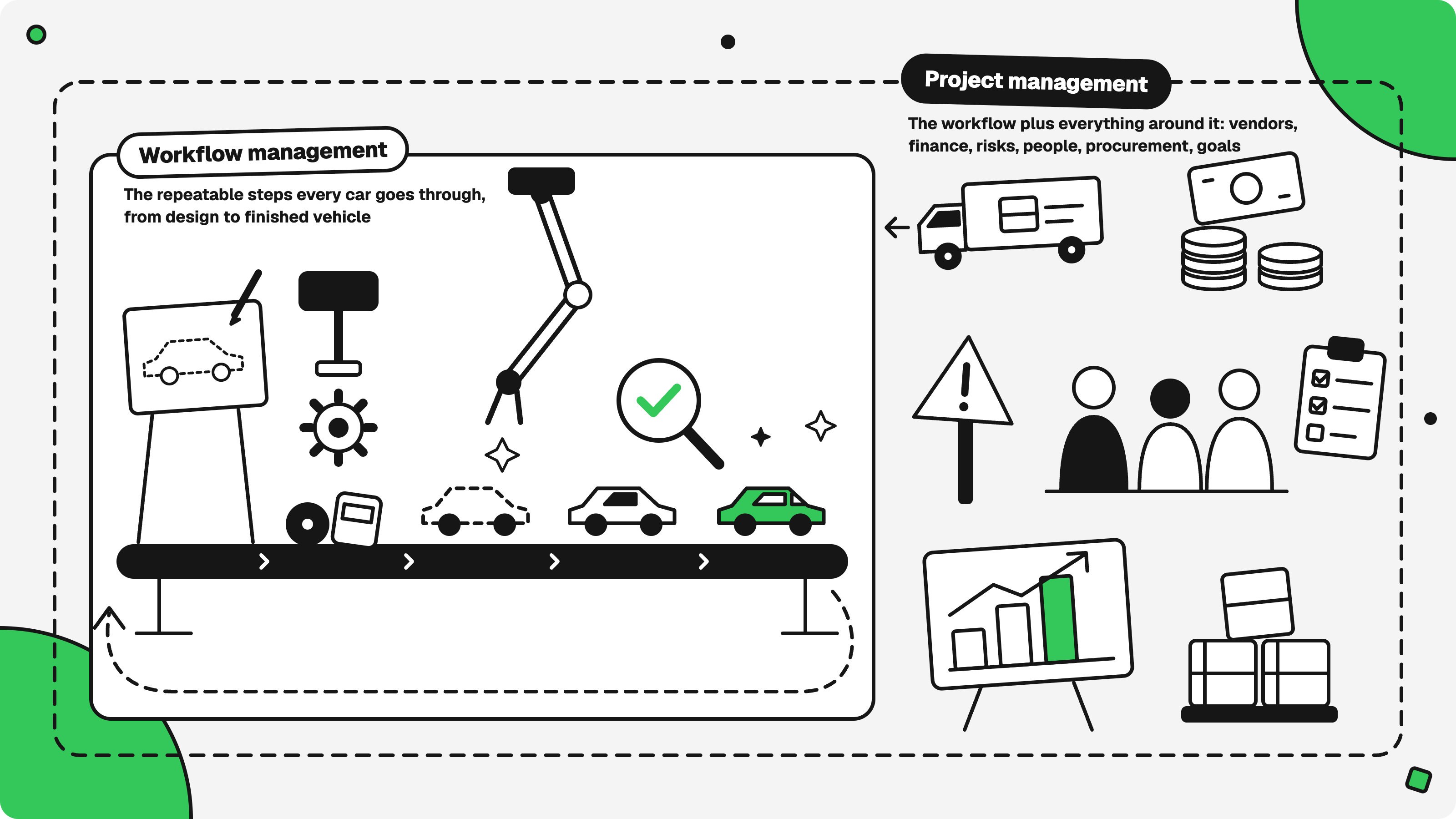
Project management is the broader discipline. It coordinates resource allocation, budget, scope, risks, and other elements needed to achieve a project's objectives. Moving work through the project is one part of that job.
Workflow management focuses on that part in greater depth: how work moves through a process, where it waits, and how to make delivery faster and more predictable.
The two disciplines overlap because decisions about resources, schedules, and risks directly affect workflow. A late vendor, a budget cut, or a missed milestone can cause work to pile up somewhere in the process. But the two disciplines ask different questions:
- Project management: How do we achieve the project's objectives?
- Workflow management: How does work move toward those objectives, and how can we improve that movement?
In our car manufacturing example, workflow management keeps production moving by coordinating assembly stages, ensuring parts arrive when needed, and preventing bottlenecks. Project management covers the broader challenge of bringing the car to market, from securing financing and negotiating with vendors to working with procurement teams and managing production risks.
The importance of flow in workflow management
Flow is how work moves through a workflow over time: how fast items travel from start to finish, where they wait, and how steadily they arrive. In the car factory, the workflow is the list of stages. The flow is what actually happens in them: chassis waiting for engines, engines waiting for a free assembly slot, finished cars waiting for inspection.
Flow exists whether you manage it or not. Left alone, work piles up in some stages, starves others, and finishes whenever it finishes. Managing flow means making it visible and shaping it on purpose, which is why Lean and Kanban, with decades of theory on exactly this, are the natural reference points.
Four characteristics of effective flow
A team exists to produce something of value. A project manager works on four characteristics of the flow that serve that purpose, and each one is what you reach for when the previous one isn't enough.
Output
Output is the reason the team exists, so it comes first. It has two sides. Effectiveness is whether the output achieves the goals the organization set. Efficiency is whether you get it without waste: idle time, rework, and overloaded stages. Trying to maximize efficiency alone misses half the picture: a factory that builds a thousand cars nobody wants is efficient but not effective. One that builds the right car while half the line stands idle is the opposite.
Predictability
When output is low, the first question is why, and you can't answer it without transparency. Predictability is transparency in practice: you can monitor progress at every step, see where work waits and what blocks it, and so say where things are heading and what the output will be. In the factory, you know how long a car normally takes from chassis to showroom, and you notice the moment one runs late.
Adaptability
Sometimes transparency isn't enough: the picture is unclear, or you see the problem, and the system can't respond. Then the team, its people, and its process must be controllable enough that changes can be introduced to improve the situation. This is the real case for Agile. It's not a methodology to adopt for its own sake. Short feedback loops let you try a change, see its effect, and correct course while work is still moving, like fixing a wheel while the car keeps driving.
Continuous self-improvement
The end state comes from TRIZ and its concept of the ideal final result: the function is delivered, but the system does it by itself. For a flow, that means the team does the improving without outside intervention. The entire team knows what a good process looks like, inspects its own, and introduces improvements by consensus.
Your role as a project manager is not to push work through the system. It's to build these four characteristics in the team: set up the visibility, teach people to read it, and gradually hand the improvement over to them. The next section covers the tools for doing that.
What happens when flow isn't managed
Poor workflow management often leads to three problems.
Work piles up in front of a bottleneck
Let's imagine a creative team at a design agency where every creative project has to go through an approval process (the creative director's sign-off) before the client gets it. Designers finish a banner, a landing page, a pitch deck, and drop each one into the review column. The creative director spends their days on client calls and new pitches, so they make it to reviews in the evening, if at all. By Thursday, there are fifteen items waiting, half of them are due this week, and the client is asking where everything is.
The instinct is to push the designers to move faster, but that only makes the line in front of the creative director longer. The real constraint here is the review step. Until someone notices it and changes something there, the queue keeps growing. It's the same as finished cars piling up at the end of the line because the inspection bay is full.
Nobody owns the whole flow
Take a product launch split across three different teams. Design hands off the mockups and closes its tickets. Engineering builds the feature and marks it done. Marketing writes the announcement email and schedules it for Tuesday.
Everyone hits their own deadline. Then, the day before launch, someone finally clicks through the whole thing and finds that the email links to a page that isn't live yet, and the onboarding screen still shows last quarter's pricing. Every part was finished. Nobody was checking how the parts fit together, because keeping everyone on the same page wasn't anyone's job. This is the handoff problem, and it gets worse with every team you add.
Everything gets started, but little gets finished
This one is a pattern rather than a single incident, but any software team will recognize it. Developers pick up new tickets whenever they're blocked, or a request arrives, and soon everyone is "in progress" on three things. Nothing is idle, yet nothing ships. By Little's Law, average cycle time equals work in progress divided by throughput. Raise the work in progress without raising throughput, and every item takes longer.
In all three cases, people were busy. However, there was no dedicated person to manage the movement of the work, and that's what the four characteristics above address.
The benefits of workflow management are just as consistent. Where flow is managed, delivery becomes predictable, bottlenecks are found before they turn into crises, and the same people produce more finished work, so you enhance productivity without adding headcount. Clear ownership and explicit "done" conditions reduce human error and handoff failures. A documented, standardized workflow shortens onboarding for new team members and exposes manual processes and routine tasks worth automating.
Customers see it as faster, more reliable delivery, and customer satisfaction follows.
Workflow management best practices and techniques
A project manager's toolkit falls into three groups, in the order you'd use them: define the system, manage the flow, then evaluate and improve it.
Define the system
You can't manage a flow you haven't described. This is workflow mapping, and it answers six questions.
- Where does the workflow start and end? In the car factory, it might run from an approved design to a vehicle handed to the dealer. Marketing is outside. Naming what's out of scope prevents the workflow from growing unnoticed.
- What moves through it, and does everything follow the same path? Requests, tasks, features, and documents are different work items. A bug and a new feature rarely need the same stages, so give different types different workflows.
- What stages exist, and what must be true to enter or leave each one? A stage should mean something, and every transition should have an explicit condition. For example, a ticket can't move to "In review" until its tests pass. Many tools enforce these conditions as validation rules. This is what turns a column on a board into a standardized workflow.
- Who owns what? Who decides, who can assign tasks, who does the work, who handles blocked items, and what inputs do you depend on from other people, teams, or external events?
- What does "done" mean? Deadlines, quality standards, and service expectations, agreed before work starts.
- At what flight level are you working? Flight level is the altitude at which you look at work: individual tasks, one team's workflow, or work flowing across several teams. Each level has its own planning horizon and its own problems, so pick one on purpose.
Manage the flow
With the system defined, the daily work is keeping it moving.
- Manage demand and priorities. Know how much work arrives, how much it varies, and whether it exceeds capacity. Decide what goes first, and agree on how urgent requests affect existing commitments.
- Make queues visible. Work sitting in queues is the largest hidden cost in most workflows. Show where it accumulates, so a pile-up in one stage is noticed early instead of being discovered at the deadline.
- Limit work in progress and pull work. Cap how much work is active at once, and start something new only when capacity frees up, rather than pushing tasks into an overloaded process. This is the direct answer to the "everything started, little finished" pattern above.
- Manage handoffs and blockers. Most delays happen between stages, not inside them. Make impediments visible and agree in advance on how they're resolved and by whom.
- Manage commitments and plan realistically. Define when work is accepted for delivery and what must be true before you commit. Plan and manage timelines around deadlines, dependencies, and capacity without pretending everything can be predicted in advance.
Evaluate…
Flow management without measurement is guesswork. Start with three key metrics:
- Throughput: how many items the system finishes in a period
- Cycle time: how long an item takes from a defined start to completion
- Work item age: how long unfinished items have been in progress. Unlike cycle time, which you only learn after an item is done, age warns you while there's still time to act.
…and improve
Then use them to ask better questions:
- Where does work accumulate, and why do times vary? Bottlenecks and variability explain most of the gap between plan and reality.
- What's going on with the outliers? There are always tasks that don't "fit" into the flow. Be ready to manage them individually or find a pattern among them and eliminate the underlying problem.
- Where is the waste? Look for unnecessary waiting, handoffs, and rework, and for repetitive processes that could be automated. Track defects alongside speed so faster flow doesn't come at the expense of quality.
- Do our policies work? Entry criteria, WIP limits, and prioritization rules are hypotheses. Check whether they produce the intended results.
- Does it help the customer? An improvement that speeds up the internal flow but doesn't deliver more value isn't one.
Simple template for a team to follow when managing workflow
Here's what you might want to consider to set up a well-functioning workflow.
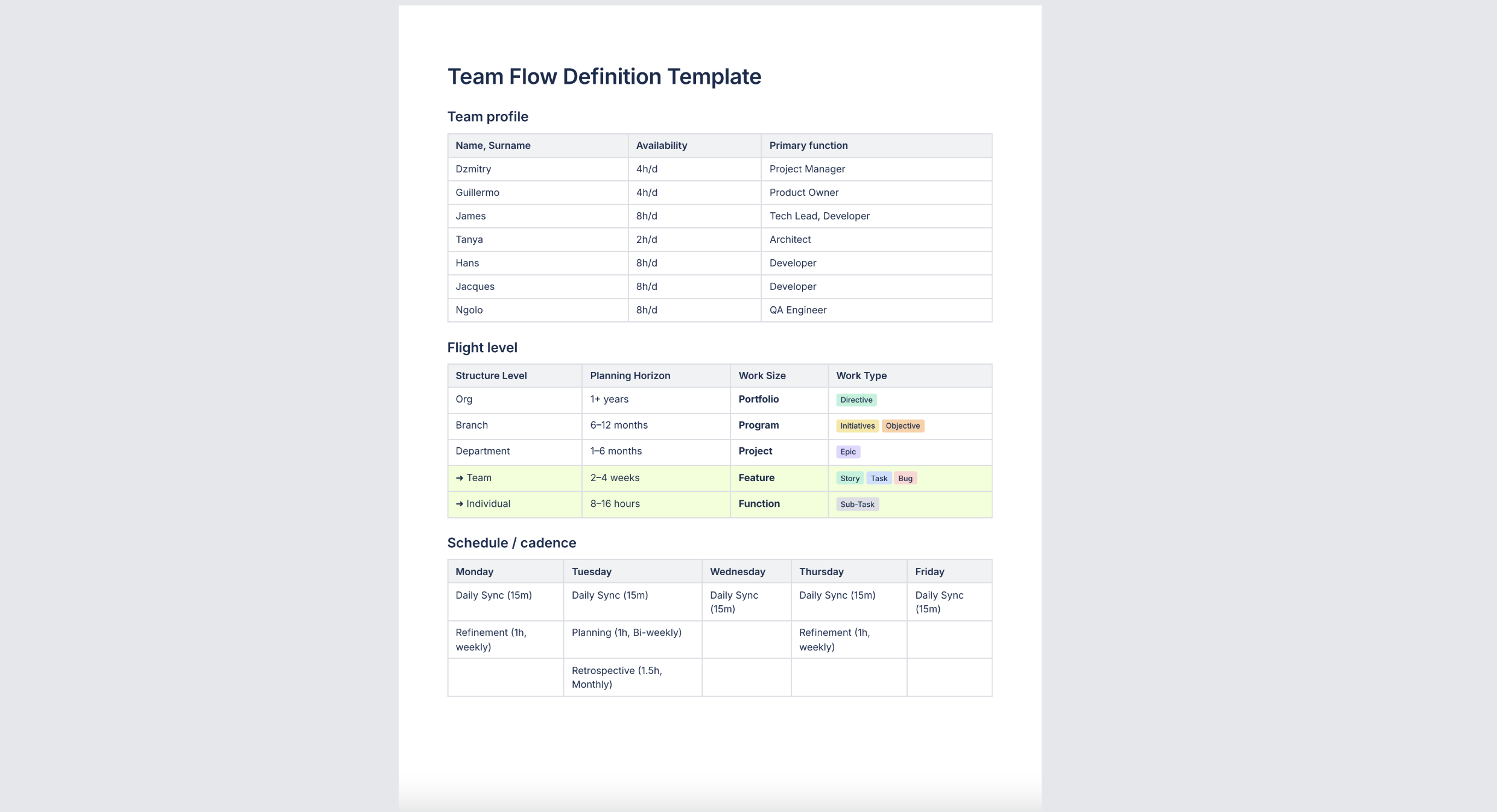
📥 Download as Excel
📥 Download as PDF
P.S. If your team works in Jira, Planyway turns this template into a live plan: everyone’s availability becomes a workload view, and epics, stories, and sub-tasks line up on one timeline or in one table.
Workflow management software: how to choose one
Workflow management software (also called workflow management tools, workflow software, or a workflow management system) is where your definition of the flow lives: statuses, transition rules, boards, automations, and reports. The tool doesn't create a good flow. It enforces and shows the one you defined, so streamlining workflows starts before you pick one, and automating a flow nobody understands just produces the same mess faster. So, define first, using the template above, then choose.
What to look for
Each criterion maps to a part of the template.
- Custom workflows. Can you give each work type its own statuses and set conditions on transitions, such as "can't move to Done until the review is approved"? Look for a workflow builder with conditional logic that handles multi-step workflows, not a fixed set of columns.
- Visibility. Can you see queues, blocked items, and WIP limits? Can you view work across several projects at once, on a centralized platform rather than in different tools?
- Metrics. Throughput, cycle time, and work item age should be available out of the box or through reports and export.
- Automation. Built-in rules or separate workflow automation software should automate repetitive tasks: assigning, creating recurring tasks, notifying, moving items, and routing approvals to the right person. Approval workflows should record who approved what. Automate only steps that are stable, since automating a step you're still changing locks in the wrong version.
- Capacity and time. Can you compare workload to availability and track actual time against estimates?
- Integrations. The tool should connect to where your team already works (code repositories, CI/CD, chat, existing systems), so data management doesn't mean entering the same data twice.
- Collaboration and permissions. Roles and access control that support smooth team collaboration, and, if you work with clients, a way to share progress with them, such as client portals.
- Adoption and cost. How long does onboarding take? Is there a free plan or trial, and what does the basic plan include? What does per-user pricing look like when the team grows?
Types of tools
- Work and project management platforms (Jira, monday.com, Asana, Trello): project management software that combines project management features, such as project tracking, with boards and built-in workflows. They fit team-level flow, from software teams to marketing teams.
- Process automation and business process management tools (low-code builders, automation services, BPM engines): they help streamline operations when a workflow crosses several systems or runs mostly as automated workflows, such as invoice processing, document management, or employee onboarding.
- Add-ons for the tool you already use: they fill gaps without migrating your existing processes.
How to run the selection
- Write your flow definition first.
- Turn it into a must-have list.
- Trial one tool with one team on a real project.
- After a couple of iterations, check whether you can actually get the metrics you defined.
How Planyway extends your Jira workflow management
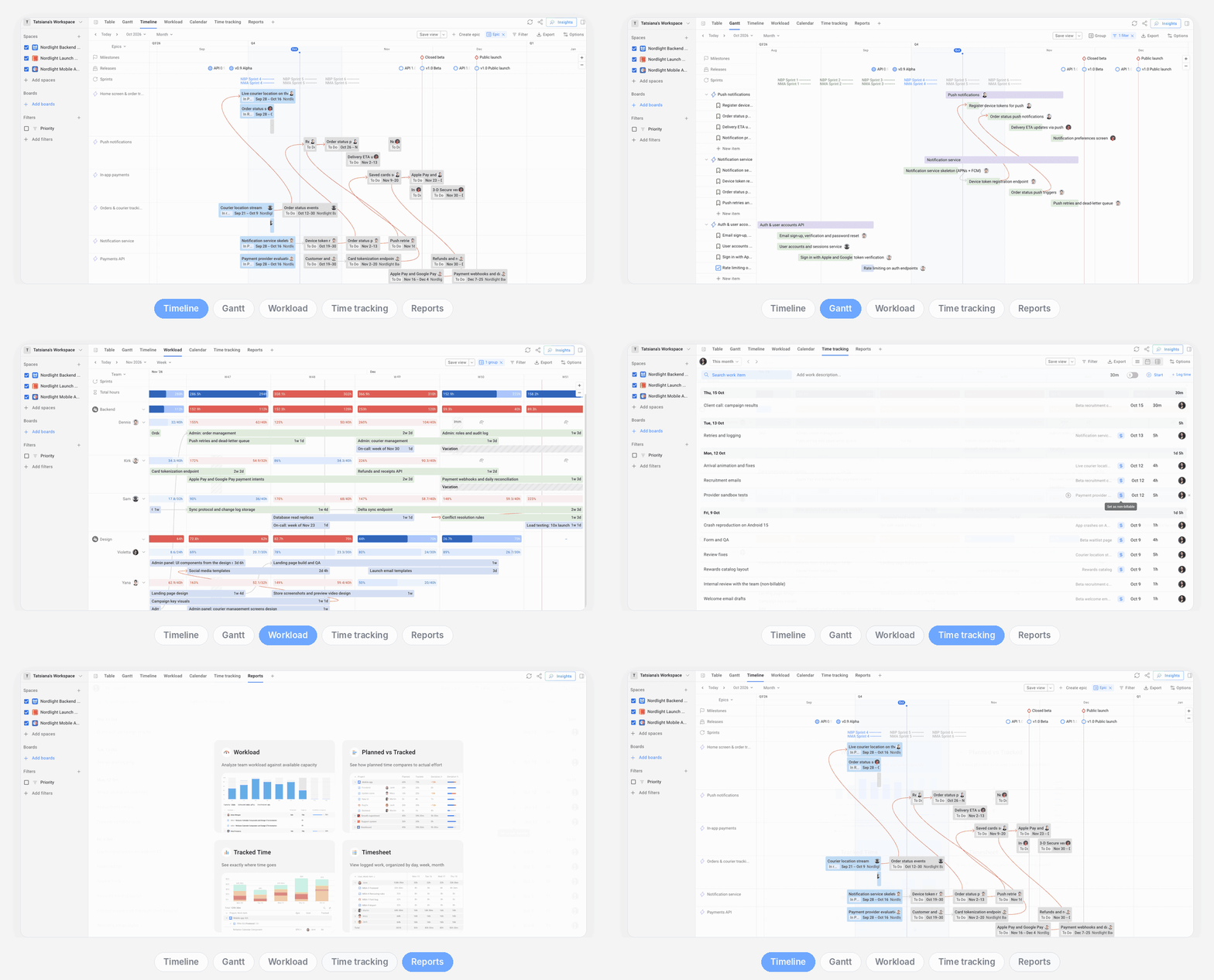
If your team works in Jira, you already have the core: custom workflows with transition conditions, issue types, and boards. What Jira shows less well is the plan around the flow: who’s free when, who’s drowning, how work in one space depends on work in another, and how long things actually take. Planyway adds that on top of the same Jira data:
- Dependencies across spaces. Remember the launch where every team hit its deadline and the parts still didn’t fit? In Planyway, cross-space dependencies show up on one timeline, and autoscheduling shifts dependent work when something slips.
- Workload and capacity. Planyway delivers a live capacity view with utilization bars and over-capacity alerts that show when someone’s booked past their limit or has work landing on their days off, across all your spaces at once.
- Time tracking. You can also compare actual time with estimates within the same Planyway workspace (time syncs both ways with Jira, so nobody logs it twice).
- Several spaces on one timeline. The flight-level view, when you’re looking at work across teams rather than inside one.
Final word
Workflow management isn't about adding process to your business operations. It's about making the movement of work visible and giving the team the means to improve it. Start small: define one flow, agree on the rules, limit work in progress, and watch cycle time and work item age for a few weeks. Change one thing at a time and see what the numbers do.
The goal, as in the car factory, isn't to push work harder. It's to build a system that runs predictably and eventually improves itself. Software helps once the flow is defined. If your team works in Jira, Planyway adds timeline, workload, and time tracking on top of the workflow you've built.


FAQ
A software team defines how a bug moves from To Do through In Progress to Done, and sets a condition for each transition: tests pass, and a second developer has reviewed the code. Each developer works on no more than two items at a time, and the team tracks cycle time and looks for bottlenecks in its retrospective. The same logic applies to a car factory coordinating component deliveries with assembly: define the steps, set the rules, watch where work waits, and improve.
The four most commonly cited are:
- Sequential: steps happen in a fixed order, such as onboarding a new employee.
- Parallel: independent steps happen at the same time, such as a writer drafting while a designer prepares visuals.
- State machine: work moves between states depending on conditions, such as a ticket going from Open to In Progress to Closed.
- Rules-driven: predefined rules decide what happens next, such as a loan advancing only when the applicant passes a credit threshold.
Some sources add AI-driven and collaborative workflows to the list. Sequential workflows are the easiest to set up, but most Jira workflows are state machines.
There's no single best workflow software for everyone. It depends on your flow, so define the flow first, then check the tool against the criteria above: custom workflows with transition conditions, visibility of queues and blockers, metrics such as cycle time, automation for repetitive tasks, and integrations. Teams already working in Jira usually keep Jira for the workflow itself and add an app for planning, capacity, and time tracking, such as Planyway.
It's a platform where you define, run, and monitor workflows: statuses, transition rules, boards, automations, approvals, and reports. It replaces spreadsheets, email chains, and manual status updates with one place where every step, owner, and deadline is visible. Examples range from work management platforms like Jira (with add-ons like Planyway) or Monday to process automation and business process management tools.
It depends on the question you're asking:
- How does work move, and under what conditions? Use a flowchart or process map showing steps and transition conditions.
- Where is work right now? Use a Kanban board, which shows queues, blockers, and WIP limits.
- When will it be done, and who has capacity? Use a timeline, calendar, or workload view.
Most teams use two or all three, because each one answers a different question.