14 free timesheet templates for Excel (weekly, monthly, and other options)

While putting this set together, we went through maybe twenty free timesheet templates from the first page of Google, and the funny thing is how many of them are just an empty grid with Monday to Sunday down the side and a box at the bottom that says TOTAL PAY, which you then fill in yourself with your phone calculator, so what's the template even for?
The template must do the arithmetic. You type when someone started, when they went for lunch, when they came back, and when they left, and the sheet takes the lunch breaks out, splits regular and overtime hours, adds whatever paid leave there was, and gets to gross pay on its own, and the project and client sheets do the same thing for billable amounts and how much of the budget has gone.
So, here’s our take, along with 14 timesheet templates for Excel that can be downloaded with one click. And if you’d rather grab the whole library at once, here’s the link to all 14.
14 free timesheet templates (easy download)
We've grouped our timesheet templates by what you're tracking the time for, so the first five are about pay periods (weekly, biweekly, semi-monthly, monthly, daily), the next four are for projects and clients (project, contractor, agency billing, engineering), and the last five came out of our own work with software teams (sprint, developer, team weekly, on-call, R&D capitalization). Each file has a README tab, a sample that's already filled in so you can see what goes where, and cream-colored cells for the things you type.
1. Weekly timesheet template
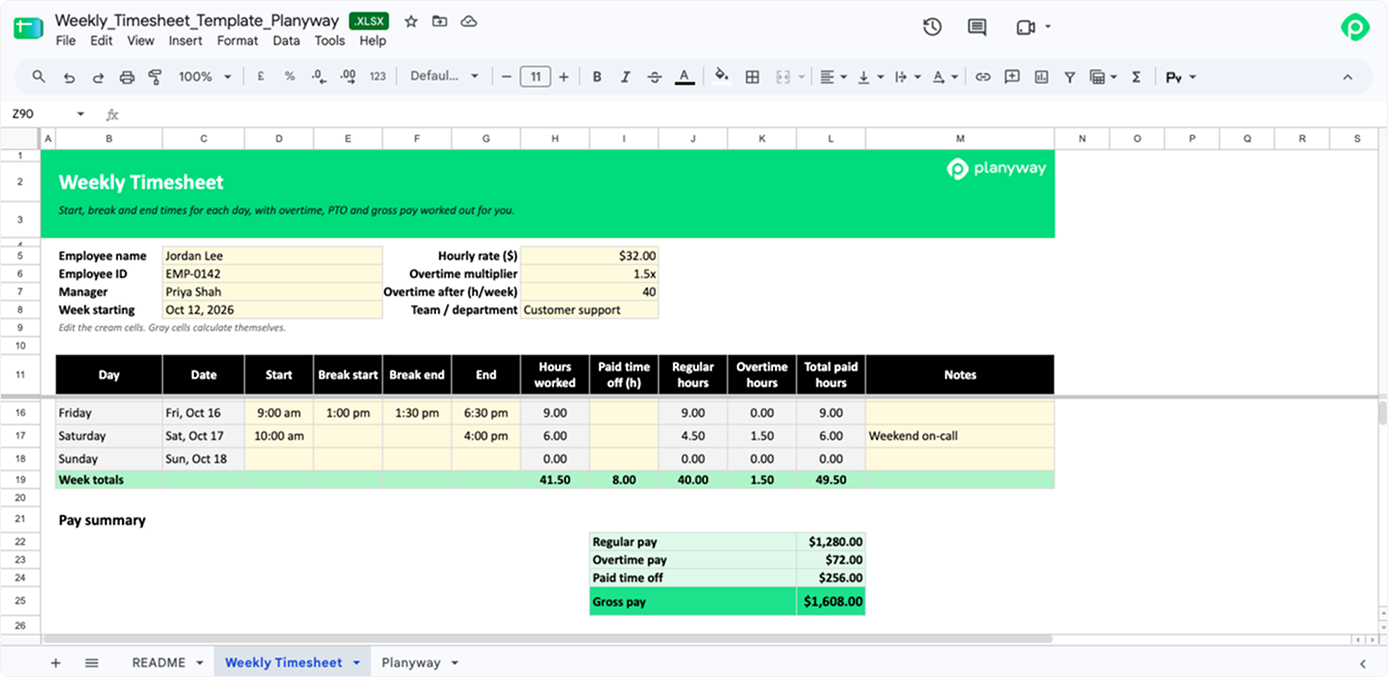
If you pay people every Friday and like having one page per person, this weekly timesheet is the one to start with, since it's seven rows with the employee name and hourly rate at the top, and even a shift that starts at 10 PM and ends at 6 AM comes out right without anyone fiddling with the formula. By the bottom of the page you have hours worked for each day, regular hours and overtime hours split against the weekly limit, vacation days, sick days, and holidays added in as paid leave, and then weekly hours and total pay, which is about everything a small business owner with hourly employees or a site manager with construction workers on changing shifts needs at the end of the week.
📥 Download the weekly timesheet template
2. Biweekly timesheet template
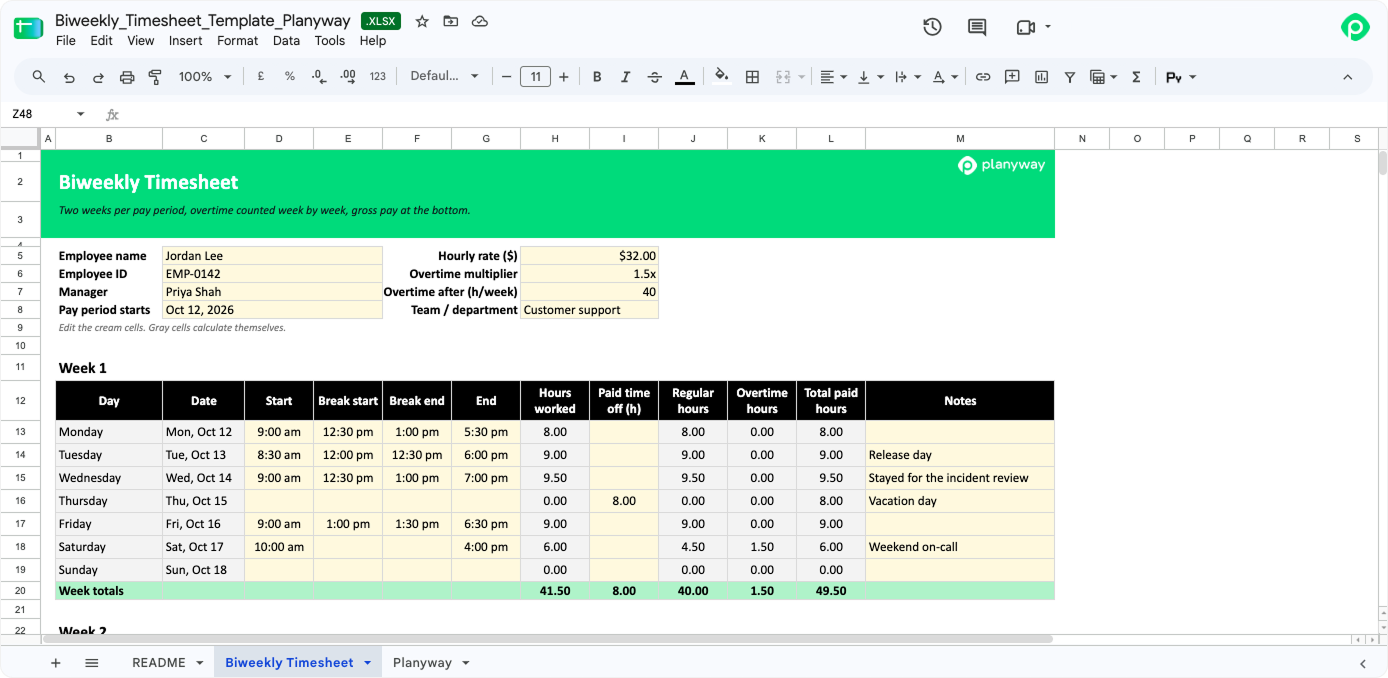
The biweekly timesheet template looks like two weekly sheets glued together with a pay period total underneath, and there's a reason we didn't just make one long 14-row table: if someone works 45 hours in the first week and 35 in the second, the two weeks add up to a clean 80, but you still owe five hours of overtime from week one. Each week gets its own overtime line, so when you calculate total hours worked for the every-other-Friday payroll (that's 26 paychecks a year), the leave hours and gross pay at the bottom already have that sorted out.
📥 Download the biweekly timesheet template
3. Semi-monthly timesheet template
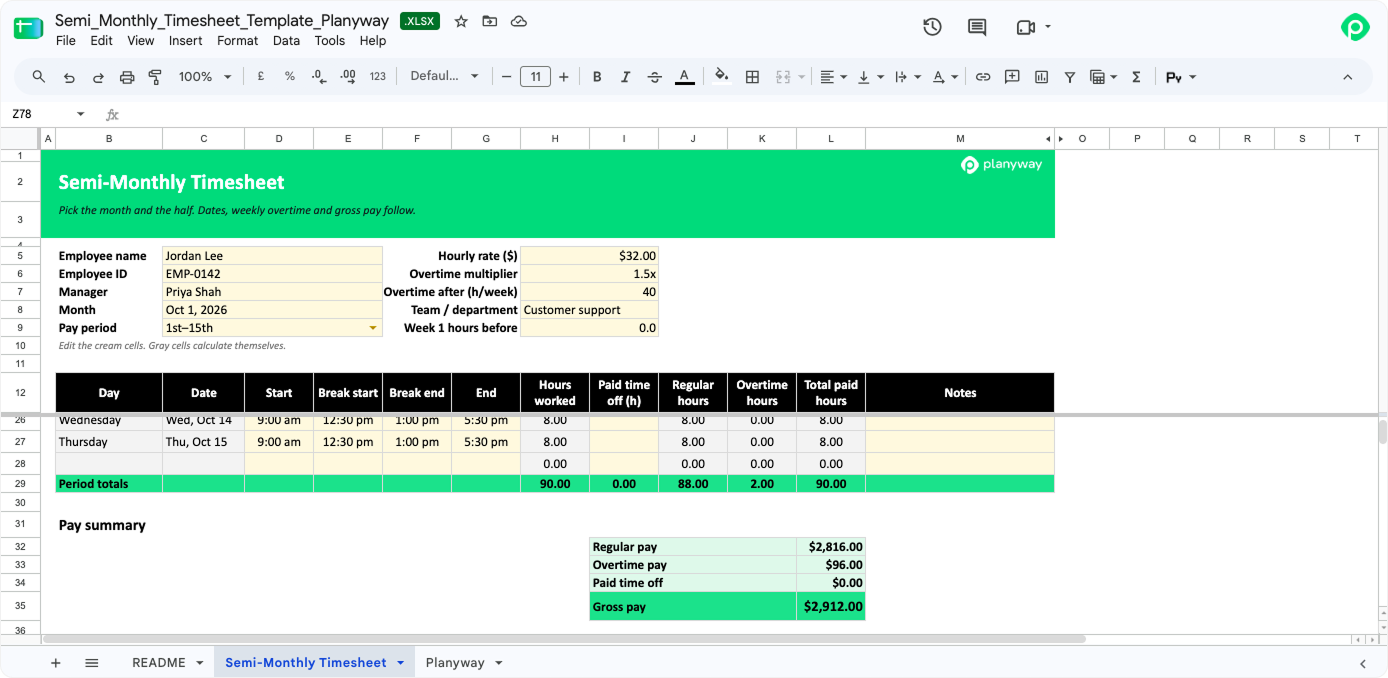
You choose a month and say whether it's the first half or the second, and the semi-monthly timesheet template fills in the right 15 or 16 dates, February too. As weeks almost never start on the 1st or the 16th, there's a “Week 1 hours before” cell where you put those earlier hours, and the math comes out right. It's for anyone paid on a semi-monthly basis, which works out to 24 paychecks a year.
📥 Download the semi-monthly timesheet template
4. Monthly timesheet template
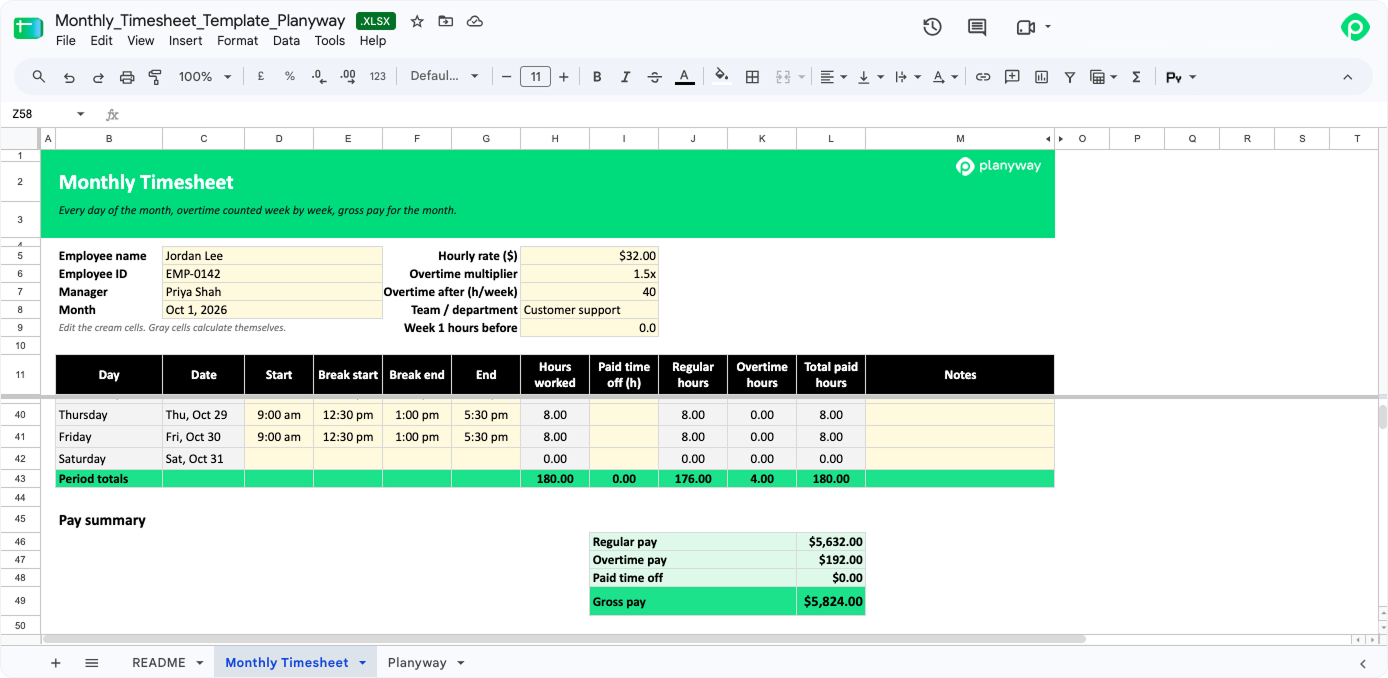
The monthly timesheet template is one long page with every day of the month on it, and you only enter one date for it to work out whether this month has 28, 30, or 31 days, after which it counts overtime week by week inside the month (with the same carry-in cell as the semi-monthly one) and gives you monthly hours and gross pay at the bottom. Part-time staff and contractors who report on a monthly basis like it, because it's one file instead of four, though, honestly, we'd still recommend opening a monthly timesheet once a week, because whatever gets filled in on the 30th for the whole month is mostly a reconstruction.
📥 Download the monthly timesheet template
5. Daily timesheet template
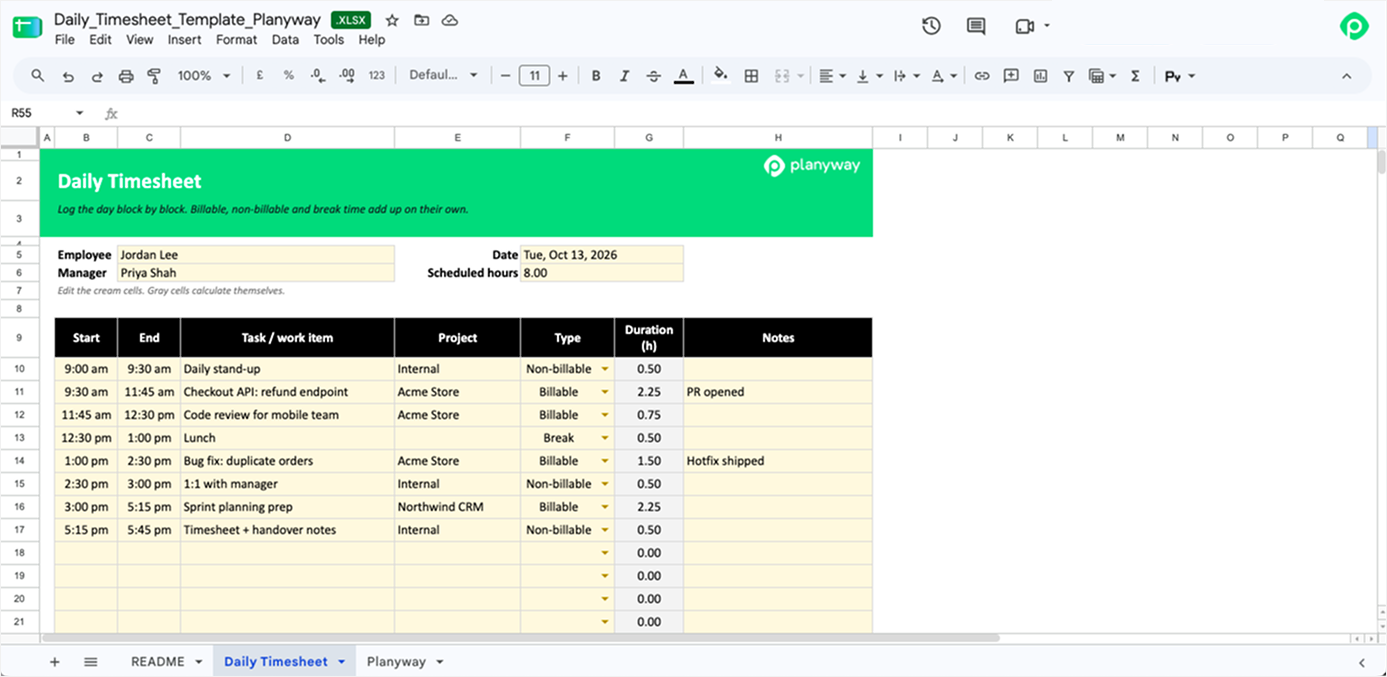
You know the kind of day that starts with a quick call and somehow ends at five with nothing finished? The daily timesheet template is for figuring out where that day went, so instead of one start and one end, you write down blocks of time, each with what you worked on, for which project, and whether it was billable, non-billable, or a break. At the end it tells you how much of the day you could actually bill and how far you drifted from the plan, and if you record work hours this way for two weeks, you'll know a lot more about where your time spent goes than any gut feeling will tell you.
📥 Download the daily timesheet template
6. Project timesheet template
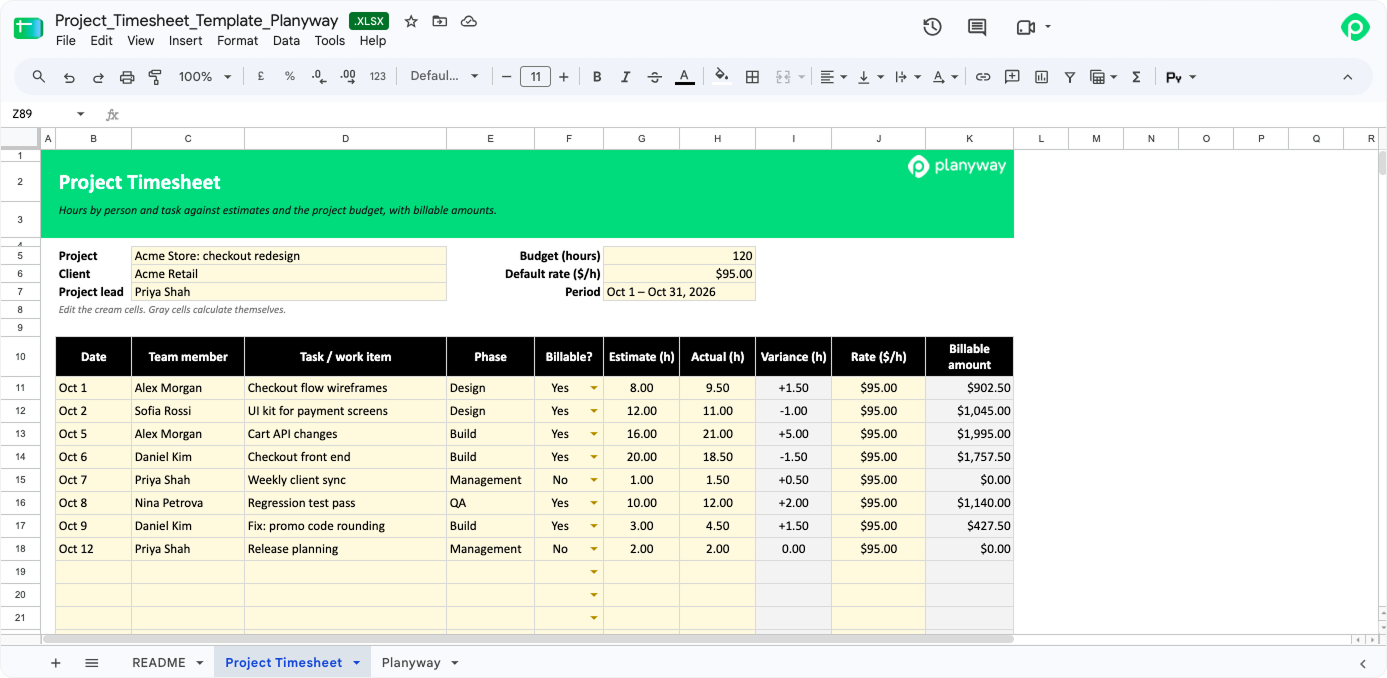
Every project lead we know gets the “So how much budget do we have left?” question on Friday afternoon, and the project timesheet template is meant to make that a two-second answer, since everyone's hours on the project go into one log next to the task, the phase, the original estimate, and a billable flag, with a default rate you can override on any line where someone bills differently. You see the gap between the estimate and the actual on each task, how much of the budget is used, and the billable amount so far, which is most of what it takes to manage project costs on a fixed budget. And if you're running multiple projects, it's simplest to keep one copy per project.
📥 Download the project timesheet template
7. Contractor timesheet template
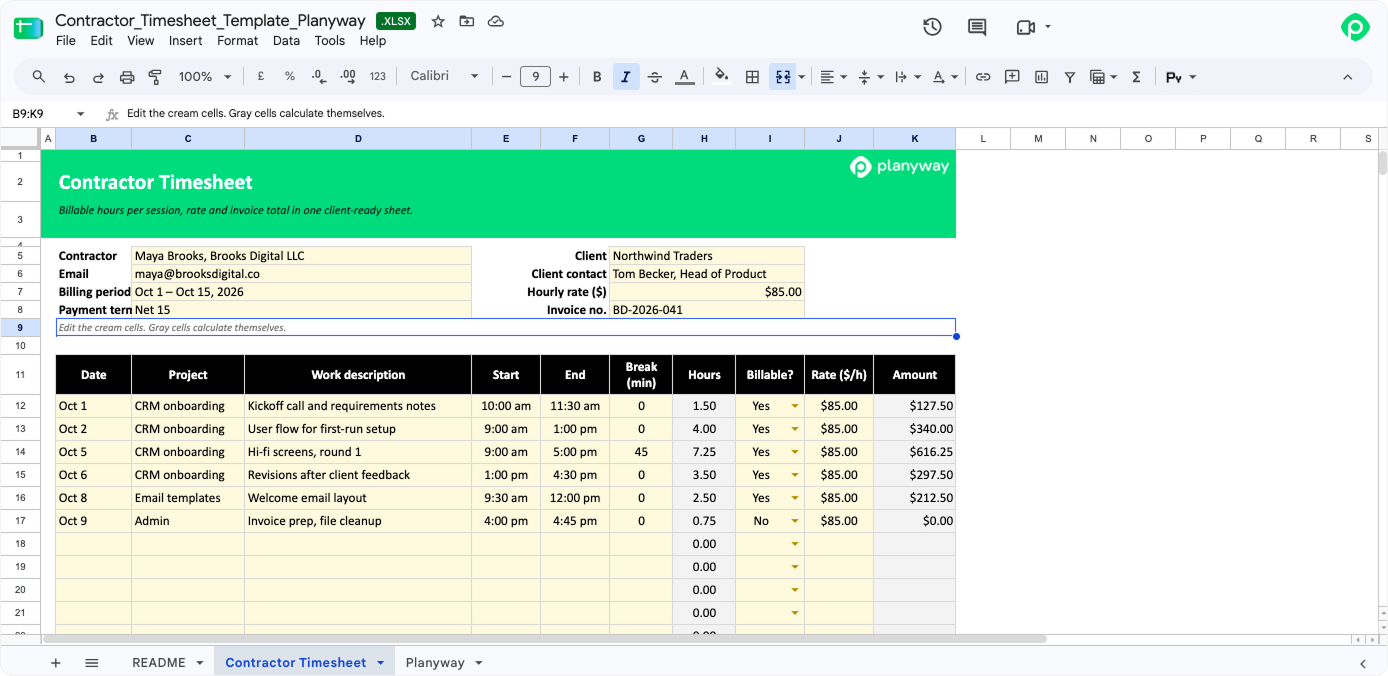
If you freelance, you've probably had a client come back with “What was this four hours on the 12th?” and the contractor sheet is built so that question has an answer on the same page, because every session gets its own line with the date, the project, the relevant details the client would recognize, start and end times, and any unpaid break in minutes. The header holds your details, the client's, and the invoice number, so it doubles as invoice backup, and at the bottom it multiplies billable hours by your hourly rate, then adds expenses and tax to reach the total due. A lawyer friend who looked at it said that with two renamed columns it would work as an attorney timesheet template too, since the hours column already takes the tenths of an hour that most firms bill in.
📥 Download the contractor timesheet template
8. Agency client billing timesheet template
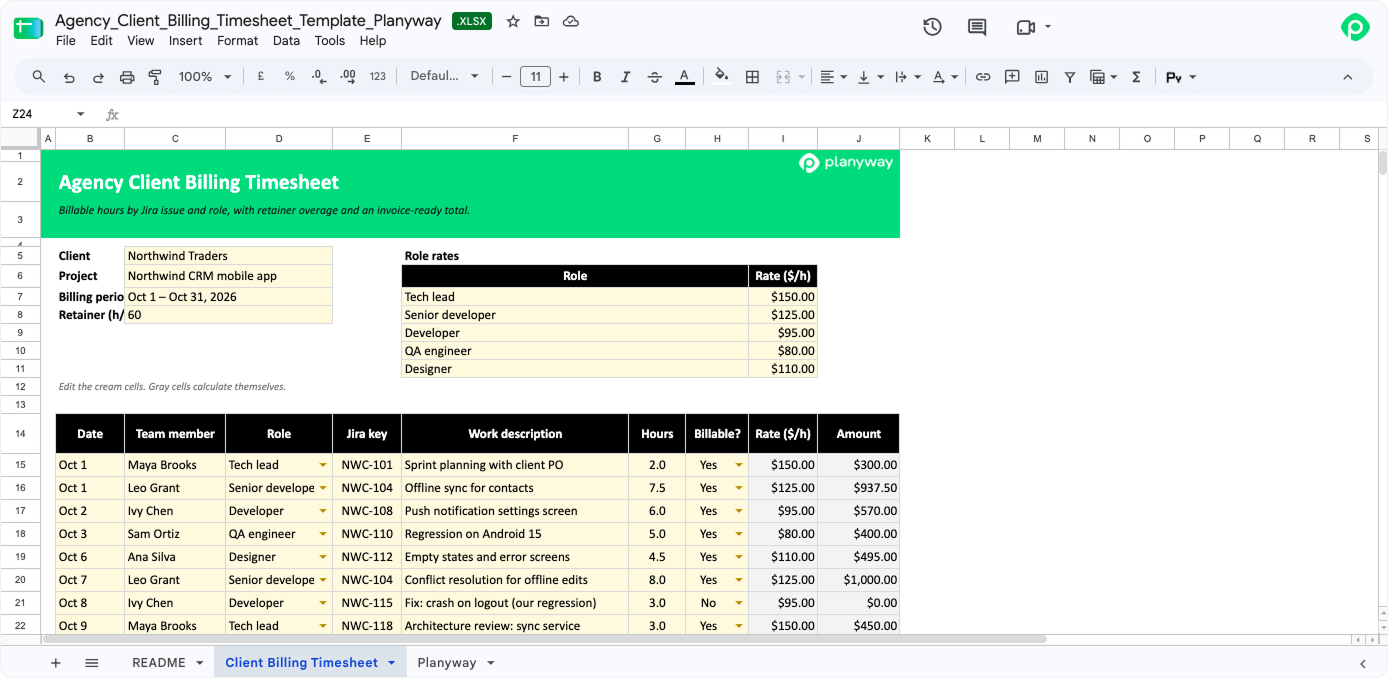
Agencies usually bill by role rather than by person, so in this one you set the rate for a tech lead, a senior developer, QA, and a designer once, and every line picks up the right rate from whoever did the work, next to a Jira key and a description your client can match to something they asked for. When the month closes, you get billable hours and amounts per role, how far you've gone over the retainer, the non-billable time you're absorbing, and then discount, tax, and total due, which is pretty much the whole invoice, and it means accurate invoices stop depending on someone rebuilding the same summary by hand every month.
📥 Download the agency client billing timesheet template
9. Engineering timesheet template
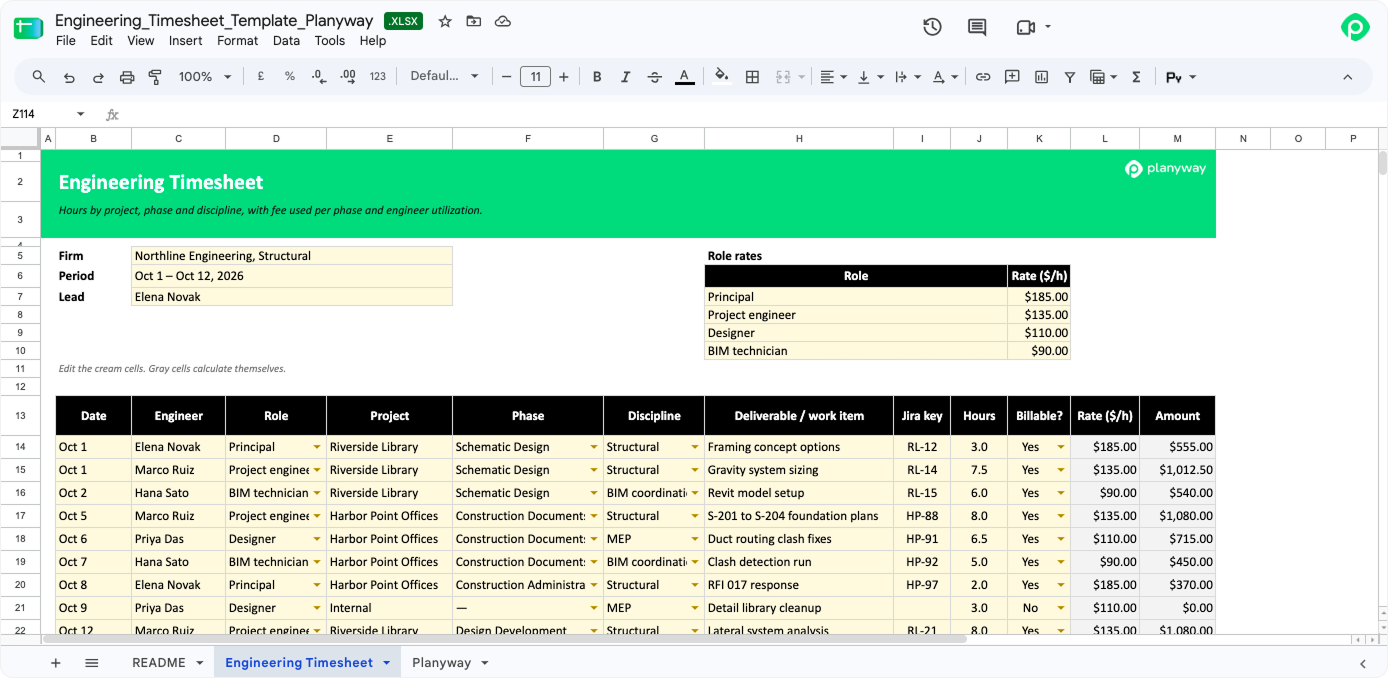
Engineering and architecture firms tend to get paid per phase, so on this sheet every line says which engineer, which role, which phase (schematic design, design development, and so on), which discipline, and which deliverable, with an optional Jira key if your team uses one, and rates are pulled from a small table by role. The part we like most is the phase summary, where the fee used for each phase turns to “Watch” at 80% of its budget and to “Over budget” past 100%, and next to it there's a utilization number for every engineer, so the project details that decide what you can bill all sit in one place.
📥 Download the engineering timesheet template
10. Sprint timesheet template
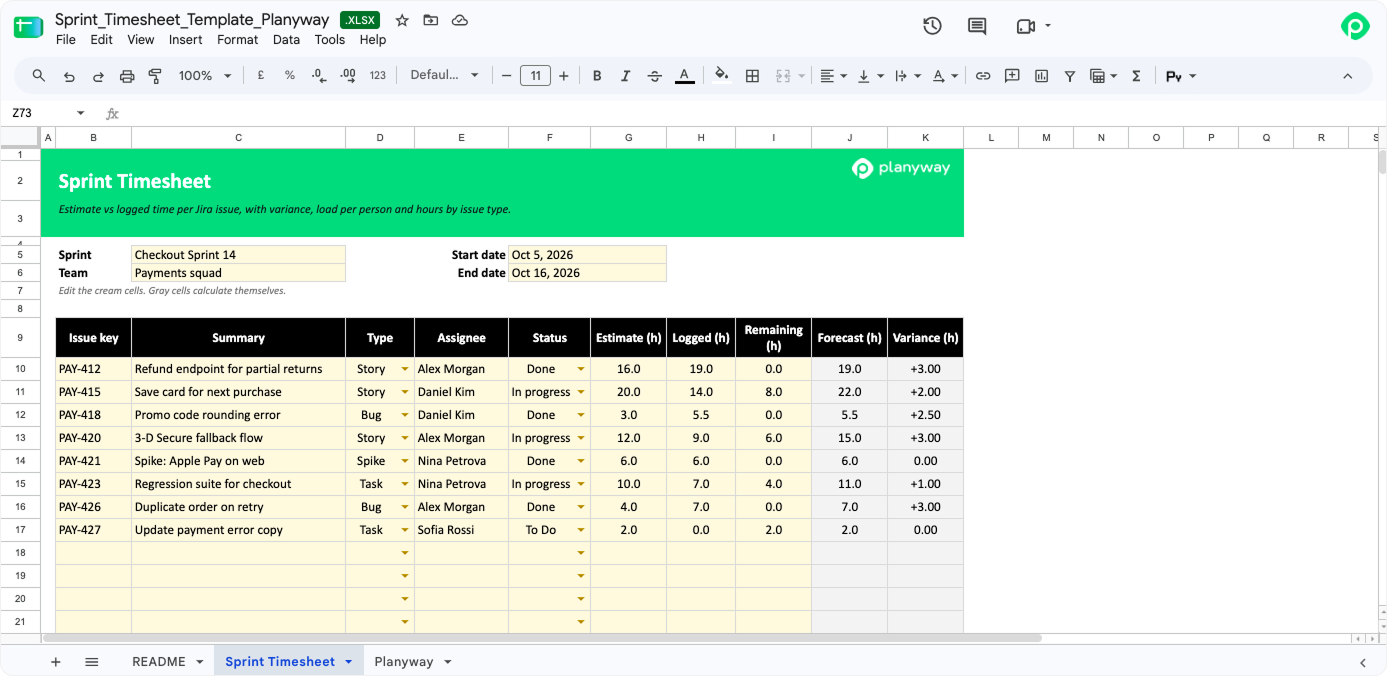
Most retros start with someone saying, “I think we underestimated,” and this sheet is there so you can see by how much, with one line per Jira issue holding the original estimate, the hours logged so far, and the hours someone thinks are left, plus a breakdown of how much went to bugs as opposed to stories. In this version, load per person only counted logged hours, which meant nobody looked overloaded until the sprint was over, so we switched it to logged plus remaining, and now you can see a developer sliding past 100% while there's still time to move a ticket. It gives Scrum teams who estimate in hours some project management numbers for the retro without anyone opening five Jira reports.
📥 Download the sprint timesheet template
11. Software developer timesheet template
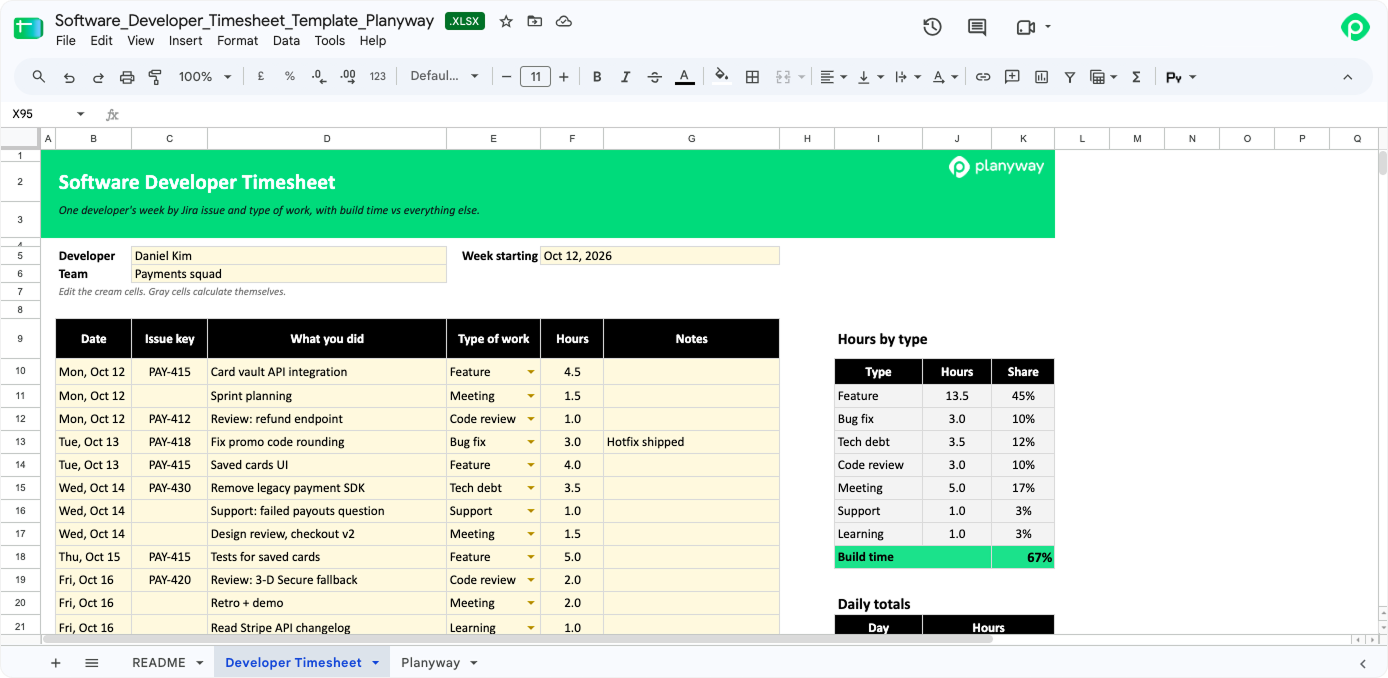
This one came from a developer on our team who was pretty sure his 40-hour week contained about 20 hours of actual coding and wanted proof before bringing it up, so every line has a Jira key, a short note on what he did, and a type, which can be feature, bug fix, tech debt, code review, meeting, support, or learning. The summary shows hours and share of the week for each type, so you can track hours by kind of work for a sprint or two and walk into the conversation about meetings with numbers rather than a feeling.
📥 Download the software developer timesheet template
12. Dev team weekly timesheet template
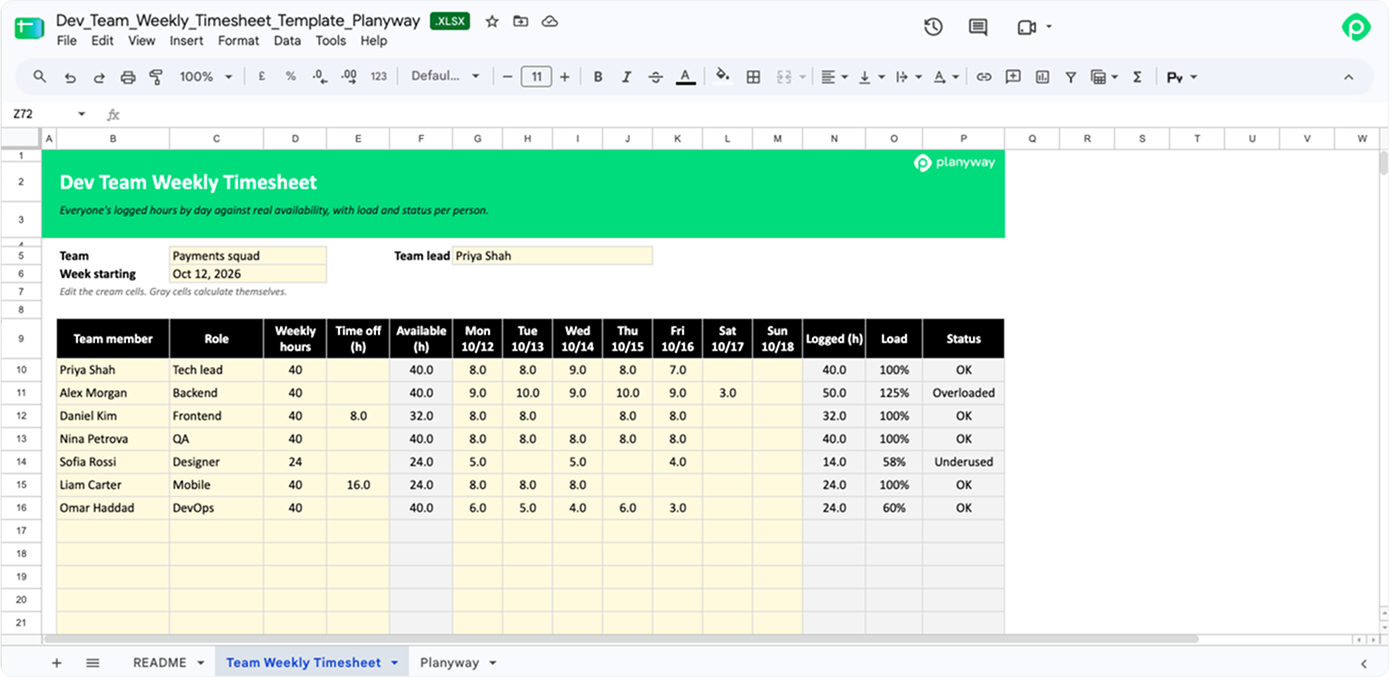
For a team lead, this is the whole team's week on one screen, with one row per person, their usual weekly hours, any time off, and what they logged each day, and the sheet works out who actually had how much time available and flags anyone above 110% or below 60%. Engineering managers with remote teams use it to keep an eye on employee hours and team productivity without asking everyone for a status update, but one thing we put straight into the README is that a low number almost always means someone forgot to log, not that they spent Wednesday doing nothing.
📥 Download the dev team weekly timesheet template
13. On-call and support timesheet template
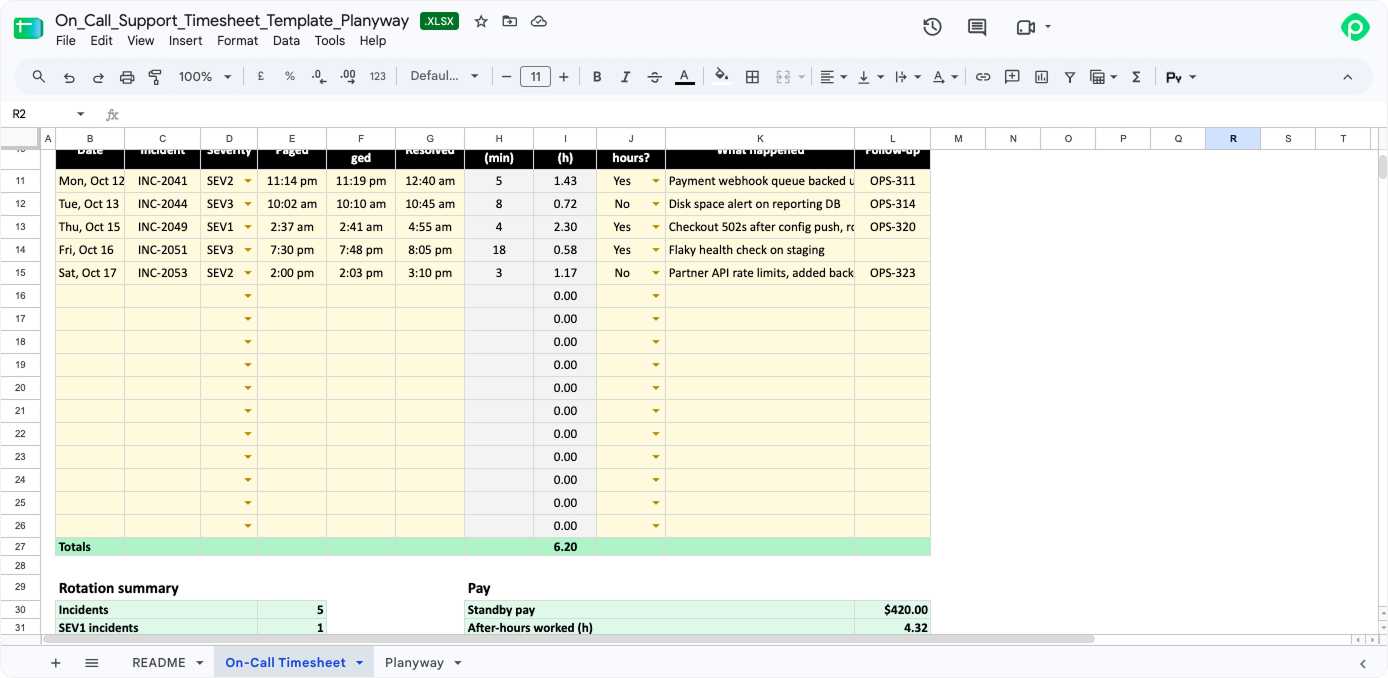
If you've ever been paged at 2:37 AM for a SEV2, you probably also remember wondering whether anyone would count that hour, so here every incident gets a line with its severity, when the page came in, when someone acknowledged it, when it was resolved, and whether it was after hours. From that, the sheet works out response time in minutes, hours per incident, standby pay for the rotation, after-hours pay at whatever multiplier you set, and total on-call pay, because tracking work hours incident by incident is about the only fair way to pay people for their nights and weekends.
📥 Download the on-call and support timesheet template
14. R&D capitalization timesheet template
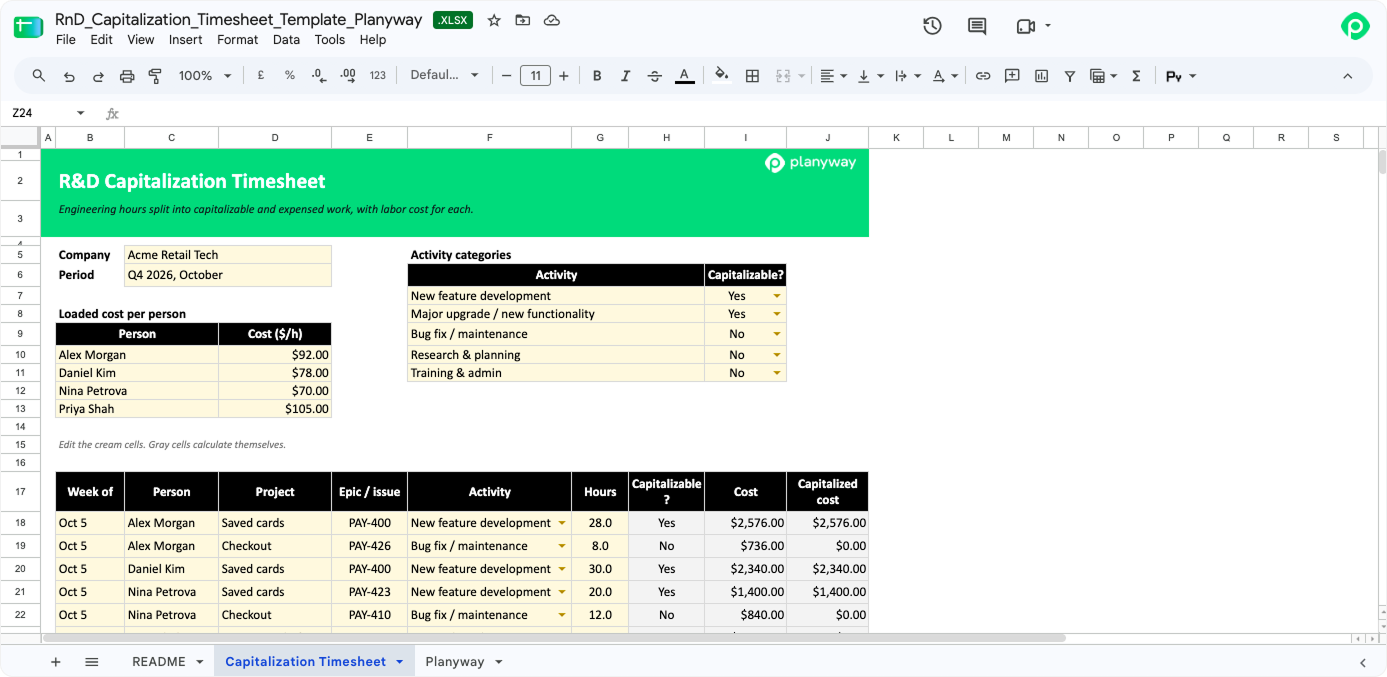
This is the one finance asks engineering for at quarter end, when they need to know which hours went into new features (which usually get capitalized) and which went into bug fixes, maintenance, and research (which usually don't), so you set the activity rules once, add a loaded hourly cost per person, and log hours by project and epic. We added a note about ASU 2025-06, the new US GAAP rules that take effect for annual periods beginning after December 15, 2027, and about Section 174A, under which domestic R&D costs can again be deducted right away for US federal tax starting in 2025, although which bucket a given hour goes in is still something to agree with your accountant.
📥 Download the R&D capitalization timesheet template
When a spreadsheet doesn't cut it (and how Planyway can help)
Excel timesheet templates work well for one person or a small team, but they get painful fast once you're chasing a dozen files every Monday, copying hours by hand into payroll processing, and trying to keep them in step with the tool where the work is actually planned.
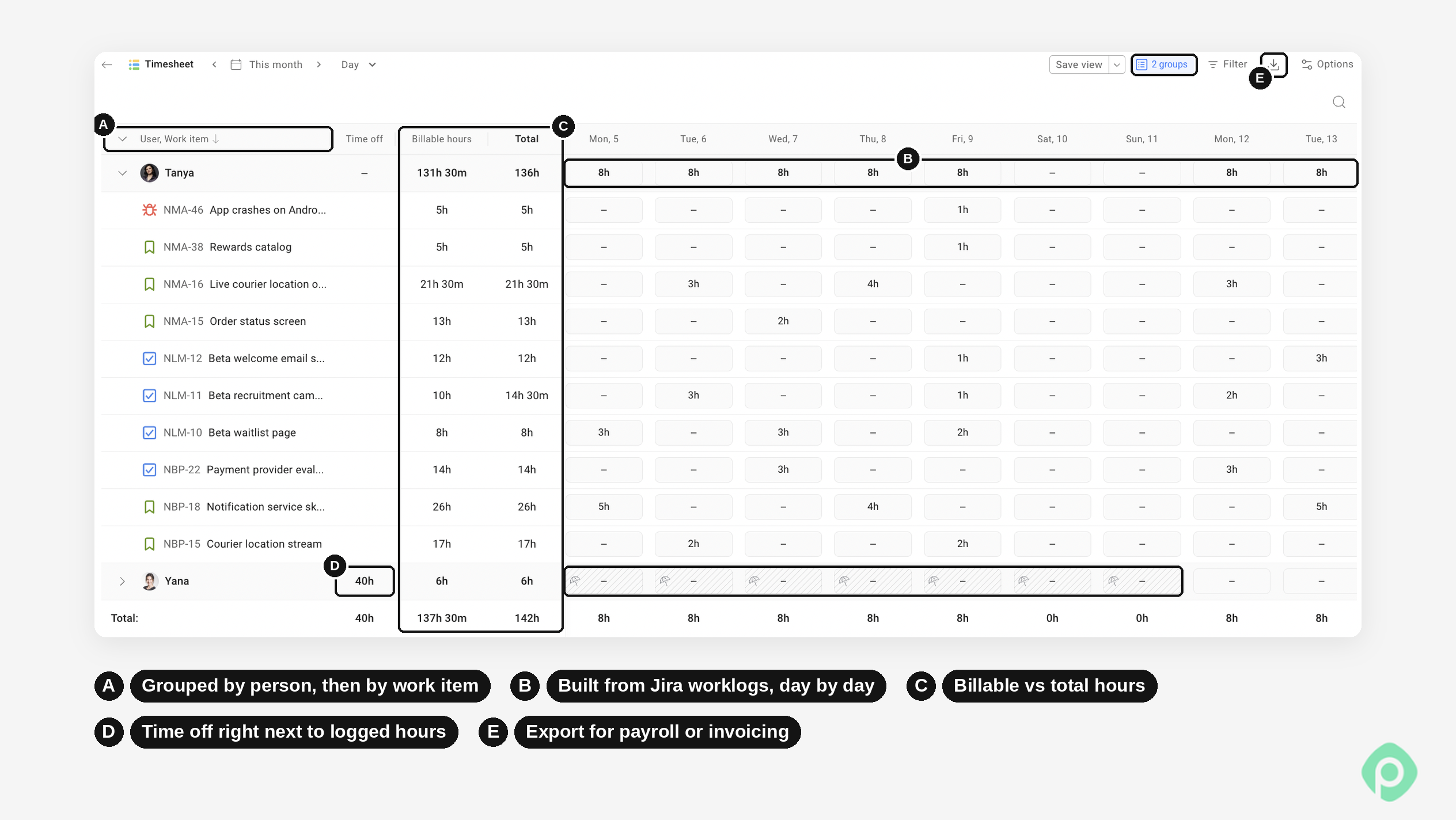
If your team already lives in Jira, half the job is done, because every task there has a place to log time. Planyway for Jira is an all-in-one app for cross-project planning, resource management, and time tracking, so it adds a more convenient time tracking layer right on top of Jira.
Here’s what you get in Planyway:
- A timer on every Jira task or manual entry. Start the timer on any Jira task and stop it when you’re done, and the worklog gets created for you. If you’d rather fill in your hours at the end of the day, type them into a timesheet instead.
- Team timesheets by day, week, or month. See each person’s hours at a glance and spot who’s overloaded and who has room.
- Other customizable reports with advanced filters. You can slice time however you report it — by person, project, epic, or date, and split billable from non-billable hours.
- Two-way sync with Jira. Time logged in Planyway goes into Jira’s own time tracking, and time logged in Jira shows up in Planyway, so nobody keeps two records.
- Export to Excel. Take the numbers anywhere you need them.
- Everything in one place. Your time data sits next to the same timeline you already use for task management.
How to get timesheets people actually fill in
Picking a template is the easy part. The real challenge is getting people to fill it in accurately and on time. Here’s what has worked for us with these employee timesheet templates:
- Ask for daily entries. A timesheet filled in on Friday evening is mostly guesswork. Asking employees to log a few lines each day helps reduce manual errors and avoid awkward “can you explain this invoice?” emails.
- Keep the template simple. Excel timesheet templates work best when they include only the fields you actually need. If nobody uses the Notes column, remove it. Tracking breaks should take one field, not three — because when you ask people to record breaks in several different cells, they often stop doing it.
- Clarify billable hours upfront. Decide what counts as billable before employees start logging time, not when the first invoice is already out.
- Review entries weekly. Have someone check the numbers every Monday. That way, an unusually long Tuesday gets flagged while people still remember what happened. Regular reviews are a big part of effective timesheet management.
- Keep accurate records. Accurate records are essential for accurate payroll and for answering questions months or years later. Under most recordkeeping regulations, employers generally need to retain payroll records and supporting time cards for a couple of years. Employee work hours can be recorded on paper, in an Excel spreadsheet, or in a timesheet app, as long as the records meet applicable requirements.
- Make timesheets easy to archive and share. Each employee timesheet in this pack fits on one printed page. When you need a PDF timesheet for your records or a client, you can export it from Excel, Google Sheets, Word, or your preferred tool.


FAQ
To calculate hours worked in Excel, take the end time minus the start time and multiply by 24, since Excel keeps time as a fraction of a day, so a typical cell looks like
=(D2-C2)*24, and if someone works past midnight, you'd write=MOD(D2-C2,1)*24instead, then take the break off the same way. You don't have to type any of that into our sheets, though, because the formulas are already there. They automatically total hours for each day and week and calculate total pay from your rate, which means they calculate totals automatically while you only fill in the times.The templates track overtime by workweek, which is how the FLSA defines it, so the first 40 hours of the week (you can change that number) count as regular, and anything past that gets paid at your multiplier, 1.5 unless you set something else, and paid time off is left out of the overtime count because it isn't time actually worked. A few states, California being the best-known one, add daily overtime on top of that, so if you're there, it's worth checking the totals against your state's rules.
The difference between biweekly and semi-monthly timesheets comes down to the calendar, since biweekly means every other week, 26 pay periods a year and always 14 days long, while semi-monthly means two fixed dates each month, so 24 periods of 15 or 16 days. In both cases overtime is still counted by the workweek, which is exactly why our semi-monthly sheet has a cell for the hours someone already worked earlier in a week that started in the previous period.
The templates that track billable hours are the daily, project, contractor, agency client billing, and engineering ones, where every line gets a billable flag and the amount comes from your hourly rate (or from the rate for each role in the agency and engineering sheets), and the summary keeps billable and non-billable time apart so you can see both.
You can track time in Jira instead of a spreadsheet, because every work item there has a log work option and the hours add up on the item, but what plain Jira won't give you is a timesheet view or reports across people and projects. That's the gap apps like Planyway are made for, so your team can track time right on their Jira tasks, and you can see weekly totals in one place without anybody emailing a free template around on Friday.